
Scroll through Reddit right now and you’ll find people posting genuinely stunned reactions to the same thing: two AI voices casually chatting about a boring PDF like they’re old friends catching up over coffee. They laugh. They interrupt each other. One of them says “wait, that’s actually kind of wild” mid-sentence.
That’s NotebookLM Audio Overview, and it’s the reason your group chat has probably already sent you a link with the caption “you HAVE to hear this.”
Here’s the part that matters most: you need zero audio editing skills to create a NotebookLM Audio Overview, zero coding knowledge, and it’s completely free to use right now. If you can upload a file and click a button, you can do this.
What is Google NotebookLM Audio Overview? (A Leap in AI Audio Generation)
At its core, NotebookLM Audio Overview takes any document you upload — a PDF, a Google Doc, a website URL, even a YouTube video — and turns it into a realistic audio conversation between two AI hosts discussing the material like it’s their favorite podcast topic.
Unlike older tools, the NotebookLM Audio Overview isn’t a robotic text-to-speech reading. It represents a massive shift in AI audio generation because it actually understands context. That’s the entire magic trick here. The AI hosts genuinely discuss your content — they summarize, they react, they build on each other’s points, and they occasionally go on believable little tangents before circling back.
Here’s the “wow factor” that made this go viral in the first place:
- They breathe between sentences — actual audible inhales, like a real person pausing mid-thought
- They interrupt each other — one host will cut in with “oh, that’s interesting” before the other finishes
- They use filler words — “um,” “like,” “you know” show up naturally, exactly like unscripted human speech
- They laugh at genuinely funny parts of your document, unprompted
- They mispronounce things occasionally, then sometimes self-correct — which somehow makes it feel more human, not less
Google has expanded this well beyond the original single format too. In 2026, you can now generate a Deep Dive (the classic long-form conversational overview), a quick Brief, a skeptical Critique format, a full Debate between two opposing hosts, or a structured 30-minute Lecture — all from the exact same uploaded sources.
Step-by-Step Google NotebookLM Tutorial: How to Turn PDF into Podcast
This genuinely takes under two minutes to set up. Here’s the entire process:
- Step 1: Go to NotebookLM (Gemini Notebook). To start generating your NotebookLM Audio Overview. Head to notebooklm.google.com and sign in with any free Google account — no credit card, no download required.
- Step 2: Create a new notebook and upload your sources. Click “New Notebook,” then drag in your PDF, paste a website URL, upload a Google Doc, or even drop in a YouTube link. You can upload multiple sources into one notebook at once.
- Step 3: Click “Audio Overview” in the Studio panel. You’ll see it sitting right alongside other output options like Video Overview and Study Guide. Optionally, you can type a quick instruction first — something like “focus on chapter 3” or “explain this like I’m a total beginner” — and the hosts will actually follow it.
- Step 4: Wait, then listen. Generation usually takes somewhere between 30 seconds and a couple of minutes depending on your document length and chosen format. Once it’s ready, hit play — and if you want, you can even interrupt the hosts mid-conversation to ask a follow-up question out loud.
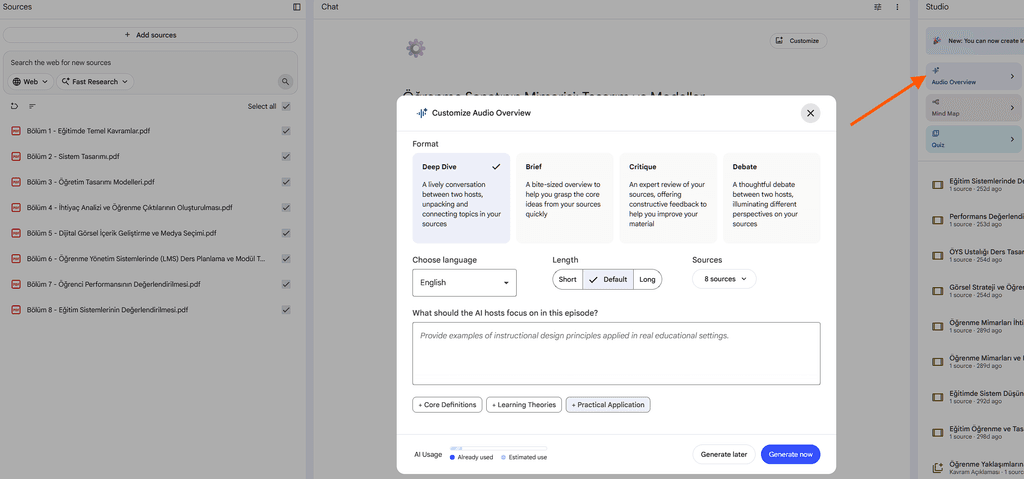
Generating a NotebookLM Audio Overview is genuinely that simple. No timeline, no waveforms, no editing software in sight.
5 Mind-Blowing Ways to Use This (That Aren’t Just Reading PDFs)
Everyone starts by uploading a boring textbook chapter. The real magic of the NotebookLM Audio Overview happens once you get creative. Here are five uses that go way beyond “summarize my homework”:
1. Upload your own journal and hear a “therapy session” about your life. Export a few months of personal journal entries as a text file, upload them, and generate a Deep Dive. The AI hosts will genuinely pick up on patterns you didn’t consciously notice — recurring stress points, things you mentioned repeatedly, emotional throughlines across entries. It’s eerily reflective, and more than a few people online have described it as unexpectedly therapeutic.
2. Turn a boring company training manual into a morning radio show. Instead of forcing new hires to slog through a 60-page onboarding PDF, upload it and generate a NotebookLM Audio Overview. Suddenly your HR policy document becomes a conversational, engaging listen employees can play during their commute — genuinely more effective for retention than silent reading.
3. Summarize a competitor’s 100-page eBook or whitepaper in 10 minutes. If you’re in marketing, content, or product research, upload a competitor’s lead magnet or industry report. You’ll get the key strategic points distilled into a discussion format that highlights what actually matters, instead of you skimming for an hour trying to find the useful parts.
4. Digest academic papers before a big exam or presentation. Students are using the NotebookLM Audio Overview as an AI podcast generator for dense research papers, turning intimidating 40-page academic PDFs into something they can absorb on a walk instead of hunched over a desk. The Debate format is especially useful here — hearing two AI hosts argue opposing interpretations of a study forces deeper understanding than passive reading ever does.
5. Turn your own meeting notes or Zoom transcripts into a recap show. Upload the transcript from a long meeting or webinar, and instead of scrolling through pages of notes later, you get a natural conversational recap that hits the key decisions and action items — genuinely more digestible than a bullet-point summary email nobody reads.
The Catch: What NotebookLM Audio Overview CANNOT Do (Yet)
As magical as a NotebookLM Audio Overview feels, it’s worth being honest about the current limitations before you build your entire workflow around it.
- You still can’t pick specific voices. You get the AI-assigned host pairing for your chosen format, and while you can nudge tone and focus with instructions, you can’t select “I want a British male voice and an American female voice” the way you might with a dedicated AI voice tool.
- You don’t get a script to approve before generation. You can guide the direction with typed instructions beforehand, but you won’t see word-for-word text to edit and re-approve like you would with a written script — the conversation is generated and delivered as final audio.
- It occasionally hallucinates minor details. If your source document is vague, poorly formatted, or contradicts itself, the hosts can sometimes state something slightly inaccurate with complete confidence. Always fact-check anything genuinely important before you rely on it.
- Longer, denser documents take real processing time. A short article generates almost instantly, but a dense 100-page technical manual can take a few minutes — not a dealbreaker, but not instantaneous either.
Frequently Asked Questions
Is NotebookLM really free to use?
Yes — the core NotebookLM experience, including Audio Overview generation, is free with any Google account. Google does now offer paid tiers (a Plus tier and a higher Ultra tier) that unlock extra features like more generations per day and premium visual formats, but the essential audio overview experience covered in this guide doesn’t require paying anything.
Can I download and publish these podcasts to Spotify or YouTube?
You can download and share your generated NotebookLM Audio Overview, including via a shareable public link directly from NotebookLM. Before publishing anywhere commercially, though, pay close attention to the source material’s copyright — if you uploaded someone else’s book, paywalled article, or proprietary document, turning it into a podcast episode and publishing it publicly can raise real copyright concerns, even though the final file is a product of AI audio generation. Stick to your own writing, public domain material, or content you have explicit rights to when publishing outward-facing content.
Can the AI hosts speak languages other than English?
Yes, and this has improved significantly throughout 2026 — Audio Overview now supports dozens of languages with full-length, natural conversations rather than the shortened non-English versions available at launch. If your source document is in Spanish, French, Japanese, or many other supported languages, the hosts will discuss it in that same language.
How long does it take to generate a NotebookLM Audio Overview?
Most standard documents generate in well under a minute. Longer or more complex sources — especially if you’re generating the extended 30-minute Lecture format — can take a couple of minutes. Either way, you’re looking at a coffee-break wait time, not something you need to queue up and walk away from for hours.
The ZeroSkillAI Verdict
NotebookLM Audio Overview is exactly the kind of tool ZeroSkillAI exists to talk about — genuinely powerful AI that requires absolutely no technical skill to use, delivers a result that sounds shockingly professional, and costs nothing to try. You’re not learning software. You’re not editing waveforms. You’re uploading a file and getting back something that sounds like a real podcast episode made specifically for you.
Whether you’re a student trying to survive finals week, a content creator repurposing research into new formats, or just someone curious what an AI “therapy session” about your own journal sounds like, this is one of the most accessible, immediately satisfying AI tools available anywhere in 2026. Go upload something boring and see what happens — you’ll understand the Reddit hype within about ninety seconds.