
Free Midjourney alternatives are dominating the creator economy in 2026 because creators refuse to pay $10-60/month for AI image generation when dozens of powerful zero code tools deliver professional results at zero cost. This definitive list reviews the 7 best free Midjourney alternatives that provide studio-quality AI art generator capabilities without subscriptions, Discord servers, or technical complexity—every tool below has been tested with real commercial projects to verify quality, speed, and commercial use rights compliance.
The 7 Tools: Tested & Ranked
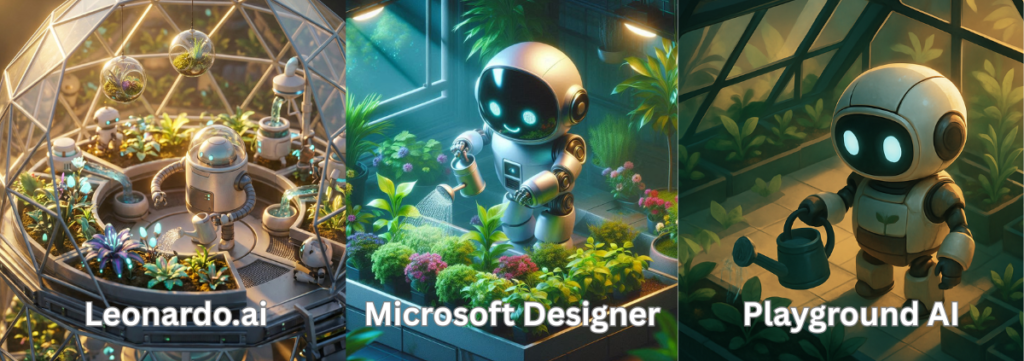
1. Leonardo AI – One of the Top Free Midjourney Alternatives
The Vibe: Leonardo AI feels like a professional design studio wrapped in a beginner-friendly interface. The community gallery showcases millions of user-generated images with publicly visible prompts, making it the ultimate learning resource for mastering AI image generation. The platform updates weekly with new models, features, and improvements based on user feedback.
Best For: Creators selling digital products on Etsy, Amazon KDP cover designers, print-on-demand artists, and anyone needing consistent character generation across multiple images (massive advantage over most free Midjourney alternatives).
Copy-Paste Prompt Example: “A minimalist line art illustration of a cozy reading nook with floor-to-ceiling bookshelves, a vintage armchair with a knitted blanket, warm golden hour lighting streaming through a large window, potted plants on the windowsill, steaming coffee mug on side table, ink drawing style, clean black lines on white background, suitable for adult coloring book, high contrast, intricate details in the book spines and plant leaves, professional vector quality –ar 2:3”
The Catch (Limitations & Licensing): Free tier provides 150 tokens daily (approximately 30-50 high-quality images depending on settings). Credits reset at midnight UTC with no rollover. Leonardo AI grants full commercial use rights to all generated images on both free and paid tiers, explicitly stated in their terms of service. Watermarks appear on some outputs but can be removed manually. No attribution required for commercial projects.
2. Microsoft Designer (Bing Image Creator) – Essential Free Midjourney Alternative
The Vibe: Microsoft Designer is the streamlined, no-nonsense option for creators who want professional AI image generation without learning complex interfaces. Powered by OpenAI’s DALL-E 3 (the same engine behind ChatGPT’s image capabilities), it generates incredibly clean, photorealistic images that often surpass Midjourney quality for certain styles. The integration with Microsoft Edge browser means you can generate images without even visiting a separate website.
Best For: Social media marketers needing quick graphics, bloggers creating featured images, presentation designers, and anyone prioritizing speed over granular artistic control. Microsoft Designer excels at interpreting natural language prompts better than most free Midjourney alternatives.
Copy-Paste Prompt Example: “A modern productivity workspace flat lay photograph, MacBook Pro displaying colorful data charts, wireless mouse, AirPods in charging case, minimalist journal with fountain pen, small succulent plant in concrete pot, marble desk surface, soft natural window light from left side, professional product photography style, shot from directly above, pastel color palette with pops of rose gold, shallow depth of field, ultra sharp focus, suitable for Pinterest marketing”
The Catch (Limitations & Licensing): Completely unlimited free generations with no daily caps—genuinely unlimited. However, Microsoft’s content policy is stricter than most AI art generator platforms, occasionally blocking prompts that other tools accept. The platform prioritizes photorealism and struggles with highly stylized anime or abstract art. Microsoft grants full commercial use rights with explicit language in their service agreement, making it one of the safest free Midjourney alternatives for commercial projects.
3. Adobe Firefly – The Safest Free Midjourney Alternative for Commercial Use
The Vibe: Adobe Firefly feels premium because it is—it’s Adobe’s answer to the AI image generation revolution, built with the same professional standards as Photoshop and Illustrator. Unlike most AI art generator platforms trained on scraped internet data, Firefly exclusively trains on Adobe Stock licensed content, eliminating copyright concerns entirely. The interface integrates seamlessly with Adobe Express for immediate design workflows.
Best For: Professional designers selling to corporate clients, stock photography contributors, print-on-demand sellers paranoid about copyright strikes, and anyone needing ironclad legal protection for commercial use rights. Adobe explicitly indemnifies users against copyright claims for Firefly-generated content.
Copy-Paste Prompt Example: “A professional lifestyle photograph of a diverse team collaborating in a bright modern office space, three colleagues gathered around a large monitor reviewing design mockups, natural expressions of engagement and creativity, bright airy atmosphere with floor-to-ceiling windows, potted plants and natural wood furniture, soft diffused lighting, shot with 50mm lens at f/2.8, shallow depth of field focusing on the central team member, warm color grading with teal and orange tones, corporate stock photography style, authentic candid moment”
The Catch (Limitations & Licensing): Free tier provides only 25 monthly credits (approximately 25 images), which is restrictive compared to other free Midjourney alternatives. The model heavily favors Adobe’s photographic aesthetic—expect polished, commercial-looking results but struggle with experimental artistic styles. Adobe’s strength is its weakness: training only on licensed content means less stylistic diversity than models trained on billions of web images. However, Adobe provides the strongest commercial use rights guarantee in the industry, with explicit copyright indemnification for paying and free-tier users alike.
4. Playground AI – The High-Volume Free Midjourney Alternative
The Vibe: Playground AI is the power user’s dream among free Midjourney alternatives, offering an overwhelming array of advanced features that would cost hundreds monthly on other platforms. The community aspect rivals Leonardo AI, with millions of public creations showcasing prompts, settings, and techniques. The interface can intimidate beginners but rewards those who invest time learning its capabilities.
Best For: Programmatic content creators generating hundreds of images weekly, AI image generation experimenters who want access to multiple models (Stable Diffusion XL, SDXL Turbo, Playground v2.5), and creators building large image libraries for websites, courses, or digital products. The 1,000 daily image limit makes Playground AI unbeatable for volume.
Copy-Paste Prompt Example: “A whimsical watercolor illustration of a magical forest tea party, anthropomorphic woodland creatures (rabbit in waistcoat, fox in top hat, hedgehog in floral dress) seated around a mushroom table, delicate porcelain teacups and tiered cake stand, glowing fireflies, soft dappled sunlight through ancient oak trees, wildflowers and ferns, dreamy pastel color palette dominated by soft purples and mint greens, loose painterly style with visible brushstrokes, storybook illustration quality, enchanted fairy tale atmosphere, perfect for children’s book illustration –ar 4:5”
The Catch (Limitations & Licensing): Free tier grants 1,000 image generations daily—unmatched among free Midjourney alternatives. The interface complexity overwhelms beginners; expect a learning curve navigating canvas tools, mask painting, and model selection. Image quality consistency varies depending on chosen model and settings. Playground AI provides commercial use rights for all generated content under their free tier, explicitly confirmed in documentation. No watermarks or attribution requirements for commercial projects, making it excellent for zero code tools workflows at scale.
5. Canva AI Image Generator – The All-in-One Free Midjourney Alternative
The Vibe: Canva’s AI art generator feels less like a standalone tool and more like a superpower embedded in the world’s most popular design platform. Generate an image and immediately drop it into social media templates, presentation slides, or marketing materials without switching applications. The integration makes Canva one of the most practical free Midjourney alternatives for creators who need finished designs, not just raw images.
Best For: Social media managers creating daily content, small business owners designing marketing materials, YouTube thumbnail creators, Instagram story designers, and anyone building complete visual projects rather than isolated images. Canva excels at workflow efficiency among zero code tools.
Copy-Paste Prompt Example: “A bold motivational quote graphic background, abstract geometric shapes in energetic gradients blending electric blue, hot pink, and sunset orange, dynamic diagonal composition suggesting upward movement and growth, subtle texture overlay giving printed poster feel, modern trendy aesthetic popular on Instagram, negative space in center third for text overlay, professional graphic design quality, vibrant saturated colors, suitable for social media motivational content, 1080×1080 square format”
The Catch (Limitations & Licensing): Free Canva accounts receive only 50 lifetime AI image generation credits—not 50 per month, but 50 total ever. This makes it unsuitable as a primary AI art generator for volume creators but excellent for occasional high-impact projects. Image resolution on free tier is limited to 1080px for most formats. Canva grants commercial use rights for AI-generated images but restricts usage to within Canva-created designs—you cannot download raw AI images and use them independently without a Canva Pro subscription. This licensing limitation differentiates Canva from more permissive free Midjourney alternatives.
6. Tensor.art – The Anime-Focused Free Midjourney Alternative
The Vibe: Tensor.art dominates the anime and illustration niche among free Midjourney alternatives, hosting the largest collection of community-trained anime models anywhere online. The platform feels like browsing an infinite gallery of manga, webtoon, and character art, with every image linking to the exact model and prompt used. For anime-style AI image generation, nothing free compares.
Best For: Webtoon creators, visual novel developers, character designers, anime fan artists, manga-style illustrators, and anyone creating Japanese-inspired art. Tensor.art also excels at consistent character generation across multiple images using LoRA models. Among zero code tools for anime creation, this is the undisputed champion.
Copy-Paste Prompt Example: “Anime portrait of a mysterious silver-haired witch in flowing midnight blue robes, piercing violet eyes with subtle magical glow, ornate celestial jewelry with crescent moon pendant, surrounded by floating glowing runes and ethereal wisps of magic, dark fantasy aesthetic, detailed line work in face and hair, soft rim lighting creating dramatic atmosphere, painted by range murata and wlop, highly detailed digital art, sharp focus on eyes and face, dreamy bokeh background with starfield, vertical composition suitable for phone wallpaper”
The Catch (Limitations & Licensing): Free tier provides 100 daily credits (approximately 20-40 images depending on quality settings and model choice). Credits refresh daily at UTC midnight. The platform’s strength—thousands of community models—becomes overwhelming for beginners unsure which model suits their needs. Tensor.art provides commercial use rights for generated images but warns that individual community-uploaded models may have restrictions; verify model licensing before commercial use. The platform specializes heavily in anime/illustration styles; photorealism and abstract art receive less development attention than other free Midjourney alternatives.
7. SeaArt.ai – The Hidden Gem Free Midjourney Alternative
The Vibe: SeaArt.ai is the underdog among free Midjourney alternatives that insiders discovered in late 2025. It combines Playground AI’s generous daily limits with Leonardo AI’s quality and adds unique features like AI upscaling, background removal, and image-to-video conversion—all free. The interface strikes the perfect balance between powerful and approachable, making it ideal for creators graduating from beginner zero code tools.
Best For: Digital product creators needing the full production pipeline (generate, upscale, edit, export), Etsy sellers creating print-on-demand designs, content creators building YouTube thumbnails and social graphics, and anyone wanting maximum features without monthly costs. SeaArt.ai delivers premium AI image generation capabilities at zero cost.
Copy-Paste Prompt Example: “A hyper-detailed product photography shot of artisanal handmade soap bars, rustic wooden cutting board surface, each soap a different natural color (lavender purple, sage green, honey gold, rose pink), visible organic textures like oatmeal flakes and dried flower petals embedded in soap, soft diffused window lighting creating gentle shadows, scattered fresh herbs (lavender sprigs, rosemary) and honey dipper as props, shallow depth of field with 85mm lens effect, warm earthy color palette, professional e-commerce product photography, overhead flat lay angle, Instagram-worthy aesthetic perfect for handmade product listings”
The Catch (Limitations & Licensing): Free tier provides 150 daily credits (comparable to Leonardo AI) with bonus credits for daily login streaks—potentially 200+ credits daily for consistent users. The platform is newer and less established than other AI art generator options, meaning smaller community and fewer tutorials. SeaArt.ai grants full commercial use rights to free tier users with no attribution requirements, explicitly stated in their terms. The combination of generous limits, powerful features, and clear licensing makes SeaArt.ai the best-kept secret among free Midjourney alternatives in 2026.
At a Glance: The Best Free Midjourney Alternatives
| AI Tool | Best Feature | Free Limit (approx.) | Best For |
| 1. Leonardo.ai | Pro Interface & Control | ~30-50 images / day | Overall artistic control, KDP covers & print-on-demand. |
| 2. Microsoft Designer | DALL-E 3 Accuracy | Unlimited (15 fast boosts/day) | Following complex prompts perfectly & quick social graphics. |
| 3. Adobe Firefly | Commercially Safe & Photorealistic | 25 credits / month | Realistic stock-photo style images & safe client work. |
| 4. Playground AI | Insane Quantity | 1,000 images / day | Heavy experimentation and high-volume asset creation. |
| 5. Canva AI | All-in-One Design Integration | 50 lifetime credits | Complete design workflows & immediate social media templates. |
| 6. Tensor.art | Community Models (LoRAs) | ~20-40 images / day | Anime styles, webtoons, and specific aesthetic filters. |
| 7. SeaArt.ai | Pro Editing Tools & Generous Limits | 150+ credits / day | Digital products needing upscaling and maximum free features. |
Pro Tips for Mastering Free AI Image Generation
- Master negative prompts: Every AI art generator improves dramatically when you specify what to exclude. To stop getting distorted hands, weird artifacts, or blurry faces, grab our ultimate Negative Prompt List. Using these specific exclusions guarantees professional, studio-quality results across all free Midjourney alternatives.
- Upscale strategically: Most platforms generate at 1024×1024 or 1536×1536 by default. Use free upscaling tools (Upscale.media, BigJPG) to reach 300 DPI print quality. This workflow transforms zero code tools outputs into professional commercial products.
- Study successful prompts: Every platform listed offers public galleries with visible prompts. Spend 30 minutes weekly analyzing top-performing images in your style category. The fastest way to master AI image generation is reverse-engineering prompts from images you admire.
The Verdict: Which Free Midjourney Alternative Should You Choose?
Choose based on your exact workflow:
- Professional client work needing legal protection? → Adobe Firefly (strongest commercial use rights indemnification)
- High-volume content production (100+ images weekly)? → Playground AI or SeaArt.ai (1,000 and 150+ daily limits respectively)
- Anime, manga, or illustration styles? → Tensor.art (unmatched anime model library among free Midjourney alternatives)
- Social media graphics needing quick turnaround? → Microsoft Designer (fastest workflow) or Canva AI (complete design integration)
- Etsy digital products or Amazon KDP covers? → Leonardo AI (best quality-to-ease ratio with clear commercial use rights)
- Complete beginner testing AI art? → Microsoft Designer (simplest interface of all AI art generator platforms)
- Maximum features without subscriptions? → SeaArt.ai (upscaling, editing, video conversion all included)
The reality of free Midjourney alternatives in 2026: You genuinely don’t need paid subscriptions to create professional AI image generation outputs anymore. These seven platforms collectively provide 1,500+ free daily images with quality matching or exceeding Midjourney’s standard output. The limitation isn’t quality—it’s your prompt engineering skills and understanding of each tool’s strengths.
Always verify commercial use rights before selling AI-generated content. While all seven platforms listed grant commercial use rights on free tiers, licensing terms evolve. Check current terms before launching commercial projects. Screenshot licensing pages as documentation.
Your immediate next step: Pick the free Midjourney alternatives that matches your primary use case. Generate 20 test images in the next hour using the copy-paste prompts provided above. Compare quality, speed, and style across platforms. Master one AI art generator completely before spreading across multiple tools. Expertise with one platform beats mediocrity across seven. Once you master these zero code tools, you can easily use them to launch one of the top 100+ Best AI Side Hustles, from selling Etsy printables to self-publishing KDP coloring books.
The subscription-based AI image generation era is ending. Free zero code tools now deliver professional results. Your competitive advantage isn’t access—it’s execution speed and prompt mastery. Start creating now.
Pingback: 10 Best Free AI Tools for Students in 2025 (Save Time & Boost Grades) -
Pingback: How to Create Your Dream 2026 Vision Board Using Free AI (Step-by-Step) -
Really enjoyed this post, thanks for sharing. NanoB257 Looking forward to reading more of your work here.