
Free AI website builders are revolutionizing web development in 2026 because creators refuse to spend weeks learning HTML, CSS, or WordPress when prompt to code technology can generate fully functional websites in minutes through simple text descriptions. This comprehensive guide reviews the 7 best free AI website builders that help you launch a website using nothing but natural language prompts—every tool below has been tested with real projects to verify deployment speed, design quality, and the ability to create professional sites without writing a single line of code.
The 7 Tools: Tested & Ranked
While testing dozens of platforms, we found that these specific free AI website builders offer the most reliable performance for zero-code creators.
1. Framer AI
The Vibe: Framer AI represents the pinnacle of design-forward free AI website builders in 2026, transforming simple text prompts into stunning, animation-rich landing pages that rival custom developer work. The platform combines AI generation with Framer’s legendary design capabilities—every element is customizable through an intuitive visual editor, animations are smooth and professional, and responsive design happens automatically. Framer’s AI understands design principles like hierarchy, white space, and visual flow, producing layouts that feel professionally art-directed rather than template-generated. The interface is polished and modern, with a chat-based prompt system that iterates on designs through conversation. When comparing free AI website builders, Framer consistently wins on visual aesthetics and animation quality.
Best For: Creative professionals building portfolios, agencies creating client landing pages, SaaS companies launching product pages, startups needing investor-ready pitch sites, and anyone wanting visually impressive sites that stand out from generic WordPress templates.
Deep-Dive Zero-Code Workflow:
Going from Idea to Live Site in 15 Minutes:
- Initial Prompt Generation: Start with a detailed description: “Create a landing page for a productivity app called ‘FocusFlow’ that helps remote workers manage deep work sessions. Style: Modern, minimalist with soft gradients (blue to purple). Sections: Hero with app screenshot mockup, three-column feature showcase with icons, testimonial carousel, pricing table (3 tiers), and CTA section. Include smooth scroll animations and a sticky navigation bar. Target audience: 25-40 year old knowledge workers.”
- AI Layout Creation: Framer AI generates a complete multi-section landing page in 30-45 seconds. The AI automatically includes: Professional typography pairings (headline + body fonts), color scheme derived from your gradient specification, placeholder images sized correctly, responsive breakpoints for mobile/tablet/desktop, and suggested animations on scroll. You get a functional site immediately, not a wireframe.
- Conversational Refinement: Use follow-up prompts to iterate: “Make the hero section taller with the headline larger and centered” or “Change the three-column features to a bento box grid layout” or “Add a FAQ accordion section before the pricing table.” Each refinement takes 10-20 seconds. This conversational editing is what makes Framer AI special among free AI website builders—you’re directing design changes in plain English.
- Visual Polish: Switch to Framer’s visual editor for final touches. Swap AI-generated placeholder images with your actual product screenshots, adjust animation timing curves, fine-tune spacing between sections, customize button hover states, and add your brand logo. The visual editor maintains all AI-generated structure while giving you pixel-perfect control.
- Domain Connection and Publishing: Connect a custom domain (requires Framer’s paid plan) or publish to a free framer.website subdomain. Click “Publish” and your site goes live instantly with automatic SSL, global CDN hosting, and optimized performance. No separate hosting setup required.
- SEO and Analytics Integration: Add page titles, meta descriptions, and Open Graph tags through Framer’s SEO panel. Connect Google Analytics with one click. Framer AI even suggests SEO-optimized meta descriptions based on your page content.
Framer AI excels at creating sites that look professionally designed, not AI-generated. The animation capabilities and design polish surpass every other option among free AI website builders.
The Catch (Pricing & Limits): Framer offers a generous free tier allowing unlimited pages on framer.website subdomains. Free sites include Framer branding in the footer and limit custom domains (requires Mini plan at $5/month per site). The free tier is genuinely functional for portfolios, side projects, or testing before launch. Paid plans ($5-15/month per site) remove branding, add custom domains, enable form submissions, and provide CMS features for blogs. For zero-code platform users wanting maximum design quality, Framer’s free tier delivers exceptional value.
2. Bolt.new by StackBlitz
The Vibe: Bolt.new revolutionizes prompt to code technology by generating full-stack web applications directly in your browser, making it the most powerful option among free AI website builders for functional apps rather than static sites. In 2026, Bolt.new understands complex application requirements—user authentication, database interactions, API integrations, payment processing—and generates working code using modern frameworks like React, Vue, or Svelte. The platform runs a complete development environment in the browser, so you’re testing live functionality while the AI builds your app. Bolt.new’s interface shows both the chat where you describe features and a live preview pane where you see the app update in real-time.
Best For: Entrepreneurs building SaaS MVPs, developers prototyping ideas without setup time, creators building interactive tools (calculators, quizzes, generators), and anyone needing functional web apps with backend logic, not just static marketing pages.
Deep-Dive Zero-Code Workflow:
Building a Functional Web App in 30 Minutes:
- Comprehensive App Prompt: Start with detailed specifications: “Build a simple task management app with these features: User can add tasks with title, description, and due date. Tasks display in a card grid with different colors based on priority (high/medium/low). Include filters to show all tasks, only incomplete tasks, or only completed tasks. Add a search bar to filter tasks by keyword. Use local storage to persist tasks between sessions. Style: Clean, modern interface with Tailwind CSS. Make it mobile-responsive.”
- Full-Stack Generation: Bolt.new generates complete application code including: React components for the task card, form inputs, and filter controls; State management logic handling task creation, completion toggling, and deletion; Local storage integration for data persistence; Tailwind CSS styling for responsive design; and Working search and filter functionality. The entire app is functional immediately—you can add tasks, mark them complete, filter by status, and refresh the page without losing data.
- Iterative Feature Addition: Add complexity through conversation: “Add a dark mode toggle that persists user preference” or “Include task categories with color-coded labels” or “Add export functionality to download tasks as CSV.” Each feature request triggers Bolt.new to modify the existing codebase, maintaining consistency while adding functionality. This iterative development approach mirrors professional software development but through natural language.
- Backend Integration: For more complex apps, Bolt.new can integrate APIs: “Connect this to a Firebase backend for user authentication and cloud storage” or “Add Stripe payment integration for a premium tier.” The AI generates authentication flows, database schema, and API connection code.
- Testing and Debugging: Test functionality directly in the browser preview. If you encounter bugs, describe them: “The filter isn’t working when I select ‘completed tasks'” and Bolt.new debugs and fixes the code. This prompt to code debugging is revolutionary—you describe problems in plain English rather than reading error logs.
- Code Export and Deployment: Download the complete codebase as a ZIP file. The code is clean, well-structured, and production-ready. Deploy to Vercel, Netlify, or any hosting platform that supports modern JavaScript frameworks. Bolt.new even provides deployment instructions specific to your chosen hosting.
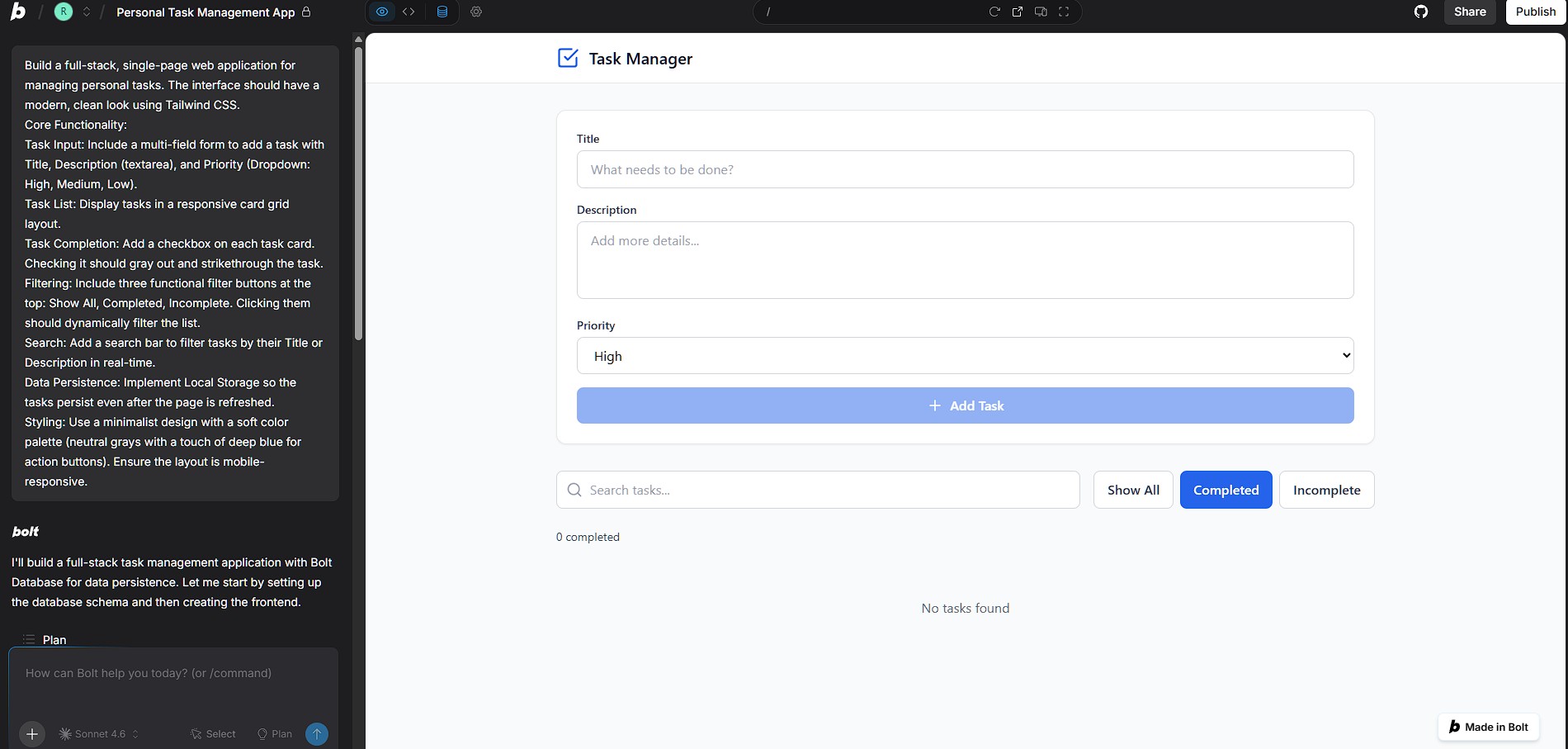
Bolt.new transforms the impossible (building functional apps without coding knowledge) into the achievable. You’re creating real software through conversation.
The Catch (Pricing & Limits): Bolt.new offers a generous free tier with full access to AI generation and browser-based development. Free users get unlimited projects with some limitations on compute time for very complex applications. The platform is completely free for most use cases—you’re only limited by browser capabilities. Paid tiers add priority processing and extended compute time for enterprise applications. Among free AI website builders focused on functional apps rather than static sites, Bolt.new is unmatched for capability and value.
3. v0.dev by Vercel
The Vibe: v0.dev by Vercel specializes in generating beautiful UI components and React interfaces through chat, making it the go-to zero-code platform for creators who want modern, component-based design systems. In 2026, v0 has evolved to understand complex design requirements, accessibility standards, and responsive behavior patterns. The platform generates production-ready React components using Shadcn UI and Tailwind CSS—industry-standard tools that ensure your designs are maintainable and customizable. v0’s chat interface feels like collaborating with a senior front-end developer who instantly produces pixel-perfect implementations of your ideas.
Best For: Developers prototyping interfaces quickly, designers who want to see designs as functioning code, product managers creating interactive mockups, and creators building component libraries for larger projects.
Deep-Dive Zero-Code Workflow:
Creating a Professional Dashboard in 20 Minutes:
- Component-First Prompting: Start specific: “Create a dashboard header component with: Company logo on the left, navigation menu with Home, Analytics, Settings tabs, search bar in the center, and user profile dropdown on the right. Include notification bell icon with red badge. Make it responsive—navigation collapses to hamburger menu on mobile. Use dark mode styling with subtle gradients.”
- AI Component Generation: v0 generates a complete React component with: JSX structure for all elements, Tailwind CSS classes for styling, responsive breakpoints using Tailwind’s mobile-first approach, interactive states for hover, active, and focus, and accessibility attributes (ARIA labels, keyboard navigation). The preview shows the component functioning exactly as described.
- Iterative Design Refinement: Request modifications: “Make the search bar 40% wider” or “Change notification badge to pulse animation” or “Add dropdown menu under user profile with Sign Out option.” Each iteration refines the component while maintaining code quality and accessibility.
- Building Complex Layouts: Generate additional components: “Create a sidebar navigation with expandable sections for Dashboard, Reports (with sub-items for Sales, Traffic, Conversions), Users, and Settings. Include icons for each section. Highlight active nav item.” Then: “Create a main content area with stats cards showing key metrics (4 cards in a grid: Total Revenue, Active Users, Conversion Rate, Avg Order Value). Each card should have a number, label, percentage change indicator, and small trend line chart.”
- Component Assembly: v0 provides code for individual components. Copy and paste them into a main layout component, or use v0 to generate the complete assembled dashboard: “Combine the header, sidebar, and stats cards into a full dashboard layout with proper spacing and responsive grid.” v0 generates the parent component that orchestrates all pieces.
- Code Export and Integration: Copy the generated code directly into your project, or download as standalone files. The code integrates seamlessly with Next.js, Remix, or any React-based framework. All dependencies are clearly listed (Shadcn UI components, Lucide icons, Tailwind CSS).
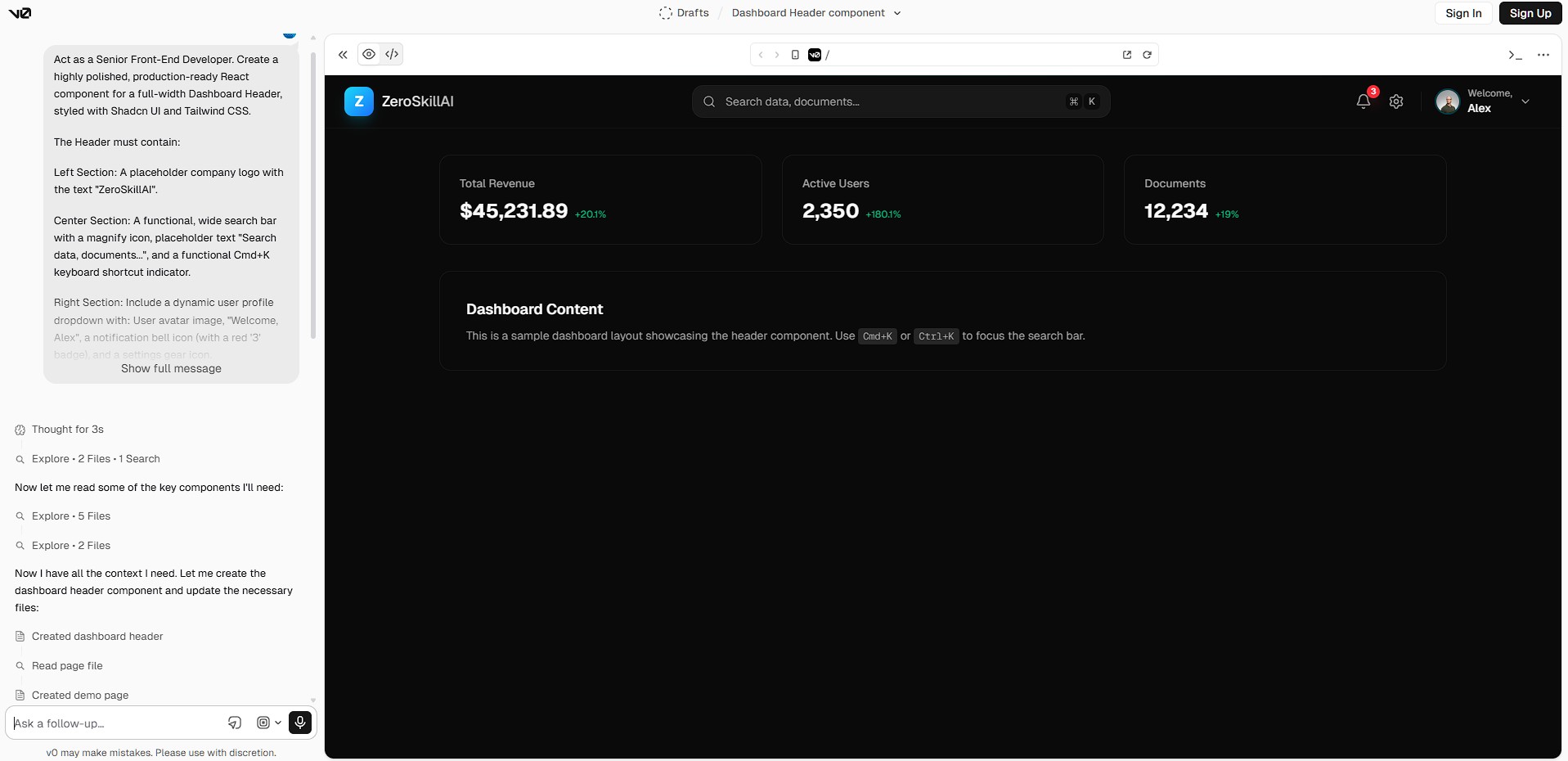
v0 excels at creating component-based designs that feel native to modern web development. You’re not locked into a proprietary system—the code works anywhere React works.
The Catch (Pricing & Limits): v0 offers a free tier with 200 credits monthly (each generation costs 1-3 credits depending on complexity). This allows 60-100 component generations monthly, sufficient for most individual projects. Paid plans ($20/month) provide 5,000+ credits for professional use. The free tier is genuinely useful for prototyping and small projects. v0 is unique among free AI website builders in that it generates code you own and can use anywhere, not a site locked to their platform.
4. Lovable.dev
The Vibe: Lovable.dev has emerged as the premier zero-code platform for creating functional SaaS applications in 2026, positioning itself between Framer’s design focus and Bolt.new’s full-stack complexity. Lovable specializes in multi-page applications with user authentication, database functionality, and modern UI patterns—the exact stack needed for launching MVPs. The platform’s AI understands SaaS-specific requirements: user dashboards, subscription management, admin panels, and data tables. Lovable’s interface combines chat-based prompting with a visual component editor, allowing you to launch a website that functions like a complete software product without coding knowledge.
Best For: Entrepreneurs building SaaS MVPs, creators launching membership sites, consultants creating client portals, educators building course platforms, and anyone needing functional web applications with user management and data persistence.
Deep-Dive Zero-Code Workflow:
Launching a SaaS MVP in 45 Minutes:
- Application Architecture Prompt: Start comprehensive: “Build a fitness coaching app called ‘FitTrack’ with these features: User registration and login (email/password), user dashboard showing workout history, page to log new workouts (exercise name, sets, reps, weight), calendar view of workout history, progress charts showing total volume over time, user profile page to edit settings. Admin dashboard to view all users and their workout stats. Use modern, clean design with blue/green color scheme.”
- Multi-Page Generation: Lovable generates the complete application structure: Authentication pages (login, signup, password reset) with validation, user dashboard with personalized data display, workout logging form with proper input types, calendar component with interactive date selection, chart visualization using modern charting libraries, profile settings page with update functionality, admin dashboard with user management table, and database schema for users, workouts, and preferences.
- Database and Authentication Setup: Lovable automatically configures: Supabase backend for data storage and user authentication, database tables with proper relationships (users → workouts), authentication flows including email verification, and row-level security ensuring users only access their own data. You don’t configure servers or databases—Lovable handles infrastructure through prompt to code automation.
- Feature Iteration: Add complexity: “Add ability for users to create custom workout templates they can reuse” or “Include social features where users can share workout achievements” or “Add export functionality to download workout history as PDF.” Each feature request updates the application logic, UI components, and database schema coherently.
- UI Customization: Use Lovable’s visual editor to refine: Adjust color schemes and typography, modify component layouts and spacing, customize form fields and validation messages, and tweak chart types and data visualization. The visual editor works alongside AI generation—you describe major features, then polish visually.
- Testing and Deployment: Test the application directly in Lovable’s preview environment. Create test users, log workouts, verify data persistence, and check responsive behavior on mobile. When ready, deploy with one click to Lovable’s hosting infrastructure or export code for self-hosting on Vercel/Netlify.
Lovable bridges the gap between simple landing pages and complex web applications. You’re building real software products through conversational prompts.
The Catch (Pricing & Limits): Lovable offers a free tier allowing one active project with full functionality hosted on lovable.dev subdomains. Free tier includes authentication, database, and all features but limits custom domains and has Lovable branding. Starter plan ($20/month) removes branding, adds custom domains, and allows multiple projects. For creators launching a website that functions as a complete application, Lovable’s free tier provides incredible value—you’re getting SaaS infrastructure without server costs.
5. 10Web
The Vibe: 10Web represents the AI evolution of WordPress, making it the best option among free AI website builders for creators who want WordPress’s flexibility without its complexity. In 2026, 10Web’s AI Builder analyzes your business type, industry, and goals, then generates a complete WordPress site with appropriate plugins, themes, and content structure automatically configured. The platform handles technical WordPress decisions (caching, security, hosting optimization) while you focus on describing what you need in plain English. 10Web’s interface combines AI chat for generation with WordPress’s familiar editing environment for customization.
Best For: Small businesses needing professional sites quickly, agencies managing multiple client sites, bloggers wanting WordPress without technical headaches, local service businesses (restaurants, salons, law firms), and anyone wanting WordPress power without WordPress complexity. It serves as the perfect bridge between traditional CMS platforms and modern free AI website builders.
Deep-Dive Zero-Code Workflow:
Creating a Business Website in 25 Minutes:
- Business Description Prompt: Begin with comprehensive details: “Create a website for ‘GreenLeaf Landscaping,’ a residential landscaping company in Austin, Texas. Services: lawn maintenance, garden design, tree trimming, irrigation installation. Need: Homepage with hero section showcasing work, Services page with detailed descriptions and pricing, Portfolio gallery of completed projects, About Us page with team bios, Contact page with quote request form. Style: Natural, organic feel with green/brown earth tones. Target audience: homeowners aged 35-60.”
- AI Site Generation: 10Web’s AI creates a complete WordPress installation including: Professionally designed theme matching industry aesthetics, pre-written content for all pages using your business details, contact forms configured with lead capture, image galleries set up for portfolio display, SEO basics (meta titles, descriptions, sitemap) pre-configured, and essential plugins installed (caching, security, forms). You get a functioning site in 60-90 seconds.
- Content Customization: Edit AI-generated content using WordPress’s block editor. The AI provides strong starting points—service descriptions, homepage copy, about page narratives—which you refine with specific details, real team names, actual service pricing, and authentic company story. This hybrid approach saves hours compared to writing from scratch.
- Design Refinement: Use 10Web’s visual customizer to adjust: Color schemes and font pairings, header and footer layouts, button styles and hover effects, spacing and padding throughout sections, and mobile responsive breakpoints. Changes happen in real-time preview, no code required.
- Plugin Integration: 10Web’s AI suggests and configures plugins based on your business type: Booking systems for service scheduling, e-commerce if you sell products, review widgets for testimonials, and local SEO optimization for appearing in Google Maps searches. The AI explains why each plugin benefits your specific business.
- Hosting and Launch: 10Web includes managed WordPress hosting optimized for speed and security. Your site runs on their infrastructure with automatic backups, malware scanning, and performance optimization. Connect your custom domain through their dashboard and launch a website with enterprise-grade hosting included.
10Web makes WordPress accessible to complete beginners while maintaining the platform’s power for future growth. You’re not locked into proprietary systems—it’s real WordPress.
The Catch (Pricing & Limits): 10Web offers a limited free trial for testing AI generation, but requires a paid plan ($10/month minimum) for keeping sites live. The Personal plan includes hosting for one site, AI Builder access, and essential features. Business plans ($24/month+) add unlimited sites, premium plugins, and priority support. While not purely free like Framer or Bolt.new, 10Web’s value proposition is hosting + AI generation combined, which typically costs $50+ monthly separately. For creators wanting WordPress specifically, 10Web delivers among free AI website builders that integrate with established CMS platforms.
6. Relume AI
The Vibe: Relume AI specializes in the critical first step of web design that others skip: instant wireframing and site mapping through AI, making it essential among free AI website builders for planning before building. In 2026, Relume’s AI transforms simple descriptions into comprehensive sitemaps showing all pages, navigation structure, and content hierarchy, then generates detailed wireframes for each page showing section layouts, content blocks, and user flow. The platform integrates with Figma and Webflow, allowing you to launch a website through a complete design-to-development pipeline starting with AI-generated structure.
Best For: UX designers planning complex sites, agencies creating client proposals, web developers needing structural clarity before coding, and anyone wanting to validate site architecture before investing time in detailed design.
Deep-Dive Zero-Code Workflow:
From Concept to Wireframe in 10 Minutes:
- Sitemap Generation Prompt: Start with high-level description: “Create a sitemap for an online learning platform offering programming courses. Main sections: Homepage, Course Catalog (filterable by topic and difficulty), Individual Course Pages (with curriculum, instructor bio, reviews), Student Dashboard (enrolled courses, progress tracking), Pricing Page, Blog for tutorials and industry news, About and Contact pages.”
- AI Sitemap Creation: Relume generates a visual sitemap showing: Homepage at the top level, primary navigation pages as direct children, sub-pages under relevant sections (e.g., Blog Categories under Blog), utility pages (Terms, Privacy, FAQ) grouped logically, and suggested user flows from landing to conversion. This sitemap clarifies site structure before any design work begins.
- Wireframe Generation: For each page in the sitemap, request wireframes: “Generate wireframe for the Course Page. Include: Hero section with course title and instructor photo, overview section with what you’ll learn bullet points, curriculum accordion showing modules and lessons, instructor bio with credentials, student reviews section, pricing card with enrollment CTA, FAQ accordion, and related courses carousel.”
- Component Library Creation: Relume generates wireframe components: Navigation headers (standard, mega menu, mobile responsive), hero sections (various layouts for different page types), content blocks (text + image, grid layouts, testimonials), forms (contact, newsletter signup, checkout), and footers (simple, comprehensive, social-focused). These components become your design system.
- Figma or Webflow Export: Export wireframes directly to Figma for visual design phase, or to Webflow for development. Relume maintains structure, spacing ratios, and component organization through export. Designers add visual polish (colors, imagery, typography) to the structural foundation Relume created.
- Client Presentations: Use Relume’s presentation mode to walk clients through site structure before committing to design. This validates information architecture, content requirements, and user flows early, preventing expensive revisions later.
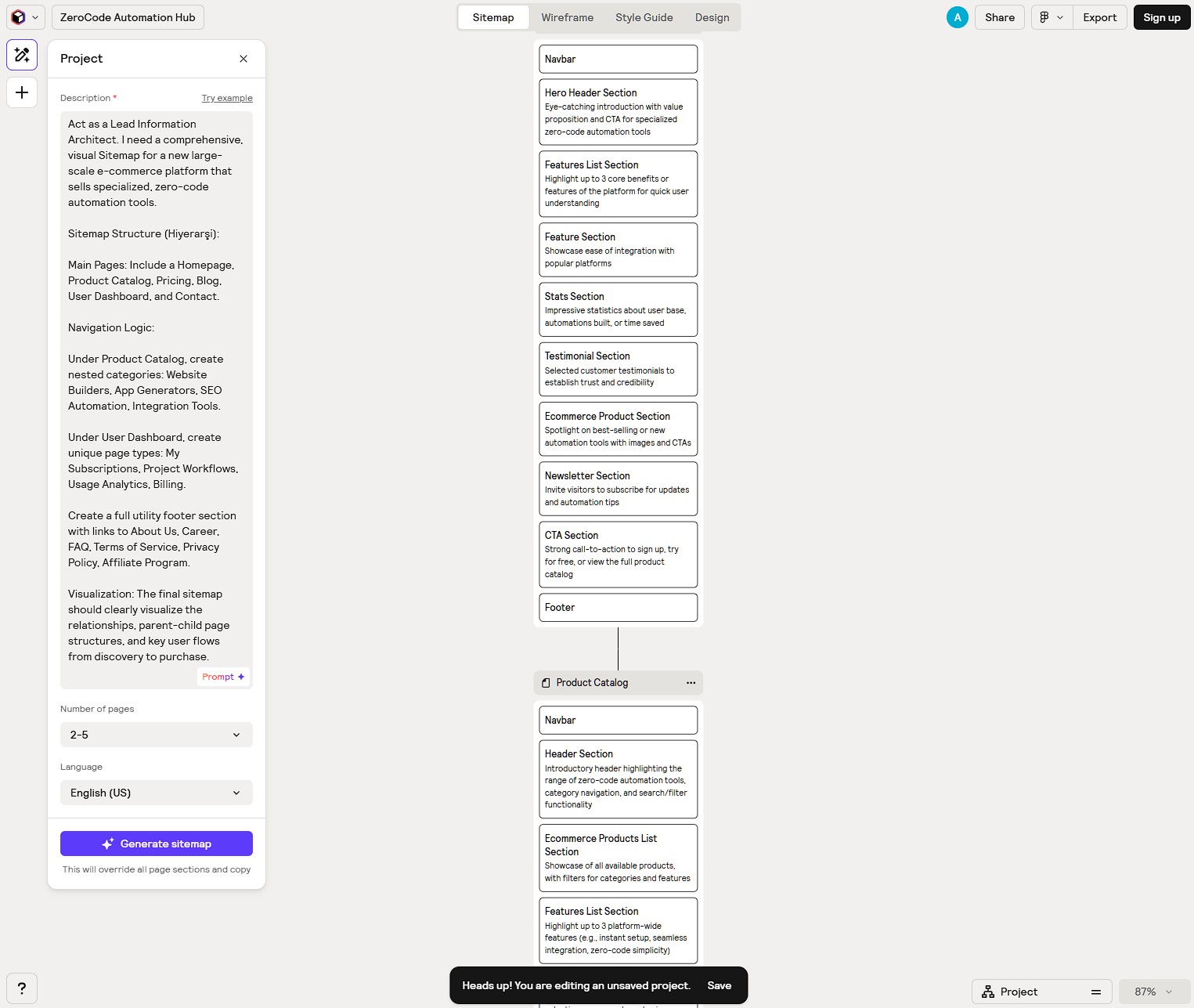
Relume excels at the planning phase that separates professional sites from amateur attempts. You’re thinking through structure systematically.
The Catch (Pricing & Limits): Relume offers a free tier with limited sitemap and wireframe generation (approximately 3 projects monthly). Free tier includes basic component library access but restricts some premium components and templates. Pro plan ($32/month) unlocks unlimited projects, full component library, Figma/Webflow export, and team collaboration. For zero-code platform users focused on planning and architecture rather than final implementation, Relume’s free tier provides substantial value for early-stage projects.
7. Dorik AI
The Vibe: Dorik AI represents the most beginner-friendly entry point among free AI website builders, prioritizing simplicity and speed over advanced features. In 2026, Dorik’s AI builds clean, professional static sites through remarkably straightforward prompts—you describe your site purpose, and Dorik generates a complete multi-page site optimized for that use case. The platform focuses on common website types (portfolios, landing pages, small business sites, blogs) and executes them exceptionally well rather than attempting complex applications. Dorik’s interface is intentionally simple: prompt input, preview, refine, publish—no overwhelming options or technical decisions.
Best For: Complete beginners building their first website, freelancers creating portfolio sites quickly, small businesses needing simple online presence, event organizers creating one-page sites, and anyone wanting to launch a website in under 10 minutes without any learning curve.
Deep-Dive Zero-Code Workflow:
Building a Portfolio Site in 8 Minutes:
- Simple Purpose Prompt: Start minimal: “Create a portfolio website for a freelance graphic designer named Sarah Chen. Showcase: Logo design, brand identity, packaging design, illustration work. Include about page, portfolio gallery, services offered, and contact form. Style: Minimalist, lots of white space, professional.”
- Complete Site Generation: Dorik AI generates: Homepage with hero section introducing Sarah, portfolio grid displaying project thumbnails, individual project pages with detailed images and descriptions, services page listing offerings with pricing indicators, about page with bio and work philosophy, contact page with form and social links, and mobile-responsive design throughout. Total generation time: 20-30 seconds.
- Content Replacement: Swap AI-generated placeholder content with real information: Upload actual design project images, replace bio with authentic background, update service descriptions with real offerings, and connect contact form to real email. Dorik’s editor uses simple click-to-edit interactions—no complex panels or settings.
- Visual Adjustments: Make basic design tweaks: Choose from Dorik’s preset color palettes, select typography pairings from curated combinations, adjust section spacing using simple sliders, and modify button styles from preset options. All changes are intentionally constrained to prevent design chaos.
- SEO and Publishing: Add page titles and meta descriptions through simple forms. Connect custom domain (requires paid plan) or use free dorik.io subdomain. Click “Publish” and the site goes live on Dorik’s hosting with automatic HTTPS and CDN. No separate hosting setup required.
- Future Updates: Use Dorik’s CMS to add new portfolio projects without rebuilding the site. Upload images, write descriptions, and publish new case studies through a simple dashboard.
Dorik excels at reducing web creation to its absolute simplest form. You’re not overwhelmed with options—you’re guided to completion quickly.
The Catch (Pricing & Limits): Dorik offers a generous free plan allowing one published site on a dorik.io subdomain. Free tier includes all AI generation features, basic analytics, and hosting but adds Dorik branding and limits custom domains. Personal plan ($18/year) removes branding, adds custom domain, and allows 5 sites. For absolute beginners using free AI website builders to create their first online presence, Dorik’s free tier is ideal—you can build, test, and validate ideas before committing to paid hosting.
Pro Tips for Using No-Code AI Tools
- Layer Tools for Maximum Results: The most sophisticated creators combine multiple free AI website builders in workflow sequences. Example powerful workflow: (1) Use Relume AI to generate sitemap and wireframes, validating structure and user flow, (2) Export Relume wireframes to Figma for visual design polish if needed, or proceed directly to implementation, (3) Use Framer AI to build design-heavy pages like homepage and about, (4) Use Bolt.new to create functional app components like user dashboards or calculators, (5) Use v0 to generate specific React components for complex interactions, (6) Combine all pieces into final site deployed through Vercel or Netlify. This multi-tool approach provides professional results matching custom development while remaining entirely zero-code platform based.
- Iterate Through Conversation, Not Settings: The paradigm shift in free AI website builders is conversational refinement versus traditional settings adjustment. Instead of hunting through dropdown menus to change padding values or color schemes, simply describe desired changes: “Make the hero section background darker” or “Increase spacing between portfolio items” or “Change CTA button to green with rounded corners.” This prompt to code approach is faster and more intuitive than traditional website builders. Treat the AI as a designer who implements your feedback instantly.
- Optimize Content for SEO After Building: Once your site structure is built using free AI website builders, the next critical step is filling pages with SEO-optimized content. Use AI writing tools to generate blog posts, service descriptions, and landing page copy that ranks in search engines. Combine AI site generation with AI content creation for complete automation. Tools like Framer and 10Web include built-in SEO features (meta tags, sitemaps, structured data), but quality written content determines whether your new site actually attracts organic traffic. Remember that while free AI website builders solve your technical setup, high-quality SEO content is what actually drives your organic traffic.
Frequently Asked Questions
Do websites built with free AI website builders rank well in Google?
Yes, sites built with free AI website builders can rank excellently if they include quality content and proper SEO fundamentals. Google’s algorithms evaluate content quality, site speed, mobile responsiveness, and user experience—not how the site was built. Platforms like Framer, 10Web, and Dorik generate clean, fast-loading code that meets Google’s technical requirements. The key success factors: (1) Write high-quality, original content addressing user search intent, (2) Optimize meta titles, descriptions, and header tags, (3) Ensure fast page load speeds (most AI builders handle this automatically), (4) Build quality backlinks from relevant sites. Sites built with these tools rank successfully in competitive niches when combined with proper SEO strategy.
Can I use my own domain name with these platforms?
Custom domain capabilities vary by platform among free AI website builders. Free tiers typically provide subdomains (yoursite.framer.website, yoursite.dorik.io) while paid plans enable custom domain connection. Specific breakdown: Framer requires Mini plan ($5/month) for custom domains, Bolt.new supports custom domains when self-hosting exported code, v0 generates code you deploy anywhere (including your domain), Lovable requires paid plan for custom domains, 10Web includes domain connection in all paid plans, Relume generates code for platforms that support custom domains, Dorik requires Personal plan ($18/year) for custom domains. For professional sites, budget $5-20/month for custom domain support, or use platforms like Bolt.new and v0 that export code for self-hosting on your infrastructure.
What happens to my site if I stop using the platform?
Site portability varies significantly among free AI website builders. Platforms offering code export (Bolt.new, v0) provide complete ownership—download your code and host anywhere, independent of the original platform. Platforms with proprietary hosting (Framer, Lovable, Dorik, 10Web) require continued subscription or free tier compliance to keep sites live. Best practices for platform independence: (1) Use tools offering code export when portability matters, (2) Regularly back up content and images from proprietary platforms, (3) For business-critical sites, prefer WordPress-based solutions (10Web) with standard export capabilities, (4) Test migration paths before committing deeply to any single platform. For side projects and experiments, proprietary platforms are fine. For business assets, prioritize platforms with export functionality.
Summary: Which Zero-Code Platform is Right for You?
For a quick recap before you start building, here is how the top 7 platforms compare on their core strengths and free tier limits:
| Tool Name | Your Superpower (Best For) | The Final Output | Free Tier Value & Limits |
|---|---|---|---|
| Framer AI | Stunning design & animations | Hosted Static Site | Unlimited pages (framer.website subdomain) |
| Bolt.new | Full-stack functional web apps | Exportable App Code | Unlimited projects (compute time limits) |
| v0.dev | React components & UI systems | Copy-Paste React Code | 200 AI generation credits / month |
| Lovable.dev | SaaS MVPs with database & auth | Hosted Web App | 1 active full-feature app (subdomain) |
| 10Web | Automated WordPress setup | Hosted WP CMS | Limited free trial (paid hosting required) |
| Relume AI | Sitemaps & instant wireframes | Figma/Webflow Export | ~3 wireframe/sitemap projects / month |
| Dorik AI | Absolute beginners & fast sites | Hosted Static Site | 1 published site (dorik.io subdomain) |
The Verdict: Which Free AI Website Builder Should You Choose?
Select based on your specific project needs and technical comfort level:
- Stunning landing pages and portfolios? → Framer AI (best design quality and animation capabilities among free AI website builders)
- Functional web applications with user authentication? → Lovable.dev (complete SaaS infrastructure through prompt to code)
- Complex full-stack apps requiring custom logic? → Bolt.new (generates working code for any application type)
- UI components and design systems? → v0.dev (produces reusable React components you can use anywhere)
- WordPress sites with AI assistance? → 10Web (combines WordPress flexibility with AI generation)
- Planning and wireframing before building? → Relume AI (creates structural foundation for any project)
- Absolute beginners wanting simplest option? → Dorik AI (fastest path to launch a website for complete novices)
The reality of free AI website builders in 2026: You genuinely don’t need coding skills or expensive developers to create professional websites anymore. The combination of free AI website builders reviewed above covers everything from simple landing pages to complex web applications. The limitation isn’t platform capability—it’s your ability to clearly describe what you want and iterate through prompts.
The strategic advantage of zero-code platforms: By mastering prompt to code workflows, you develop product thinking and user experience skills that transcend any specific technology. You learn to articulate requirements clearly, think through user flows systematically, and iterate based on feedback—skills that matter regardless of which tools exist in the future.
To launch a website successfully in 2026, combine the right free AI website builders (Framer for design, Bolt.new for functionality, v0 for components) with quality content, clear purpose, and user-focused thinking. The technology enables instant creation, but strategic clarity determines whether your site achieves its goals.
Your immediate next step: Pick one tool from this list matching your primary use case. Spend 30 minutes today building something real—a portfolio page, a landing page, a simple app. Experience the prompt to code workflow firsthand. Most creators are shocked how much they can accomplish in their first session. Don’t plan endlessly—build something today, even if imperfect.
The coding era is ending for creators. Free AI website builders and zero-code platform tools now deliver results matching custom development. Your competitive advantage is execution speed and clarity of vision, not technical skills.
A good round-up, although I personally think platforms such as Base44, Pagesmith AI and Puter AI are missing from this list. They’re incredibly easy to use and the results are truly impressive. Perhaps this article could be expanded to include these two platforms 🙂