
Gamma App is an AI-powered presentation and document generator that allows users to create visually stunning decks, webpages, and docs from a simple text prompt, eliminating the need for manual formatting. If you’ve ever spent three hours aligning bullet points, searching for the “perfect” stock photo of a handshake, or fighting with slide transitions that nobody asked for, then Gamma App is about to become your new religion.
Here’s the brutal truth about traditional presentations: we spend 90% of our time moving pixels and 10% on actual content. PowerPoint has convinced us that presentations require meticulous design work—adjusting text boxes by single pixels, matching font sizes across 47 slides, hunting for royalty-free images that don’t look like corporate dystopia. It’s busywork masquerading as productivity.
Gamma App obliterates this entire workflow. You type a topic. The AI generates an outline. You approve it. Seconds later, you have a fully designed presentation deck with relevant images, cohesive color schemes, and professional layouts. No dragging. No resizing. No crying into your keyboard at 2 AM because your boss wants “something more dynamic” for tomorrow’s meeting.
Let me show you why this AI powerpoint generator is the ultimate “Zero Skill” tool for anyone who’s ever felt enslaved by slide design software.
The Problem: “Death by PowerPoint” (And Our Collective PTSD)
PowerPoint was invented in 1987. Thirty-eight years later, we’re still manually dragging text boxes around like digital cave painters. The workflow is absurd:
The Traditional Hell:
- Open PowerPoint (wait for it to load)
- Choose a template (they all look like 2012)
- Add a slide (click, click, click)
- Type your content (finally, the actual work)
- Realize the text doesn’t fit (shrink font)
- Add an image (open browser, search stock photos, download, insert, resize, position)
- Realize the image is off-center by 2 pixels (adjust, adjust, adjust)
- Repeat for 20 more slides
- Spend 30 minutes on slide transitions nobody will notice
- Cry
This is insanity. We’re knowledge workers, not graphic designers. We shouldn’t need a degree in visual hierarchy to communicate ideas.
Gamma App recognizes this and asks a radical question: What if the AI just did all of that for you?
The “Zero Skill” Solution: Type a Topic, Get a Deck
Here’s the Gamma AI presentation workflow that feels like actual magic:
Step 1: Tell Gamma what you need
“Create a presentation about the History of Ancient Rome”
Step 2: AI generates an outline
Within seconds, you get a structured outline:
- Introduction to Rome
- The Roman Republic
- Julius Caesar and the Empire
- Architecture and Engineering
- Fall of Rome
- Legacy and Influence
Step 3: Approve or edit the outline
Don’t like a section? Delete it. Want to add “Roman Military Tactics”? Add it. The AI is flexible.
Step 4: Generate the full deck
Click “Generate.” The AI produces a complete text to presentation AI deck with:
- Professional layouts for each topic
- Relevant historical images
- Cohesive color scheme
- Proper text hierarchy (headlines, body text, captions)
- Smooth visual flow between sections
Total time: 3-5 minutes. No manual formatting. No image searching. No alignment hell.
I tested this with a client presentation topic: “Marketing Strategy for SaaS Startups.” The AI generated 18 slides covering market analysis, positioning, growth tactics, and metrics—complete with charts, icons, and professional design. Was it perfect? No. Did it require 90% less work than building from scratch? Absolutely.
The Gamma app review consensus is universal: this is the closest thing to a “create presentation” button that actually works.
Key Feature 1: “Paste Text” Mode (Turn Notes Into Slides Instantly)
Here’s where Gamma App becomes genuinely life-changing for students and professionals: You can paste existing text, and it converts it into a presentation automatically.
Real-world use case: You have rough notes in Notion, Google Docs, or even just a bulleted list. Copy-paste them into Gamma App. The AI analyzes the structure, identifies key points, and generates slides with appropriate visuals and layouts.
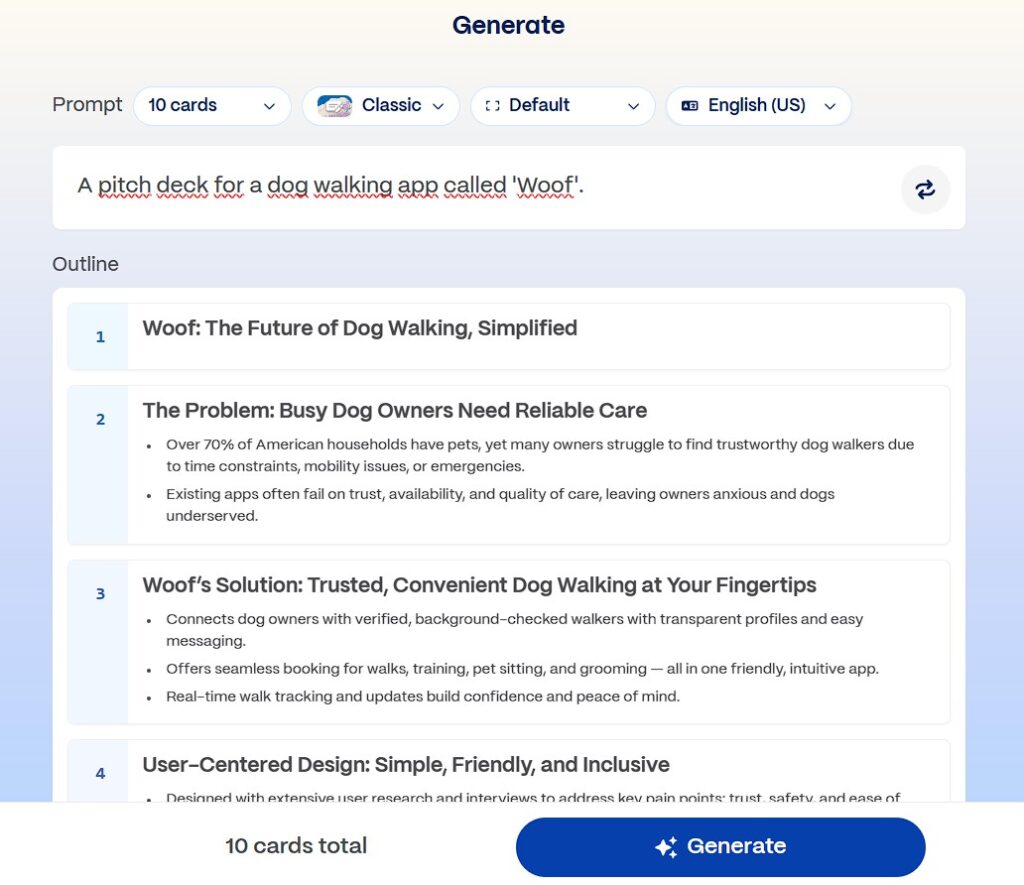
I tested this with a 2000-word blog post draft. Pasted it into Gamma. The AI:
- Identified main sections (became slide titles)
- Extracted key points (became bullet points)
- Found relevant stock photos for each section
- Applied a cohesive design theme
- Created a title slide and conclusion slide
Time investment: 30 seconds to paste text, 2 minutes to review and tweak. Compare that to manually building 15 slides in PowerPoint (easily 2+ hours).
This is perfect for students who need to present research papers. Use Gauth AI to solve complex math or science problems, then paste your solutions into Gamma App to create a visual presentation for your class. The entire workflow—from problem-solving to polished presentation—takes minutes instead of hours.
Gamma App is easily one of the top productivity tools for academic life, and it absolutely deserves a spot alongside other essentials we’ve covered in our 10 Best Free AI Tools for Students guide.
Key Feature 2: The “Card” System (Modern Web-Based, Not Slide Prison)
Gamma App doesn’t use traditional “slides.” It uses cards—fluid, responsive content blocks that feel more like a modern webpage than a rigid presentation deck.
Why this matters:
Traditional slides: Fixed 16:9 or 4:3 ratio. If your content doesn’t fit, you shrink text or add another slide. Rigid, inflexible, designed for projectors from 1995.
Gamma cards: Flexible height and width. Content expands naturally. Works beautifully on screens of any size—desktop, tablet, mobile. Feels modern and web-native.
This makes Gamma AI presentation decks perfect for:
- Sharing online (send a link, not a 50MB PowerPoint file)
- Mobile viewing (your deck looks great on phones without awkward zooming)
- Scrolling presentations (audiences can scroll through at their own pace, like a webpage)
But what if you need PowerPoint? No problem. Gamma App lets you export to:
- PowerPoint (PPTX) for compatibility with traditional workflows
- PDF for sharing or printing
- Web link for modern, interactive presentations
You get the best of both worlds: modern design flexibility with traditional format compatibility.
Gamma App vs. PowerPoint vs. Canva (The Honest Comparison)
Let’s address the competition:
PowerPoint:
- Pros: Industry standard. Everyone has it. Full control over every element.
- Cons: Manual labor hell. Terrible default templates. Requires design skills for professional results.
- Time to create 15-slide deck: 2-4 hours
Canva:
- Pros: Beautiful templates. Drag-and-drop simplicity. Great for social media graphics.
- Cons: Still requires manual work (selecting layouts, placing images, adjusting text). Limited AI generation.
- Time to create 15-slide deck: 1-2 hours
Gamma App:
- Pros: Fully automated generation. AI does design, image selection, and layout. Paste-text feature for existing content. Modern card-based system.
- Cons: Less granular control (though you can edit anything). AI sometimes picks generic images.
- Time to create 15-slide deck: 5-10 minutes
The “Zero Skill” verdict: If you value speed and hate design work, Gamma vs PowerPoint isn’t even a contest. Gamma wins by knockout. If you need pixel-perfect control for branding-critical presentations, PowerPoint still has a place. But for 90% of use cases—internal meetings, class presentations, pitch decks, reports—Gamma App is objectively superior.
Pricing: Is Gamma App Free?
Gamma App operates on a credit system:
Free Tier:
- 400 AI credits (enough for ~8-10 presentations)
- Full access to all features (AI generation, templates, export options)
- No credit card required
Plus Plan ($8/month):
- Unlimited AI generation
- Priority support
- Advanced customization options
- Remove Gamma branding
Pro Plan ($15/month):
- Everything in Plus
- Team collaboration features
- Advanced analytics
- Custom domains for shared presentations
The “Zero Skill” evaluation: The free tier is genuinely usable. 400 credits is enough to test the platform thoroughly and create several high-quality presentations. For students or occasional users, the free tier might be sufficient indefinitely. For professionals creating presentations weekly, the Plus plan ($8/month) is absurdly cheap compared to the time savings.
Is Gamma app free? Yes, with generous limits that make it practical for real use, not just a demo.
The Verdict: This Is the “Cheat Code” for Presentations
Gamma App does what AI is supposed to do: automate the tedious parts of knowledge work so humans can focus on actual thinking. Nobody enjoys aligning text boxes. Nobody dreams of becoming a slide layout expert. We just want to communicate ideas effectively without wasting hours on formatting.
Best for:
- Students creating class presentations (paste research notes → instant deck)
- Professionals needing internal meeting slides (speed over perfection)
- Entrepreneurs building pitch decks quickly (iterate fast, refine later)
- Anyone who hates traditional presentation software with a burning passion
Not ideal for:
- Pixel-perfect brand presentations requiring exact specifications
- Design-forward creative agencies showcasing visual work
- Situations requiring absolute control over every element
The “Zero Skill” rating? Maximum. You can create professional presentations on day one without knowing anything about design principles, color theory, or layout hierarchy. Type your content, approve the outline, and let the AI powerpoint generator handle everything else.
If you’re still manually building PowerPoint decks in 2025, you’re working harder, not smarter. Gamma App is the tool that finally makes presentations painless.
Stop dragging text boxes. Start communicating ideas.
Frequently Asked Questions About Gamma App
Is Gamma App free?
Yes, with 400 AI credits included. That’s enough for 8-10 full presentations. No credit card required for signup. Paid plans start at $8/month for unlimited generation.
Can I export to PowerPoint?
Yes, Gamma exports to PPTX, PDF, and web links. If your workplace requires PowerPoint files, you can generate in Gamma and export for compatibility. You get modern AI generation with traditional format support.
Does Gamma App work on mobile?
Yes, via web browser. The interface is mobile-responsive. You can create and edit presentations on phones/tablets, though the experience is better on desktop for detailed editing. Viewing/presenting works great on mobile.
Can I use my own branding and colors?
Yes, Gamma allows custom themes. You can set brand colors, fonts, and logos. The AI respects these constraints when generating slides. Plus and Pro plans offer more advanced customization options.
Does the AI steal content from other presentations?
No, Gamma generates original content and layouts. It uses stock image libraries (like Unsplash) for visuals, but all text and structure is created fresh based on your input. It’s not copying existing presentations.
Can multiple people edit the same Gamma presentation?
Yes, on Pro plans. Free and Plus tiers are single-user. Pro includes real-time collaboration features similar to Google Slides, where team members can edit simultaneously and leave comments.
How does Gamma compare to Beautiful.ai?
Gamma has better AI generation; Beautiful.ai has more templates. Both automate design, but Gamma’s text-to-presentation AI is more advanced. Beautiful.ai offers more manual control with smart templates. Choose Gamma for speed, Beautiful.ai for design flexibility.
Can I use Gamma presentations offline?
Only if exported to PDF or PPTX. Gamma’s native format is web-based and requires internet. Export to PowerPoint or PDF for offline presenting. The export quality is high—you won’t lose design integrity.
Follow ZeroSkillAI.com for more reviews of AI tools that automate the boring parts of work so you can focus on actually being productive instead of playing graphic designer.
Looking for more ways to work smarter in school? Check out our complete guide to the 10 Best Free AI Tools for Students and discover how to automate homework, research, and presentations without spending a dime.
Pingback: 100+ Best AI Side Hustles: Start Making Money with No Experience (2026 List) -