
Gauth AI is an advanced educational AI tool designed to solve complex mathematics, chemistry, and physics problems by providing step-by-step logic and explanations. Unlike basic calculators, it utilizes optical character recognition (OCR) to scan questions from photos and employs a specialized algorithm to function as an on-demand virtual tutor for students.
In this comprehensive guide, we are not just scratching the surface. We are diving deep into Gauth AI’s features, its accuracy across different subjects (it’s not just math anymore!), its pricing model, and the ethical way to use it without getting caught. Put down your calculator and read on.
What Exactly is Gauth AI? (Beyond the Hype)
If you’ve been around the “homework help” scene for a while, you might remember an app called Gauthmath. It was a solid, math-focused solver that gained massive popularity on TikTok. Well, Gauthmath has evolved. Rebranded simply as Gauth AI, the platform has expanded its brainpower significantly.
It is no longer just a calculator on steroids; it positions itself as an “AI Study Companion.” The premise is the definition of the “Zero Skill” philosophy: Maximum output for minimum effort. You don’t type out long equations. You don’t search for formulas. You simply point your camera at the problem, snap a photo, and let their Optical Character Recognition (OCR) and AI algorithms do the heavy lifting.
But unlike generic chatbots that hallucinate answers, Gauth is specifically trained on STEM (Science, Technology, Engineering, Math) data. This specialization is what supposedly makes it the “King of Homework Apps.” But does it hold up to the claim?
Key Features Breakdown
For this Gauth AI review, we tested the app on various difficulty levels, from basic algebra to university-level physics. Here is a breakdown of the core features.
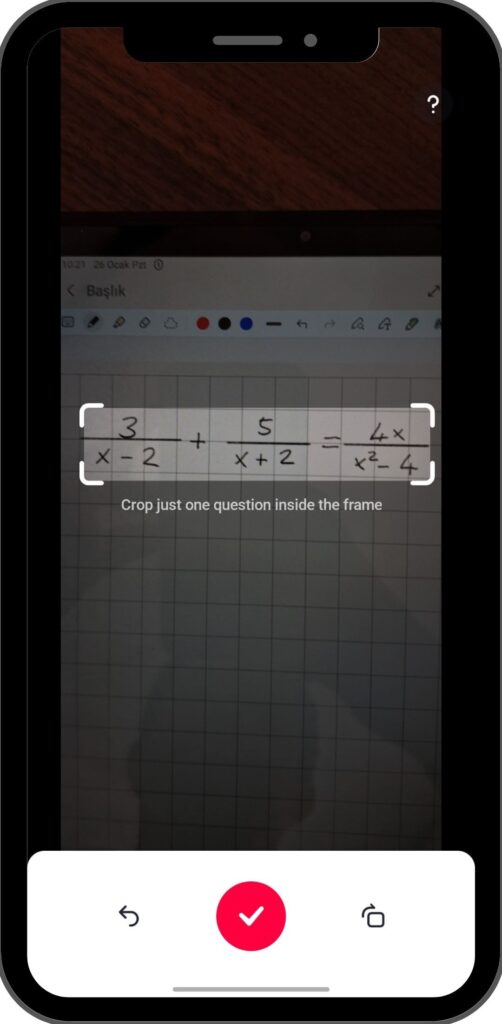
1. The “Snap & Solve” Tech (OCR)
The heart of Gauth AI is its camera interface. The OCR technology is surprisingly robust. In our tests, it successfully recognized:
- Printed Text: Textbook problems were identified instantly with 99% accuracy.
- Handwriting: This is usually where AI fails, but Gauth managed to read reasonably messy handwriting, provided the lighting was decent.
- Complex Symbols: Integrals ($\int$), Sigma notation ($\Sigma$), and chemical bond diagrams were captured correctly.
2. Step-by-Step Explanations (The Grade Saver)
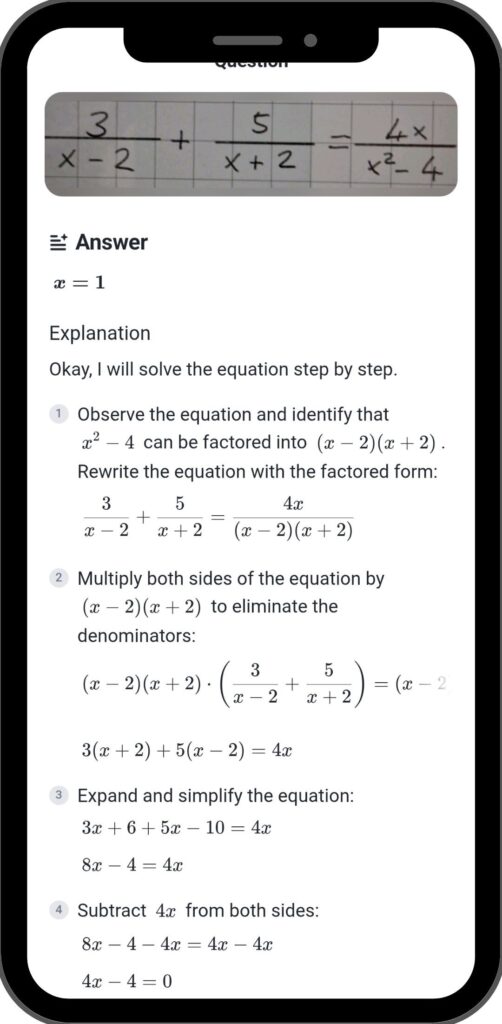
Getting the final answer ($x = 5$) is great, but it’s useless if you have to show your work. This is where Gauth shines. Instead of just giving the result, it generates a complete, line-by-line breakdown of the solution.
- Why this matters: Teachers look for the process, not just the answer. By copying the steps, you not only get full credit but might actually accidentally learn how the problem works.
3. Multi-Subject Support
The biggest upgrade from the old “Gauthmath” days is the subject range. Gauth AI now supports:
- Mathematics: Algebra, Geometry, Calculus, Statistics, Trigonometry.
- Physics: Forces, Motion, Energy, Electricity.
- Chemistry: Balancing equations, Organic chemistry, Stoichiometry.
- Biology: Basic concepts and terminology.
4. Expert Human Tutors (The “Pro” Safety Net)
This is the feature that truly separates Gauth from generic AI tools. Sometimes, AI gets confused. It happens. For those super-advanced, abstract word problems, Gauth offers a “Ticket” system.
You can use a ticket to send your problem to a verified human tutor. These are real experts (often math majors or teachers) who solve the problem manually and send you the solution. It takes longer than the AI (usually 15-30 minutes), but the accuracy is practically guaranteed.
User Experience: Is It Easy to Use?
The app design is sleek, modern, and clearly built for Gen Z students. There are no clunky menus or confusing settings.
- The Interface: As soon as you open the app, the camera is active. It feels like Snapchat for homework.
- The Speed: For standard math problems, the AI response time is under 3 seconds. It is faster than you can Google the question.
- History Tab: The app saves your past scans, so if you lose your homework sheet, you still have the digital solutions saved in your history.
Pricing: Is Gauth AI Free?
This is the million-dollar question for every student. The short answer is: Yes, but with limits.
The Free Plan
- Basic Solving: You can use the camera to solve standard math problems for free.
- Limited Explanations: Sometimes the detailed “step-by-step” view is locked behind a paywall or requires you to watch an ad.
- Daily Limits: There might be a cap on how many complex problems you can scan per day.
Gauth Plus (Premium)
If you are drowning in homework, you might consider the upgrade. The Premium subscription usually unlocks:
- Unlimited Explanations: No ads, no limits on step-by-step guides.
- Tutor Tickets: You get a monthly allowance of tickets to ask real humans for help.
- Priority Response: Your questions jump to the front of the queue.
Is it worth it? If you are an engineering student or taking AP Calculus, the subscription pays for itself in one late-night study session. For casual use, the free version is plenty.
The Accuracy Test: Where Does It Fail?
No tool is perfect, and in our Gauth AI review, we wanted to find the cracks in the armor.
Where it excels:
- Equations: If it’s numbers and symbols, Gauth crushes it. Quadratic equations, derivatives, and matrix operations are solved flawlessly.
- Multiple Choice: If you scan a multiple-choice question, it doesn’t just pick “C”. It explains why C is the right answer.
Where it struggles:
- Word Problems (The Kryptonite): Like most AI, Gauth can struggle with very long, paragraph-style word problems where the context is buried in text. It sometimes misinterprets what the question is actually asking.
- Abstract Concepts: Questions like “Explain the significance of…” are harder for it than “Calculate the value of…”.
- Bad Lighting: If your photo is blurry or taken in the dark, the OCR will fail. This isn’t the AI’s fault, but it’s a limitation.
Gauth AI vs. Photomath: Which is Better?
You probably know Photomath. It’s the OG solver. So why switch?
- Photomath is excellent for pure math equations but lacks the “Science” support. If you need help with Chemistry or Physics, Photomath can’t help you.
- Gauth AI is a broader tool. It also feels slightly more “conversational” in its explanations, whereas Photomath is very rigid.
- The Verdict: Use Photomath for basic algebra. Use Gauth AI for literally everything else.
Ethical Usage: How to Use It Without “Cheating”
Okay, let’s address the elephant in the room. Is this cheating?
If you use Gauth AI to just copy answers during a test, yes, that is cheating (and you’ll probably get caught).
However, the “Zero Skill” way to use it efficiently is as a private tutor.
The Smart Workflow:
- Try to solve the problem yourself for 2 minutes.
- If you get stuck, scan it with Gauth.
- Read the steps. Don’t just look at the answer. Understand which formula they used.
- Write down the solution in your own words.This way, you finish your homework in half the time, but you actually learn the material. It’s a win-win.
Conclusion: Final Verdict
After extensive testing for this Gauth AI review, the conclusion is clear. This app is a must-have utility for any student in 2026. It bridges the gap between a calculator and a human tutor.
It is fast, surprisingly accurate across multiple subjects, and the interface is incredibly user-friendly. While the premium features are locked behind a subscription, the free value it provides is immense.
Should you download it? Absolutely. Even if you only use it to check your answers, it’s a tool that gives you a massive advantage. Just remember: The app can solve the homework, but it can’t take the exam for you. Use it wisely.
Zero Skill Score: 9.2/10 🚀
Download Gauth AI, reclaim your free time, and stop crying over calculus.
While Gauth AI helps you master your homework with zero effort, AI can also help you create stunning art. If you’re interested in mastering image generation tools, check out our Advanced Negative Prompt Guide to fix common AI art mistakes instantly.
FAQ (Frequently Asked Questions)
Is Gauth AI safe to use?
Yes, the app is safe. It does not require invasive permissions, just camera access to scan problems.
Does Gauth AI work on PC?
Gauth is primarily a mobile app (iOS and Android), but they have a website where you can upload screenshots or type questions if you prefer working on a desktop.
Can teachers detect Gauth AI?
Not directly. However, if you copy the AI’s explanation word-for-word and it uses a method you haven’t learned in class yet, your teacher might get suspicious. Always rephrase the steps!
Disclaimer: ZeroSkillAI.com promotes using AI tools to enhance learning, not replace it. Always verify solutions and understand the underlying concepts. Don’t be the person who aces homework but fails every test.
Pingback: Clawdbot Explained: Is It the Best AI Agent? Why Everyone's Buying Mac Minis (But You Don't Need To) -
Pingback: Gamma App Review 2026: The AI PowerPoint Generator That Finally Kills "Death by PowerPoint" -
Pingback: 100+ Best AI Side Hustles: Start Making Money with No Experience (2026 List) -
Pingback: Perplexity AI Review: The Best AI for Homework & Research (2026 Student Guide) -