
You wrote a perfect prompt, but the result is a disaster. 😫
The hands have 7 fingers. The eyes look creepy. There is random text floating in the sky. And everything looks blurry.
Sound familiar?
In this guide, I’m giving you my personal “Universal Negative Prompt Examples”.
⚠️ Quick Note: This guide focuses on ready-to-use “Copy-Paste” lists for beginners. If you are looking to master prompt engineering logic, understand weighting (e.g.,
(bad hands:1.5)), or learn advanced syntax, you should check out our deep-dive: Advanced Negative Prompt Guide: Mastering Weights & Syntax.For everyone else who just wants to fix ugly images right now, keep reading. Copy-paste these lists into your AI tool (Midjourney, Stable Diffusion, Leonardo.ai) to instantly improve your image quality.”
Most beginners focus only on the Positive Prompt (what they want). But pro users know the real secret lies in the Negative Prompt (what they don’t want).
Think of AI as a talented but confused artist. You need to tell it not just what to draw, but also what to avoid.
What is a Negative Prompt?
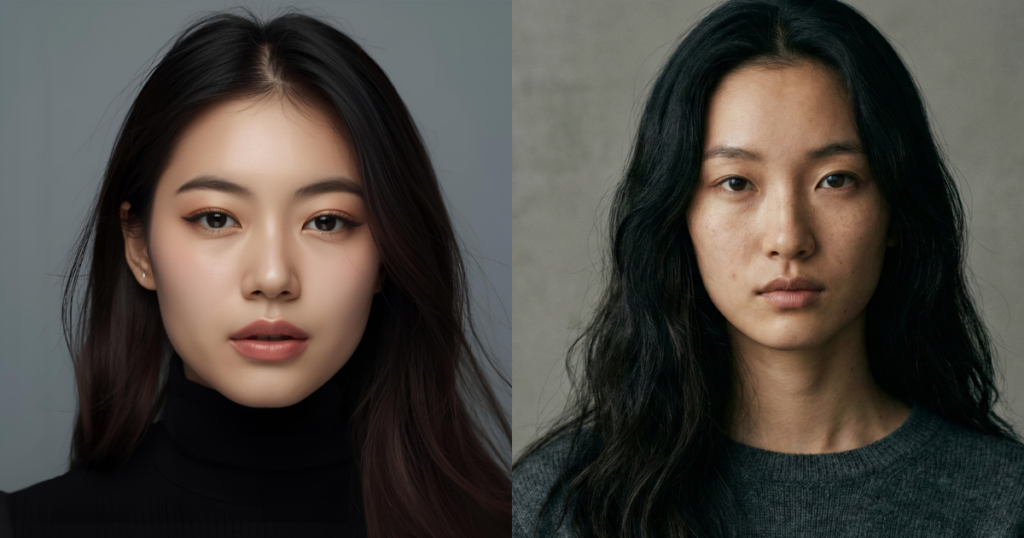
A negative prompt is a parameter that tells the AI model to exclude specific elements from the generated image.
- Positive Prompt: “A portrait of a woman.” (AI tries to draw a woman).
- Negative Prompt: “Ugly, bad anatomy, blur.” (AI tries to draw a woman but actively avoids making her ugly or blurry).
It is your safety net against bad generation.
📋 The “Universal” Copy-Paste List (Save This!)
You don’t need to reinvent the wheel every time. Use this standard list for 90% of your generations to ensure high quality.
For Realistic Photos:
ugly, deformed, noisy, blurry, low contrast, text, watermark, logo, bad anatomy, extra limbs, missing fingers, extra fingers, crop, low resolution, jpeg artifacts, cartoon, illustration, painting.
For Illustrations/Art:
photo, realistic, 3d render, grain, blur, signature, watermark, text, bad perspective, bad proportions, deformed.
🔧 Specific Fixes for Common Problems
Sometimes you have a specific problem. Here is how to fix it:
1. The “Bad Hands” Problem ✋ AI hates drawing hands. Use these negatives to help it out:
malformed hands, extra fingers, missing fingers, fused fingers, claw, bad anatomy, mutated hands.
2. The “Purple Slop” Problem 🟣 Tired of that generic neon AI look? (Read our full guide on “Purple Slop” here).
neon, purple, cyan, cyberpunk, glowing, over-saturated, metallic, robot.
3. The “Unwanted Text” Problem 🔤 Is the AI putting random letters in your sky?
text, signature, watermark, username, logo, copyright, title, heading.
For Anime & Manga Styles: Generating anime characters often results in weird eyes or extra limbs. Use this specific list for clean, high-quality anime art:
lowres, bad anatomy, bad hands, text, error, missing fingers, extra digit, fewer digits, cropped, worst quality, low quality, normal quality, jpeg artifacts, signature, watermark, username, blurry, artist name, bad feet
🚨 Important for Midjourney Users: While Stable Diffusion has a dedicated “Negative Prompt” box, Midjourney is different. You must use the --no parameter at the end of your prompt.
- Wrong: “A cat, negative prompt: dog”
- Right:
/imagine prompt: A cute cat --no dog, blur, watermark
Simply take the lists below, put --no in front of them, and paste them at the end of your Discord command.
🧪 Example: Before vs. After
Let’s see the power of negative prompts in action.
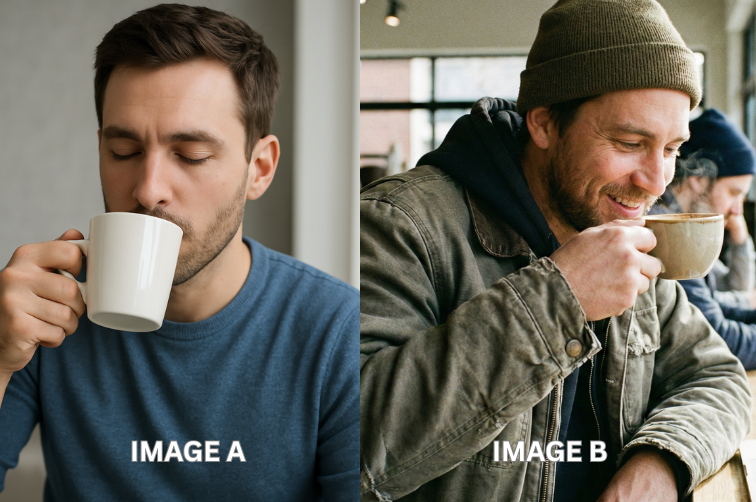
I used the exact same simple prompt for both images below: “A man drinking coffee.”
- Image A (No Negative Prompt): The result is okay, but it has that classic “AI look.” The man’s face is a bit too smooth, his eyes are not quite right, and the lighting feels artificial.
- Image B (With Negative Prompt): I added my universal negative prompt list to the same request. The difference is night and day. The lighting is cinematic, the man’s skin texture is realistic, and it looks like a professional photograph.
Conclusion: Why These Negative Prompt Examples Matter
Never leave the Negative Prompt box empty. It costs you nothing but saves you hours of re-generating images. Bookmark this page and use these lists for your next creation.
AI art tools like Midjourney, Canva Magic Media, and Stable Diffusion are incredibly powerful. But without Negative Prompts, using them feels like playing a slot machine. Sometimes you win, but mostly you get weird hands and blurry faces.
You don’t have to rely on luck anymore.
By using the lists in this guide, you are moving from a “beginner” to a “creative director.” You are telling the AI: “I have standards, and I won’t accept low-quality results.”
Your Action Plan:
- Bookmark this page: You will need to copy-paste these lists for almost every image you generate.
- Experiment: Try adding specific negatives like “fog” or “darkness” to change the mood of your images.
- Level Up Your Design: Now that your images are sharp and professional, put them to work!
🚀 Ready to Go Pro? Now that you have the basic lists, it’s time to understand why they work. Learn how to control specific glitches like a pro and create your own master lists in our next guide: Advanced Negative Prompt Guide.
Also, if you are tired of the generic ‘AI Look’, make sure to read How to Fix the “Purple AI Slop” Aesthetic.”
What is the best universal negative prompt for AI art?
The most effective universal negative prompt usually includes: “ugly, tiling, poorly drawn hands, poorly drawn feet, poorly drawn face, out of frame, extra limbs, disfigured, deformed, body out of frame, bad anatomy, watermark, signature, cut off, low contrast, underexposed, overexposed, bad art, beginner, amateur, distorted face.”
How do I use negative prompts in Midjourney?
In Midjourney, use the --no parameter followed by what you want to exclude. For example: a landscape --no water, trees, buildings.
Why does my AI art have bad hands?
AI models struggle with complex geometry like hands. To fix this, always add “malformed hands, extra fingers, missing fingers, fused fingers, claw, bad anatomy” to your negative prompt list.
Do negative prompts work in DALL-E 3?
DALL-E 3 (via ChatGPT) handles negatives differently. You usually have to describe what you don’t want in natural language within the main prompt, rather than using a separate list.
Pingback: 5 Best Free Midjourney Alternatives in 2025 (No Discord Required!) -
Pingback: Stop Typing 'Ugly': Advanced Negative Prompt Guide on How to Use Embeddings & Weights for Cleaner AI Art -