
You love Canva. We all do. It democratized design and made it possible for anyone—regardless of skill level—to create stunning visuals. But if you are running a blog, a small business, or just creating content for social media, you have probably hit that annoying “Pro content only” crown icon 👑 while designing.
It begs the question: Is Canva Pro actually worth the money? Or can you get by with the free version forever?
As someone who started with the free version and eventually upgraded, I understand the dilemma. You don’t want to add another monthly subscription to your list unless it’s absolutely necessary.
In this detailed guide, we will compare Canva Free vs. Canva Pro feature by feature, analyze the hidden costs, and help you decide if it’s time to upgrade.
The “Killer” Feature: One-Click Background Remover
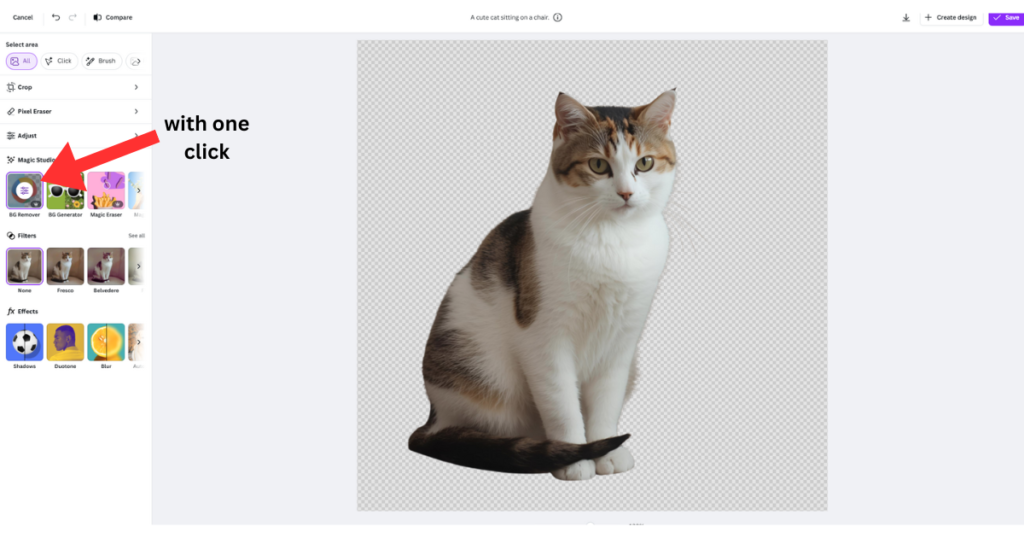
If there is one feature that justifies the price tag alone, it is the Background Remover.
In the free version, removing a background is a nightmare. You have to download your image, upload it to a third-party site (like Remove.bg), download it again, and re-upload it to Canva. This kills your workflow and often lowers image quality.
With Canva Pro, it is magic. You click “Edit Photo,” hit “Background Remover,” and within 3 seconds, you have a clean, transparent cutout.
- Best for: YouTubers (thumbnails), E-commerce sellers (product photos), and logo designers.
- Time saved: Approximately 5 minutes per image.
The Content Library: 1 Million vs. 100 Million
This is the biggest frustration with the free version. You find the perfect photo for your project, but it has watermark grid lines all over it.
- Canva Free: Gives you access to about 1 million photos and graphics. It sounds like a lot, but for specific niches, it feels very limited.
- Canva Pro: Unlocks the entire library. We are talking about 100+ million premium stock photos, videos, audios, and vector graphics.
Think about it: A subscription to a stock photo site like Shutterstock can cost $29/month for just 10 images. Canva Pro gives you unlimited access for half that price.
Magic Switch (Formerly Magic Resize)
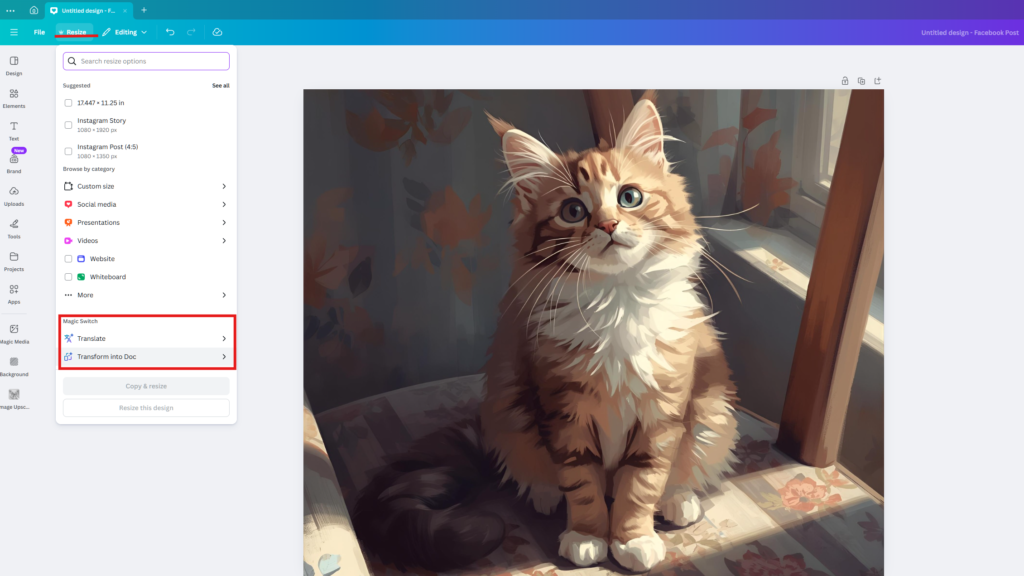
Imagine you just designed the perfect Instagram Post. Now, you need the same design for a YouTube Thumbnail, a Pinterest Pin, and a LinkedIn Banner.
On the free plan, you have to open a new file and manually copy-paste every element, resize the text, and adjust the layout. It is tedious.
Canva Pro’s Magic Switch automates this. You simply click a button, select the formats you need, and AI automatically resizes and rearranges your design to fit perfectly. It’s a massive time-saver for social media managers.
Brand Kit: Consistency is Key
Branding is all about consistency.
- Canva Free: Allows you to set a very limited palette (3 colors). You have to manually search for your fonts and upload your logo every time.
- Canva Pro: Gives you unlimited Brand Kits. You can upload your custom fonts, save endless color palettes, and store different versions of your logo. They are always accessible in the editor sidebar, ensuring every post matches your brand identity.
Advanced AI Features & Transparency
Transparent PNGs: Essential for logo design. On the free plan, you can only download images with a white box background. Pro allows transparent downloads.
More AI Credits: Pro users get 500 credits per month for Magic Media (Text-to-Image), while free users are capped at 50.
Comparison Table: At a Glance 📊
| Feature | Canva Free | Canva Pro |
| Stock Photos | 1 Million+ | 100 Million+ |
| Background Remover | ❌ No | ✅ Yes (One-click) |
| Magic Resize | ❌ No | ✅ Yes |
| Brand Kit | Limited (3 colors) | ✅ Unlimited |
| AI Credits (Magic Media) | 50/day | 500/month |
| Transparent PNG | ❌ No | ✅ Yes |
The Verdict: Who Should Upgrade?
So, Canva Free vs. Canva Pro—which one is for you?
Stick with Canva Free if:
- You create designs occasionally (once or twice a month).
- You don’t mind using external sites for stock photos.
- You are a student or hobbyist on a strict budget.
Upgrade to Canva Pro if:
- You value your time (Magic Resize and Background Remover save hours).
- You need professional features like Transparent PNGs for logos.
- You want unlimited access to premium stock assets.
Final Recommendation: Start with the 30-day free trial. Test the Magic tools yourself. If it doesn’t save you hours of work in the first week, you can always cancel.
(Ready to design? Check out our guide on How to Design a Professional Logo with Canva to put these features to use.)
Pingback: 10 Best Free AI Tools for Students in 2025 (Save Time & Boost Grades) -
Pingback: How to Create Your Dream 2026 Vision Board Using Free AI (Step-by-Step) -
Pingback: How to Design Christmas Cards with Leonardo.ai Free & Easy (3 Simple Steps) -