
Building a website used to mean weeks of tutorials, confusing plugins, and a genuine fear of breaking something you didn’t understand. That era is over.
In 2026, the smartest AI website builder tools let you skip all of it. You type one sentence describing what you want, and a fully functional, live website appears in front of you — no dragging boxes, no learning curve, no code.
What used to take a beginner 2-3 weeks of trial and error now takes under two minutes. That’s not an exaggeration or a marketing headline — it’s the literal, measurable difference between the old way of building websites and the new one.
This guide breaks down exactly how that works, and why Bolt.new has become the go-to tool for absolute beginners who want real results, fast.
The Era of Drag-and-Drop is Over
Wix and WordPress were revolutionary once. They still work — but “drag and drop” quietly became its own kind of complicated.
Think about what building a site on those platforms actually requires:
- Choosing a template from hundreds of confusing options
- Manually resizing every element until it looks right
- Installing and configuring plugins just to add basic functionality
- Fighting mobile responsiveness every time you move something
- Debugging broken layouts after a single misplaced click
- Learning platform-specific terminology before you can even start
None of that is “beginner-friendly” anymore. It’s a part-time job — and it’s exactly the kind of friction that stops non-technical people from ever finishing their site in the first place.
| Traditional Website Builders | Modern AI Website Builder |
|---|---|
| Choose from rigid templates | Describe exactly what you want |
| Manually place every element | AI generates full layout instantly |
| Install plugins for functionality | Backend logic built automatically |
| Hours to days of setup | Seconds to minutes |
| Requires design instincts | Requires only a sentence |
The new model flips the entire process. It’s called prompt-to-website — you describe your site in plain English, and the AI does the technical building for you. No canvas. No blocks. No plugins. Just a conversation.
What is an AI Website Builder?
An AI website builder is a tool that uses artificial intelligence to write all the underlying code — HTML, CSS, JavaScript, and often full backend logic — automatically, based on a plain-language description you type in.
Instead of you assembling a site piece by piece, the AI website builder generates the entire structure at once and renders a live, working preview in front of your eyes within seconds. You watch the website get built in real time, the same way you’d watch a page load.
This works because the AI isn’t just guessing at design — it’s interpreting your instructions the way an experienced developer would, then writing real, structured code behind the scenes. The difference is that you never see that code unless you want to.
Bolt.new is currently the fastest and most capable tool in this category. Built by Stackblitz and powered by advanced AI models including Claude, Bolt.new doesn’t just generate a static mockup — it builds a fully functional site with real, running code, directly in your browser.
Here’s what makes it stand out:
- Full-stack capability — it can build databases, user logins, and backend logic, not just the visual layout
- Live in-browser preview — you see your actual site updating as it’s built, not a wireframe
- Instant editing through chat — no code editor required, ever
- Open-source foundation — technically minded users can even self-host it, though beginners never need to touch that
- Modern tech stack — sites are built on frameworks like React and Node.js, the same tools professional developers use
5 Real Ways People Are Using Bolt.new Right Now
The “landing page for a business” use case gets all the attention, but beginners are building far more than that. Here’s what’s actually happening inside Bolt.new right now:
- Freelancers building instant client mockups. Instead of pitching a client with a Figma file, freelancers prompt a working prototype in minutes — clients can click around a real site before any contract is signed.
- Students building portfolio sites. No web design course required. A single prompt like “build me a photography portfolio with a dark theme and an image gallery” produces something genuinely presentable.
- Small business owners skipping web agencies entirely. A local bakery, gym, or consultant can describe their business and get a live, functional site — without paying $2,000+ to an agency.
- Indie hackers prototyping SaaS ideas. Because Bolt.new supports full-stack functionality, founders are validating app ideas with working logins and databases before writing a single line of code themselves.
- Content creators building link-in-bio pages and micro-sites. Instead of using generic templated tools, creators are prompting fully custom pages that match their exact brand aesthetic.
The common thread across every single one of these: zero technical background required to get a professional result.
Step-by-Step: How to Use Bolt.new
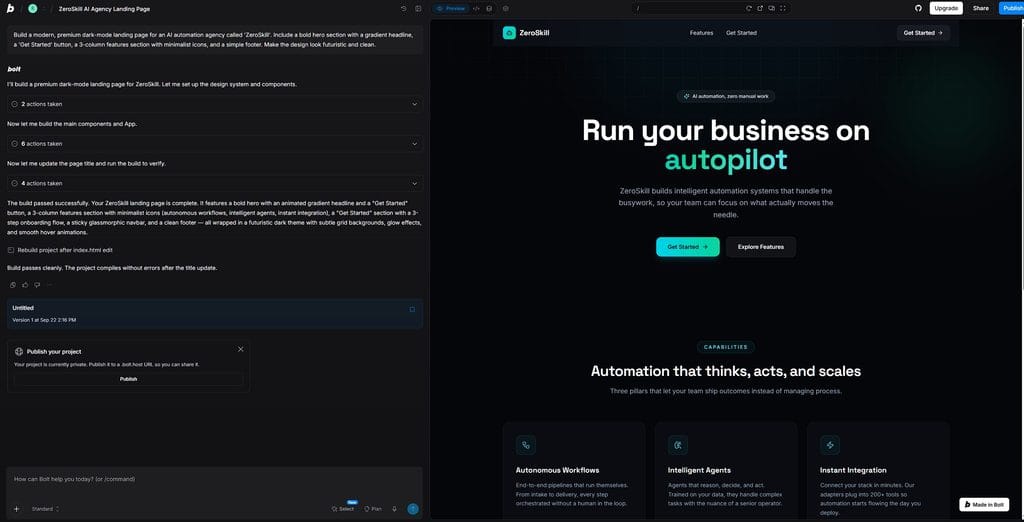
This is the entire ZeroSkill workflow — three steps, no technical background required.
Step 1: Write a simple prompt.
Open Bolt.new and type a plain description of what you want. For example:
“Create a sleek, dark-mode landing page for my digital marketing agency, with a hero section, a services list, and a contact form.”
That’s it. No formatting rules, no special syntax — just describe it like you’re talking to a designer. You can be as specific or as general as you like. Other example prompts that work well:
- “Build a minimalist portfolio site for a freelance photographer, with a full-width image grid and an about page.”
- “Create a landing page for a productivity app, with a pricing table and email signup form.”
- “Build a one-page site for a local coffee shop with hours, location map, and menu section.”
Step 2: Watch the AI write the code and build the UI live.
Within seconds, Bolt.new starts generating real code and rendering it in a live preview window right next to your chat. You’ll watch the layout, colors, and sections appear on screen as the AI works — genuinely one of the most satisfying parts of using an AI website builder for the first time.
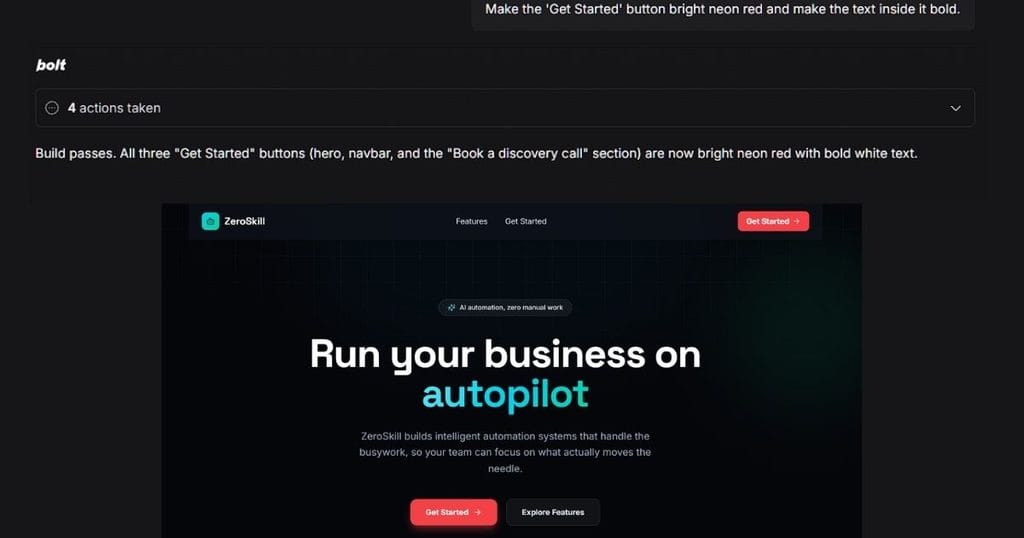
Step 3: Make edits just by chatting.
Don’t like something? Just say so. Type something like:
“Make the buttons neon green” or “Add a testimonials section above the contact form.”
Bolt.new updates the live site instantly, without you touching a single line of code. This chat-based editing is the real unlock — it turns “building a website” into something closer to giving instructions to an assistant. You can keep refining indefinitely: adjusting spacing, swapping fonts, rewriting copy, or adding entirely new sections, all through normal conversation.
How to Deploy Your Bolt.new Website
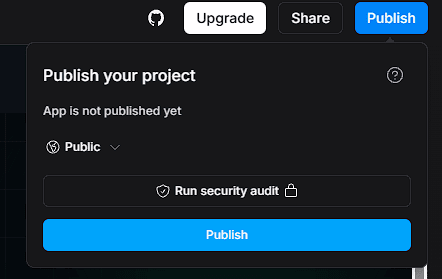
Once your site looks right, making it live on the internet takes one click.
Bolt.new includes a built-in Deploy button that pushes your finished site to hosting platforms like Netlify, Cloudflare Pages, or Vercel. You don’t need a separate hosting account set up in advance — the deployment flow walks you through connecting one in seconds.
Here’s what happens when you click deploy:
- Your generated code is bundled and published automatically
- You get a live, working URL you can share immediately
- Free hosting tiers on these platforms cover most personal projects and prototypes at no extra cost
- On paid plans, built-in SEO optimization features help your deployed site get discovered in search results without extra configuration
From typing your first prompt to having a shareable, live link, the entire process can genuinely take under two minutes. There’s no separate “publishing” learning curve the way there is with traditional platforms — deployment is treated as just another step in the same conversation you’ve been having with the AI the whole time.
Building a website isn’t the only thing AI has made effortlessly simple. If you want to save even more time, check out our complete guide on how to turn any boring PDF into an engaging podcast using NotebookLM without any technical skills.
Frequently Asked Questions (FAQ)
Is Bolt.new really free to use?
Yes. Bolt.new offers a genuinely functional free plan with 1 million tokens per month (capped at 300,000 per day), no credit card required, and unlimited projects. It’s enough to build and deploy simple, real websites without paying anything.
How much does the paid version of Bolt.new cost?
The Pro plan is $25/month and includes 10 million tokens, unused-token rollover, SEO optimization tools, AI image editing, and more database provider options. There’s also a Teams plan at $30 per member per month for collaborative work, and custom Enterprise pricing for larger organizations.
Can I connect my own custom domain?
Yes. Once you deploy through Netlify, Cloudflare Pages, or Vercel, you can connect a custom domain you already own through that hosting provider’s dashboard, replacing the default generated URL.
Do I own the code my AI website builder generates?
Yes. Bolt.new generates real, standard code (React, Node.js, and similar modern frameworks), and because the platform is open-source, you retain full access to export and own everything it builds for you.
Do I need any coding knowledge to use Bolt.new?
No. The entire point of an AI website builder like Bolt.new is that you never need to write or even look at code. Every change — from layout to color to functionality — happens through plain-language chat instructions.
Can Bolt.new build more than just a simple landing page?
Yes. Beyond basic websites, Bolt.new can build full-stack applications with databases, user authentication, and payment integrations — meaning it scales from a simple portfolio site all the way up to a functioning web app if your project grows.
What happens if my site needs more tokens than my plan allows?
If you run out of tokens on the free plan, you’ll need to wait for your daily or monthly reset, or upgrade to Pro for a significantly larger allowance. Pro users also benefit from token rollover, so unused tokens carry into the next billing cycle instead of disappearing.
Is Bolt.new better than other AI website builders?
Among current AI website builder tools, Bolt.new stands out specifically for full-stack capability — many competitors only generate front-end visuals, while Bolt.new can build working databases and backend logic in the same prompt-based workflow. For beginners who might eventually want more than a static page, that headroom matters.
Quick Recap: Why Bolt.new Is Worth Trying Today
If you’re still deciding whether to try this out, here’s the short version:
- An AI website builder replaces weeks of manual design work with a single typed sentence
- Bolt.new generates real, functional code — not just a visual mockup — and shows it to you live as it builds
- Editing happens entirely through chat, with zero coding required at any step
- Deployment is one click away, with free hosting options covering most beginner and prototype projects
- The free plan is genuinely usable with no credit card required, making it a zero-risk way to test the entire workflow today
The barrier that used to stop non-technical people from building a website — the code, the design skills, the platform complexity — has effectively disappeared. Open Bolt.new, type one sentence describing the site you want, and see for yourself how far a single prompt can take you.
Looking for more ways to work smarter, not harder? Explore our other beginner-friendly AI tools to keep building your digital empire with zero coding required.