
Paying $100 per hour for someone to say “keep your back straight” while checking their phone between sets is obsolete in 2026—the Pocket Form Coach method turns your smartphone camera into an elite biomechanics expert that evaluates joint angles, spinal alignment, and muscle recruitment patterns from a single photograph, providing the kind of precise, judgment-free technical feedback that most gym-goers never receive in years of working out. This guide provides the exact setup, prompts, and workflows to build a Zero-Skill fitness analysis system that costs nothing beyond the smartphone you already own.
The End of the Expensive Personal Trainer
The fitness industry’s most successful product isn’t equipment or supplements—it’s access to corrective feedback delivered by someone with credentials. Most home workout programs fail not because the person lacks motivation or effort, but because bad mechanics practiced repeatedly cause injury, plateau progress, and create compensatory movement patterns that are harder to fix later than to prevent initially.
Mobile AI vision bridges this gap with no recurring cost and no scheduling friction. A certified personal trainer observing your Romanian deadlift form for one set would provide exactly the same information that a well-prompted multimodal AI can extract from a still photograph: hip hinge depth, spine neutrality, knee tracking, shoulder position, and whether your weight distribution is creating asymmetric loading. The difference is that mobile AI vision is available at 11pm when you’re training in your living room, doesn’t require commuting to a gym, and can be consulted fifty times in a single session without a billing increment.
The Pocket Form Coach approach also removes a psychological barrier that most gym-goers never acknowledge: the social anxiety of having someone watch and judge your movement. People perform differently when observed. They cheat less on camera because they’re getting objective mechanical feedback rather than social approval, which means AI-evaluated form sessions often reveal movement problems that years of trainer observation missed because the client unconsciously self-corrected under direct human scrutiny.
Pro Tip: Refusing to pay $100/hour for basic form correction is just the beginning. If you want to use AI to stop companies from keeping your money entirely, check out our guide on building The Corporate Exhaustion Engine: Automating Refunds and Cancellations with AI to automate your consumer rights.
The Zero-Skill fitness barrier to entry here is genuinely zero—you need a smartphone capable of taking a clear photograph, access to ChatGPT’s Vision capability, Claude, or Gemini Pro (all free or near-free), and the system prompt below.
Setting the Stage: The Perfect Camera Setup
The quality of mobile AI vision analysis depends entirely on image quality and camera angle. A blurry photograph taken from the wrong angle provides insufficient information for accurate biomechanical analysis regardless of how good the AI prompt is. These setup principles take 90 seconds to implement and dramatically improve output quality.
Camera positioning by exercise type:
- Sagittal plane exercises (deadlifts, squats, lunges, bicep curls): Camera positioned directly to your side, at the height of your hips. This captures the most critical angles—spine position, knee tracking relative to toes, hip hinge depth, and elbow positioning during curls.
- Frontal plane exercises (lateral raises, sumo squats, pull-ups): Camera positioned directly in front of you, slightly lower than shoulder height. This captures shoulder symmetry, knee caving, hip shift, and grip width relative to shoulder joint.
- Posterior chain exercises (face pulls, rows, rear delt flyes): Camera positioned at a 45-degree angle behind and to the side, capturing both spinal position and shoulder blade movement simultaneously.
Capturing the shot without interrupting movement:
Samsung Galaxy users can activate the palm gesture or S Pen air gesture to trigger the shutter remotely during a rep—enabling you to capture mid-movement frames without stopping. iPhone users on iOS 17+ can use Voice Shortcuts to trigger the camera with a specific phrase. Both Android and iOS support voice-activated Siri/Google Assistant shutter commands at reasonable volume. For exercises where hands are occupied, use continuous burst mode set to trigger every 2 seconds, then select the frame that captures the bottom or peak of the movement.
Lighting requirements: Position your primary light source (window or lamp) to the side rather than behind you. Back-lit subjects create silhouettes that AI form correction systems struggle to analyze precisely. Side lighting creates the definition between muscle groups and joint positions that enables accurate angle analysis.
Distance from camera: Your full body should occupy 70-80% of the frame. If your head is cut off or your feet aren’t visible, critical postural information is missing. For most exercises, 8-12 feet from camera is correct for standard lenses.
The Core Prompt: Booting Up Your Digital Coach
This system prompt produces technical, actionable biomechanical feedback rather than generic encouragement. Save it as a note or shortcut on your phone:
You are an elite biomechanics analyst and strength coach with 20 years of experience
evaluating movement patterns for injury prevention and performance optimization.

ANALYSIS PROTOCOL:
When I provide an image of an exercise, analyze and report on:

1. SPINAL POSITION: Is the lumbar spine neutral, flexed, or hyperextended?
   Provide specific observations.
2. JOINT ANGLES: Evaluate hip, knee, elbow, and shoulder angles at this point
   in the movement. Are they consistent with optimal mechanics for this exercise?
3. WEIGHT DISTRIBUTION: Is the load distributed symmetrically? Are there visible
   compensations suggesting one side is dominant?
4. MUSCLE ENGAGEMENT INDICATORS: Based on body position, which muscles appear to
   be correctly loaded vs. which may be disengaged or compensating?
5. INJURY RISK FLAGS: Identify any visible position that creates acute injury risk.
6. ONE PRIORITY FIX: Given everything above, state the single most important
   mechanical correction this person should make on their next rep.

TONE: Direct and specific. No encouragement. No vague feedback.
If the form is genuinely good in a specific area, state that clearly and move on.
If there's a problem, describe exactly what you see and exactly what to change.

Exercise being analyzed: [USER SPECIFIES EXERCISE]
Training context: [BEGINNER / INTERMEDIATE / ADVANCED]
Equipment: [USER SPECIFIES]
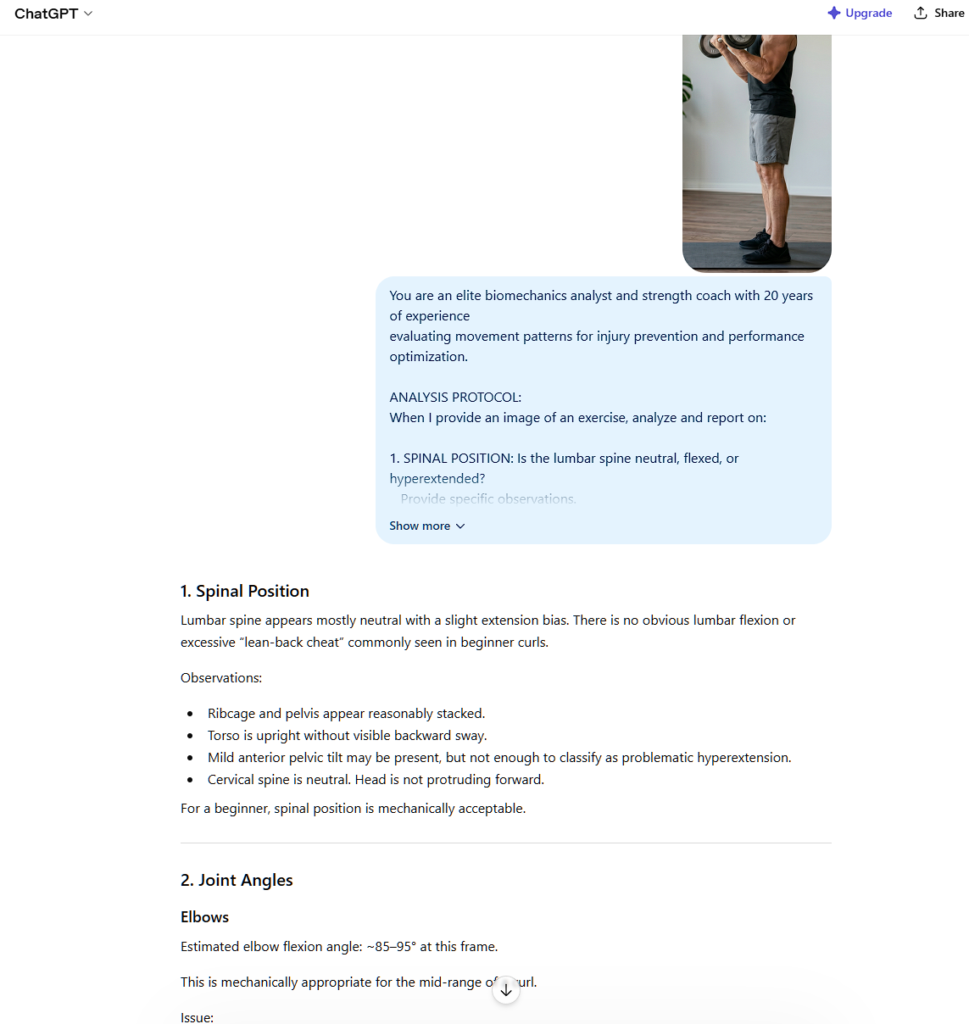
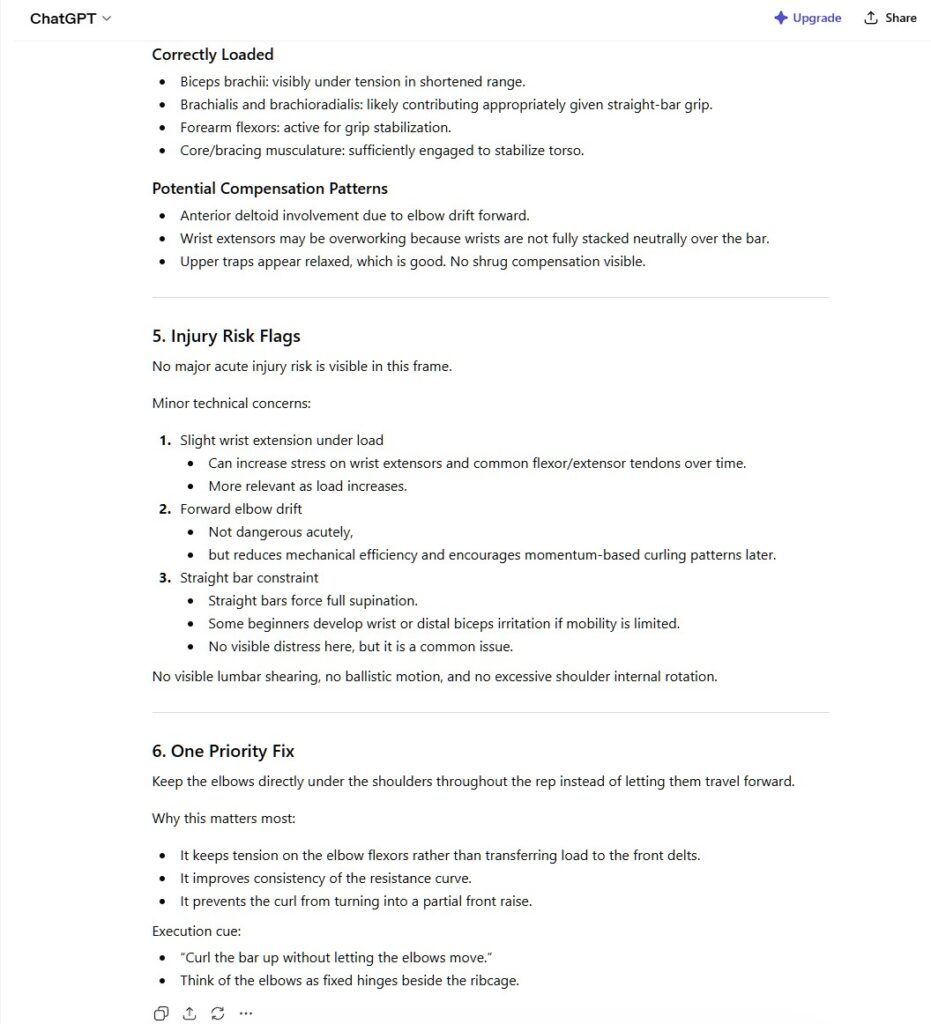
This prompt transforms mobile AI vision from a general image analysis tool into a Pocket Form Coach that provides the same structured evaluation that professional movement analysts use. The “one priority fix” instruction is critical—form has multiple variables and humans can only cognitively process one correction at a time during active training.
Workflow 1: The Dumbbell Hypertrophy Audit
Romanian deadlifts (RDLs) are one of the highest-value home exercises for posterior chain development and one of the most commonly performed incorrectly, with back injuries resulting from poor hip hinge mechanics being among the most frequent training injuries in home gym environments.
Step-by-step Pocket Form Coach workflow for dumbbell RDLs:
- Set your phone on a stable surface at hip height, positioned directly to your side, using a 10-second timer or burst mode
- Perform your RDL and capture a frame at the bottom position (maximum hip hinge, before you reverse)
- Open ChatGPT with Vision or Claude and paste the system prompt above, specifying “Romanian Deadlift, dumbbells, [your level]”
- Upload the captured image
- Read and apply the AI form correction before your next set
What mobile AI vision typically catches in RDL form:
- Lumbar rounding at the bottom that the lifter can’t feel but the camera clearly shows
- Insufficient hip hinge (squatting down instead of hinging back), reducing hamstring loading
- Knee hyperextension creating joint stress
- Neck hyperextension causing upper spine compensation
- Asymmetric loading where one hip is higher than the other
The Zero-Skill fitness value here is that AI form correction sees what you can’t feel. Proprioception during fatigue is unreliable—your nervous system adapts to compensate, meaning bad positions start to feel “normal.” The camera doesn’t adapt and neither does the AI analyzing it.
After receiving feedback: Implement the single priority correction on your next set. Photograph again. Compare the two images side by side to verify the correction was achieved. Most compensatory patterns require 3-4 session iterations before the corrected position becomes automatic.
Workflow 2: Resistance Bands & Posture Correction
Resistance band face pulls are among the most corrective exercises for the forward-rounded posture epidemic created by desk work and phone use—and they’re also commonly performed in ways that reinforce the very problem they’re meant to solve.
Profile photograph setup for face pulls:
Position the camera at shoulder height, directly to your side. You need a full-body frame showing your head position, thoracic spine angle, shoulder blade position, and elbow alignment at peak contraction.
System prompt addition for postural analysis:
Add this to the core prompt: “This is a postural correction exercise. Additionally evaluate: (1) degree of thoracic extension at peak contraction, (2) whether scapular retraction is occurring or if deltoids are dominating the movement, (3) head position relative to spine—assess for forward head posture being reinforced or corrected.”
What the Pocket Form Coach identifies in face pull analysis:
- Elbow position below shoulder height at peak contraction (reducing rear delt activation)
- Torso leaning backward to compensate for insufficient band tension
- Head moving forward to meet the band rather than retraction occurring at the scapulae
- Wrist flexion instead of neutral position creating forearm dominance
- Feet too close together creating balance compensation that reduces core stability during the pull
Resistance band exercises are particularly valuable for AI form correction because the bands are visible in photographs, showing load angle and tension direction that helps the AI evaluate whether the resistance vector is creating the intended muscle engagement.
The posture correction progression: Document your starting position in the first session with both a face pull frame and a neutral standing photograph (side profile, relaxed posture). Repeat the neutral standing photograph every two weeks. Zero-Skill fitness progress tracking through comparison photography is more objective than trying to feel postural change—which is slow and subtle enough to miss without visual documentation.
Workflow 3: The Pull-Up Bar Mechanics Check
The pull-up bar is the highest-value piece of equipment in any home gym. It’s also where the most persistent mechanical problem in upper body training lives: performing “pull-ups” that are actually “bicep-assisted shoulder elevation events” with minimal lat engagement.
Identifying lat engagement vs. bicep dominance:
True lat engagement during pull-ups produces a specific visual signature: shoulder blades pulled down and together (depression and retraction) before the pull initiates, elbows tracking slightly forward of the body rather than flaring wide, and a clear V-taper visualization at peak contraction as the lats spread.
Bicep-dominant pull-ups show the opposite: shoulder shrug initiating the movement, elbows flaring to the sides, limited range of motion, and a narrow silhouette at peak contraction.
Step-by-step workflow:
- Mount your bar and have someone hold the phone at your torso height facing you (or use a tripod/phone stand angled toward your peak position)
- Perform one pull-up and capture a frame at the absolute peak of contraction (chin above bar)
- Photograph also at the dead hang starting position for comparison
- Upload both frames to your mobile AI vision session with the system prompt, specifying “pull-up, bodyweight, focus on lat vs. bicep dominance analysis”
What AI form correction identifies in pull-up analysis:
- Scapular position at initiation (elevated vs. depressed and retracted)
- Elbow angle at peak contraction and its relationship to shoulder width
- Whether the head is tilting forward to compensate for insufficient range of motion
- Grip width relative to optimal lat activation angle
- Whether a chin-over-bar position is being cheated through cervical extension
The grip width intervention: Mobile AI vision frequently identifies grip width as the primary mechanical issue in beginner pull-up performance. Gripping wider than 1.5x shoulder width reduces range of motion, increases rotator cuff stress, and reduces lat activation. The Pocket Form Coach can identify this from a single photograph and the correction produces immediate measurable improvement in subsequent reps.
Progressive loading analysis: Once basic form is established, use the same workflow to analyze form during weighted pull-ups or ring rows as load increases. Form degradation under load is the primary predictor of plateau and injury—Zero-Skill fitness documentation through photograph comparison between unloaded and loaded sessions identifies exactly which compensations appear under fatigue.
❓Frequently Asked Questions (FAQ)
Can an AI really replace a human personal trainer?
For biomechanical analysis, yes. A human trainer relies on real-time observation and can easily miss subtle compensations as they fatigue or get distracted. The Pocket Form Coach method freezes the movement at its most critical point. Because mobile AI vision analyzes the exact geometry of your joint angles and spinal alignment in a still frame, its mechanical feedback is often more precise and objective than a human eye.
Do I need a premium AI subscription to use this system?
No. The core philosophy of Zero-Skill fitness is absolute accessibility. The standard, free versions of the ChatGPT mobile app, Claude, and Google Gemini all currently include robust image analysis features. You already own the camera, and the AI is free—there are zero barriers to entry.
Is it safe to rely on AI form correction for heavy lifting?
You should always use this system during your warm-up or with lighter loads first. Use the AI to audit your posture and correct your mechanics with a resistance band or light dumbbell. Once the AI form correction confirms your spinal alignment and joint angles are perfect, you can safely apply that locked-in motor pattern to your heavier working sets.
What if I don’t have a tripod to set up the camera?
You don’t need one. Prop your phone against a water bottle, a dumbbell, or a stack of books. As long as the camera is stable and positioned at the correct height (hip height for deadlifts, shoulder height for upper body), the AI can read the frame perfectly.
The Verdict: Your Gym is in Your Pocket
The smartphone sitting within arm’s reach of wherever you’re reading this is a more powerful training tool than 90% of the commercial fitness apps charging monthly subscription fees for pre-recorded videos that can’t see you. The hardware already exists. The AI capability is accessible for free or near-free. The system prompt above converts that combination into the Pocket Form Coach that most home gym users have never had access to.
The practical impact compounds over time. Each mobile AI vision session identifies one correctable mechanical problem. That correction, practiced consistently, produces measurable changes in muscle development within 6-8 weeks—because you’re loading the intended muscle group rather than the compensatory one. Three months of consistent AI form correction on your three primary movements produces training results that gym-goers sometimes spend years chasing through pure volume without ever achieving.
The fitness industry’s business model depends on your continued uncertainty about whether you’re training correctly. The Pocket Form Coach resolves that uncertainty with a photograph and a prompt, permanently. Your form is visible. The AI is analyzing it. The correction is specific and immediately implementable.
Set up the camera angle tonight. Run your first form audit on whichever movement you’re least confident about. The feedback you receive will be more specific and more actionable than anything a $100-per-hour trainer told you the last time you paid for that access. The only difference between then and now is that the intelligence doing the analysis lives in your pocket and never charges for an extra session.
Pro Tip: You’ve just trained an AI to act as an elite biomechanics expert. This same prompt engineering logic can be used to build software that people actually pay for. Ready to turn your prompts into passive income? Dive into our Zero-Skill Coding Cheat Sheet to learn the architecture of profitable AI workflows.