
In 2026, you don’t need to memorize Python syntax, understand database architecture, or spend months learning programming fundamentals to build digital businesses powered by automation—you just need to know how to prompt AI tools like ChatGPT Advanced Data Analysis, Claude, or Cursor to write the code for you, debug it automatically, and explain every line in plain English. This cheat sheet delivers 100+ proven Python & SQL automations prompt formulas across the four most critical business categories so you can eliminate repetitive manual work, build programmatic SEO infrastructure, and process data at scale starting today.
The “Amateur Prompt” Mistake That Breaks Code
Typing “write me a Python script for SEO” into ChatGPT generates code that crashes on line 3 because the AI makes assumptions about your file format, column names, library versions, and output requirements that don’t match your actual situation. You get back something that looks plausible, run it, get an error message you don’t understand, and give up—concluding that AI coding doesn’t work when the real problem was prompt specificity.
Professional Zero-Skill coding requires four explicit elements in every prompt: the exact input format and file type (CSV with these specific column headers, or a URL list in a .txt file), the Python libraries to use (pandas for data, BeautifulSoup for scraping, openpyxl for Excel), the exact output format (clean CSV, formatted Excel file, new folder structure), and error handling instructions (skip missing values gracefully rather than crashing). Add these four elements to any coding prompt and your success rate jumps from 20% to 90% on the first generation.
Category 1: Programmatic SEO (pSEO) Python Scripts
The Market:
Programmatic SEO is the traffic strategy of building thousands of unique, search-optimized pages from structured datasets rather than writing individual articles manually. A well-executed pSEO site targeting “best [product] in [city]” templates across 500 cities generates organic traffic at scale impossible to achieve through manual content creation. The infrastructure—data processing, template generation, URL structure creation, sitemap building—requires repetitive coding tasks that AI handles perfectly.
Every pSEO project starts with messy data and ends with clean, structured outputs ready for CMS import. These prompts bridge that gap without requiring you to understand a single line of Python logic. Using these prompts for programmatic SEO is the ultimate display of Zero-Skill coding.
The Master Formula:
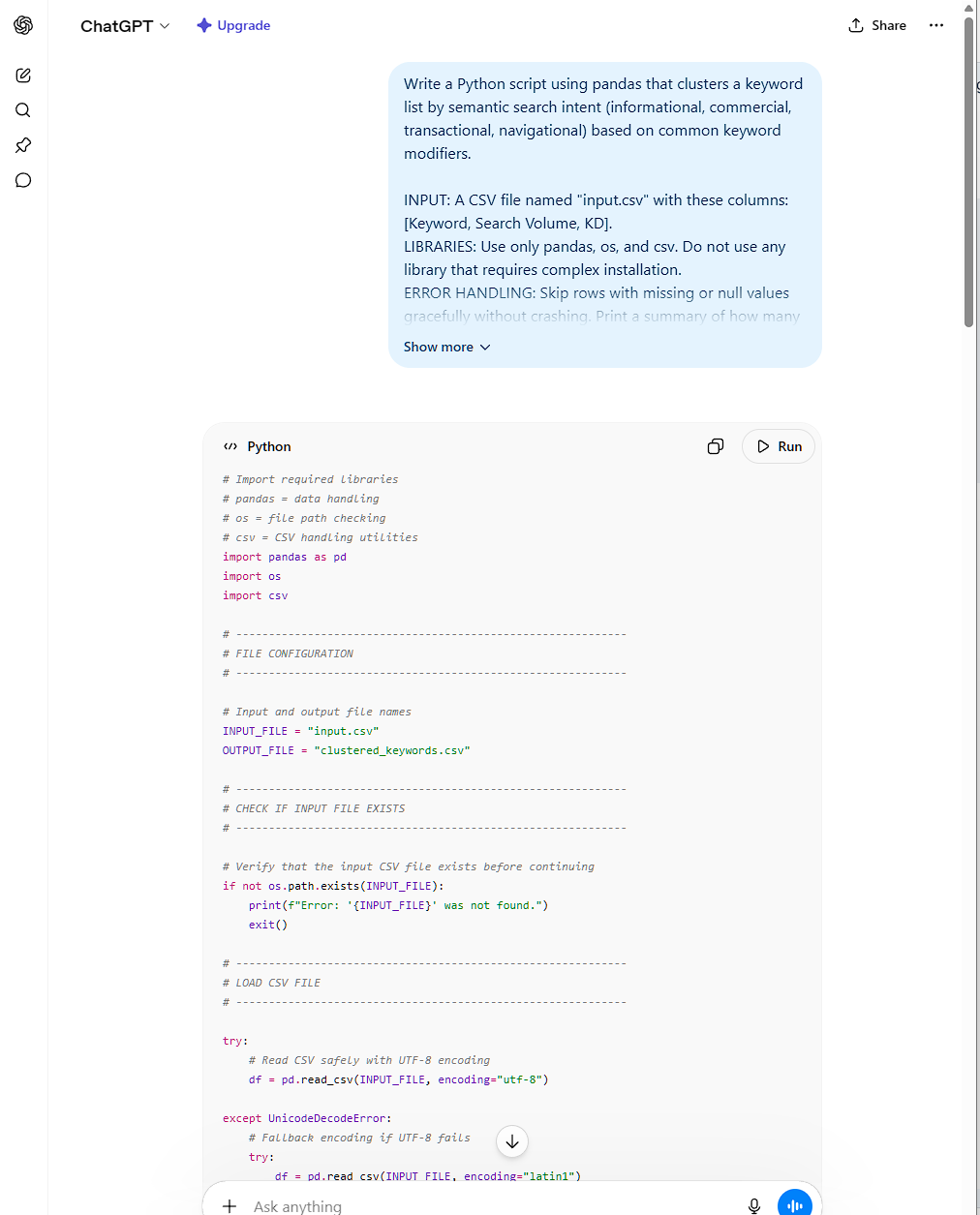
Write a Python script using pandas that [TASK].

INPUT: A CSV file named "input.csv" with these columns: [LIST YOUR EXACT COLUMN NAMES].
LIBRARIES: Use only pandas, os, and csv. Do not use any library that requires complex installation.
ERROR HANDLING: Skip rows with missing or null values gracefully without crashing.
Print a summary of how many rows were skipped and why.
OUTPUT: Save the result as "output.csv" with clean column headers.
Ensure no encoding errors and all special characters are handled correctly.
Add comments to every section of the code explaining what it does in plain English.
The 25 Variables (replace [TASK] with each):
- Merges a location dataset (city, state, population) with keyword templates to generate 500 unique page titles and meta descriptions
- Clusters a keyword list by semantic search intent (informational, commercial, transactional, navigational) based on keyword modifiers
- Generates a bulk XML sitemap from a list of URLs with correct priority and changefreq values
- Removes duplicate keywords while preserving the version with the highest search volume
- Splits a master keyword CSV into separate files organized by topic cluster
- Generates 300-word SEO content outlines from keyword + location data combinations
- Extracts all internal links from a list of URLs and outputs a flat file showing anchor text and destination
- Creates city-specific landing page templates by merging a services list with a location database
- Identifies and flags keyword cannibalization by grouping keywords with identical SERP intent
- Converts a Screaming Frog crawl export into a prioritized technical SEO fix list
- Generates hreflang tag configurations from a multilingual URL spreadsheet
- Builds a content gap analysis by comparing two keyword lists and outputting unique items from each
- Calculates keyword difficulty scores based on average domain rating from an exported backlink file
- Creates bulk redirect mapping from old URLs to new URLs following a site migration
- Extracts all heading tags (H1, H2, H3) from a crawl file and flags pages with missing or duplicate H1s
- Generates FAQ schema JSON-LD markup from a two-column CSV of questions and answers
- Sorts a keyword list by opportunity score (high volume + low competition) and outputs the top 100
- Identifies thin content pages (under 300 words) from a crawl export and creates a prioritized rewrite list
- Creates programmatic location pages by combining service keywords with geographic modifiers from two separate CSVs
- Strips HTML tags from a column of scraped meta descriptions and outputs clean plain text
- Generates breadcrumb schema markup from a URL structure CSV
- Calculates month-over-month keyword ranking changes from two separate Search Console exports
- Identifies pages with missing canonical tags from a crawl export
- Creates a bulk internal linking recommendation file by matching topic-related pages from a URL and keyword CSV
- Generates Open Graph and Twitter Card meta tags from a CSV of page titles, descriptions, and image URLs
Category 2: SQL Data Analysis & Excel (.xlsx) Formatting
The Market:
Ahrefs exports, Google Search Console reports, inventory databases, and sales analytics files contain the decisions that grow businesses—but only if you can extract meaningful patterns from thousands of rows of raw data. SQL queries and Python data analysis scripts transform chaotic exports into actionable intelligence: which pages are bleeding traffic, which products are consistently out of stock before competitors notice, which keywords are cannibalizing each other. Mastering data analysis through automated Python & SQL automations gives you an unfair advantage.
The critical advantage is speed. Manual Excel analysis of a 50,000-row Search Console export takes 6-8 hours. A properly prompted Python data analysis script processes the same file in 12 seconds.
The Master Formula:
Write a Python script using pandas and openpyxl that performs the following data analysis: [TASK].

INPUT: A CSV or Excel file named "data.csv" with these columns: [LIST YOUR EXACT COLUMN NAMES].
ANALYSIS: [Specify exact calculations, filters, groupings, and sorting required].
LIBRARIES: Use pandas for data processing and openpyxl for Excel output.
Handle all date formatting automatically regardless of input date format.
ERROR HANDLING: Fill missing numeric values with 0, missing text values with "N/A".
Print row count before and after cleaning so I can verify data integrity.
OUTPUT: Format the final output into structured columns perfectly optimized
for direct pasting into Microsoft Excel (.xlsx) files without any delimiter errors.
Apply column header formatting in bold, auto-size all columns to content width,
and add alternating row color for readability. Save as "analysis_output.xlsx".
Add plain English comments throughout the code explaining each step.
The 25 Variables (replace [TASK] with each):
- Identify keyword cannibalization by grouping URLs ranking for similar keywords and flagging duplicates with overlapping position data
- Calculate month-over-month organic traffic change per page and sort by biggest percentage drops
- Find high-converting but low-traffic pages (conversion rate above 3%, sessions below 500) that need link building priority
- Merge inventory data with sales velocity to flag products that will stock out within 7 days
- Calculate average order value by traffic source and highlight sources below the store average
- Identify pages with declining click-through rates despite stable ranking positions
- Sort a product database by profit margin and flag any item where margin dropped below 20% vs. prior month
- Aggregate affiliate commission data by campaign, calculate total earnings, and sort by ROI
- Identify email subscribers who haven’t opened in 90 days for a list-cleaning suppression file
- Calculate customer lifetime value by cohort (month of first purchase) and display trend over 12 months
- Find duplicate product SKUs in an inventory export and flag conflicting price or stock data
- Merge Google Analytics session data with revenue data and calculate revenue per session by landing page
- Calculate keyword ranking position velocity (how fast positions are changing) over a 30-day window
- Identify backlinks from domains with DR under 10 for disavow file creation
- Sort a Search Console query export by queries that rank position 11-20 (page 2) with high impressions
- Calculate page-level bounce rate from an Analytics export and flag pages above 80%
- Aggregate YouTube video performance metrics (views, watch time, CTR) by upload month
- Identify supplier invoices with amounts that don’t match purchase orders for payment reconciliation
- Calculate net promoter score from a survey response CSV and segment by customer tier
- Find all pages that haven’t received a single backlink and flag them for internal link building
- Merge two product catalogs from different suppliers and flag pricing conflicts for the same product
- Calculate content publication frequency by month and compare against traffic trend data
- Identify pages where title tag length exceeds 60 characters or meta descriptions exceed 160 characters
- Sort ad campaign performance by cost-per-acquisition and flag any campaign where CPA exceeds target
- Aggregate freelancer invoice data by project and calculate total spend versus allocated budget
Category 3: Automated Web Scraping & API Calls
The Market:
Your competitors’ pricing, inventory levels, content strategies, and customer reviews are all publicly visible data that your business decisions should incorporate—but manually checking 200 competitor product pages daily is impossible. Automated web scraping builds proprietary databases that inform smarter decisions and surface opportunities competitors haven’t spotted: the out-of-stock product category on Amazon, the rising question on Reddit that nobody’s written a guide for, the competitor whose prices just dropped 30%. Combining Zero-Skill coding with automated web scraping feeds your data analysis pipelines on autopilot.
The Master Formula:
Write a Python script using BeautifulSoup and requests that [TASK].

INPUT: [Specify whether input is a single URL, a list of URLs in a .txt file, or an API endpoint].
SCRAPING RULES: Add random time delays between 2-5 seconds between each request
to avoid triggering rate limits. Rotate through these user agents:
[the script should auto-generate 5 common browser user agents].
Handle 403, 404, and 429 response codes gracefully by skipping that URL and logging the error.
Add retry logic that attempts each failed URL 3 times before skipping.
BYPASS: Include headers that mimic a real browser visit to bypass basic bot protection.
ERROR HANDLING: Create a separate "failed_urls.txt" log for any URL that couldn't be scraped.
Print progress every 10 URLs so I can monitor the script.
OUTPUT: Save all scraped data as "scraped_output.csv" with clean column headers.
Handle encoding issues automatically.
The 25 Variables (replace [TASK] with each):
- Scrapes competitor product pages and extracts product name, price, availability status, and review count
- Pulls all YouTube video titles, view counts, and upload dates from a channel page for faceless channel research
- Extracts all image alt text from a list of competitor URLs for SEO competitive analysis
- Scrapes eBay sold listings for a product category to identify supply-gap inventory opportunities
- Pulls Etsy shop bestseller lists including product titles, prices, and review counts for niche research
- Monitors Amazon price fluctuations for a list of ASINs and alerts when price drops below threshold
- Extracts all outbound links from a competitor’s website to reverse-engineer their link-building strategy
- Scrapes Google SERP results for a keyword list and records the top 10 URLs per keyword
- Pulls LinkedIn job posting titles for a specific industry to identify emerging skill demand trends
- Extracts all H2 headings from top-ranking blog articles to build content outline templates
- Scrapes G2 or Trustpilot reviews for competitor SaaS products and categorizes complaints by theme
- Pulls Reddit thread titles and upvote counts from specific subreddits to identify viral content opportunities
- Extracts course titles and prices from Udemy category pages for online education market analysis
- Scrapes local business NAP (name, address, phone) data from Google Maps for local SEO audits
- Pulls news headlines from RSS feeds and categorizes by keyword relevance for content research
- Extracts product ingredient lists from competitor health and beauty product pages
- Pulls GitHub repository star counts and recent activity for tracking developer tool trends
- Scrapes Glassdoor salary data for specific job titles to inform freelance rate benchmarking
- Pulls real estate listing data including price, bedrooms, and square footage from listing aggregators
- Extracts FAQ sections from competitor help documentation for gap analysis
- Calls OpenAI API with a list of keywords and returns SEO-optimized meta descriptions for each
- Pulls weather API data for 500 cities and merges with a location database for seasonal content planning
- Calls Google PageSpeed API for a URL list and records Core Web Vitals scores for each
- Extracts all podcast episode titles from an RSS feed for content research and keyword analysis
- Scrapes Airbnb listing titles and prices for a specific city to identify rental market trends
Pro Tip: Once you scrape competitor data, feed it directly into our Deep Research Machine: Exact AI Research Agent Prompts to let the AI find hidden market gaps automatically.
Category 4: Local File & Asset Automation
The Market:
Digital entrepreneurs managing Etsy stores, YouTube channels, and content operations accumulate thousands of image files, video exports, invoice PDFs, and download assets with names like “IMG_4829.jpg” and “New Recording 47.m4a” that exist in complete organizational chaos. Manually renaming, resizing, sorting, and converting thousands of files is the most soul-destroying time waste in digital business—and it’s entirely eliminable through local file automation scripts. These Python & SQL automations prove that Zero-Skill coding isn’t just for the web; it manages your entire local hard drive.
The Master Formula:
Write a Python script using only the os, shutil, and pathlib modules (plus [ADDITIONAL LIBRARY]
if needed for this specific task) that [TASK].

INPUT: A folder path that I will specify as a variable at the top of the script
so I can easily change it without editing the code.
SAFETY: Before moving or renaming any file, print a preview list of all planned changes
and ask for my confirmation (y/n) before executing. Never delete files—only move or rename.
LOGGING: Create a "automation_log.txt" file recording every action taken with timestamp,
original filename, and new filename or destination. Log any errors separately.
ERROR HANDLING: Skip files that are open in another program or have permission issues.
Print which files were skipped and why.
OUTPUT: Print a completion summary showing total files processed, renamed, moved, and skipped.
Add plain English comments throughout explaining every section.
The 25 Variables (replace [TASK] with each):
- Renames 1,000 product images using SEO-optimized filenames from a CSV mapping old filenames to new keyword-rich names
- Converts all .mp4 video files in a folder to .mp3 audio using FFmpeg for podcast repurposing
- Resizes all images in a folder to web-optimized dimensions (max 1200px wide) while preserving aspect ratios
- Sorts downloaded PDF invoices into subfolders organized by year and month based on file creation date
- Converts all .HEIC iPhone photos to .JPG for cross-platform compatibility
- Compresses all PNG files in a folder to reduce file size by 60% without visible quality loss using Pillow
- Organizes video files into subfolders by resolution (720p, 1080p, 4K) based on file metadata
- Renames all files in a folder by adding a sequential number prefix (001_, 002_) for upload ordering
- Finds and removes duplicate image files based on file hash comparison, keeping the largest version
- Creates a ZIP archive of every folder in a directory for backup organization
- Converts a folder of .docx files to PDF format for client delivery
- Sorts email attachment downloads into folders by file type (images, documents, spreadsheets, audio)
- Adds watermark text to all images in a folder using Pillow without altering originals
- Extracts all images from a folder of PDF files and saves them as individual JPEGs
- Renames video files by prepending the file creation date in YYYY-MM-DD format for chronological sorting
- Creates thumbnail previews (200x200px) for all images in a folder for website gallery generation
- Splits a large CSV file with 100,000 rows into smaller files of 1,000 rows each for bulk upload
- Converts all Excel .xlsx files in a folder to CSV format for database import
- Organizes a chaotic downloads folder by moving files to Desktop, Documents, or Media subfolders based on extension
- Finds all files over 100MB in a directory tree and generates a report for storage cleanup
- Batch applies color correction (brightness, contrast, saturation adjustments) to all JPEGs in a folder
- Creates a master file inventory spreadsheet listing every file name, size, type, and modification date in a folder
- Generates sequential filename batches for Etsy digital product uploads following required naming conventions
- Strips all metadata (EXIF data) from a folder of images for privacy compliance before web upload
- Converts a folder of .wav audio files to .mp3 at specified bitrate for podcast distribution
ZeroSkill Hack: Using FFmpeg and file renaming scripts is the secret to scaling video production. Combine these scripts with our Ultimate 7-Step Blueprint for Faceless YouTube AI Automation.
The ZeroSkill Workflow: Prompt, Run, Debug
Three steps separate you from running your first automation today—no local Python installation required.
Step 1 — Prompt: Copy the master formula for your chosen category. Fill in the exact placeholders: your actual column names from your file, the specific task from the variables list, your desired output format. Paste into ChatGPT (Advanced Data Analysis mode), Claude, or Cursor. The more specific your input details, the cleaner the output code.
Step 2 — Run: Open Google Colab (colab.research.google.com) for free—no installation, no setup, just a browser. Paste the generated code into a new cell. Upload your input file using Colab’s file panel. Click run. For local file automation tasks, Cursor IDE provides the most beginner-friendly environment for running scripts against your actual computer’s folders.
Step 3 — Debug: When (not if) you get an error message, copy the complete error text—the red output including the line number and error type—and paste it back to the AI with this exact prompt: “I ran your code and got this error. Explain what caused it in plain English and provide the corrected complete script.” The AI reads the error, identifies the exact issue, and returns fixed code. Repeat until it runs successfully. Most scripts require 1-2 debug cycles maximum.
Frequently Asked Questions (FAQ)
Do I need to install Python to run these Python & SQL automations?
No! The essence of Zero-Skill coding is avoiding complex local setups. You can run 90% of these scripts directly in your browser using Google Colab. For local file management tasks, you can use beginner-friendly tools like Cursor IDE, which handles the environment setup for you.
What exactly is programmatic SEO (pSEO)?
Programmatic SEO is a digital marketing strategy where you use automation to generate hundreds or thousands of landing pages based on structured data (like a list of cities combined with a list of services). Instead of writing 500 individual pages manually, you use Python & SQL automations to merge data and create optimized templates instantly.
Can ChatGPT Advanced Data Analysis format outputs as Excel (.xlsx) files?
Absolutely. By explicitly stating in your prompt to use the openpyxl library (as shown in our data analysis Master Formulas), ChatGPT will output perfectly formatted Microsoft Excel files with distinct columns, bold headers, and proper data types, completely bypassing messy CSV delimiter issues.
What happens if the AI-generated code gives an error?
Do not panic. Errors are normal even for senior developers. Simply copy the entire red error log and paste it back into your AI chat with the prompt: “I received this error. Explain what went wrong and give me the fully corrected code.” The AI will debug its own code and provide a working version.
The Verdict: Execution Beats Syntax
Understanding what a script should accomplish matters infinitely more than memorizing Python syntax—because syntax is what AI handles, while business logic is what you bring. You know that your product images need SEO-optimized filenames. You know that your keyword list needs to be clustered by intent. You know that competitor pricing needs to be tracked daily. AI handles the technical implementation of decisions you already understand.
Pick the single most repetitive, time-consuming task you performed manually this week. Find the closest matching variable from this cheat sheet. Run the master formula with your specific details. That one automation likely saves 2-5 hours weekly—compounding into 100-200 hours annually returned to strategy, creation, and growth.
These Python & SQL automations don’t require a computer science degree, a bootcamp, or months of practice. They require knowing precisely what you want automated, using this cheat sheet to construct a specific prompt, and following three steps to make it run. Zero-Skill coding isn’t a limitation—it’s a strategy. The entrepreneurs automating fastest in 2026 aren’t the ones who can write code from memory. They’re the ones who can describe what they need clearly enough that AI writes it perfectly.
Stop doing manually what a script could handle permanently. Start today.
Pingback: How to Become a Freelance Prompt Evaluator: The Lucrative 2026 Guide to Getting Paid by AI Labs -
Pingback: The Ultimate Automated Affiliate Hub: Building a Hands-Free Physical Product Review Site with pSEO -
Pingback: Corporate Exhaustion Engine: 3 Powerful AI Refund Tactics -