
Relying on outdated Stack Overflow threads and 400-page Python textbooks is dead in 2026 because absolute beginners now use free AI coding assistants as personal programming mentors who explain concepts interactively, debug syntax errors instantly, and help you learn Python through real project-building rather than memorizing documentation. This comprehensive guide reviews the 7 best free AI coding assistants that transform programming education from tedious memorization into conversational learning—every tool below has been tested with complete beginners to verify how effectively they teach programming logic, help build tools from scratch, and prepare learners for technical screening tests without overwhelming complexity.
The 7 Tools: Tested & Ranked
1. Cursor
The Vibe: Cursor represents the pinnacle of AI-first code editors in 2026, feeling less like software and more like having a senior developer sitting beside you who understands your entire codebase and patiently explains every concept. The interface resembles Visual Studio Code (because it’s built on the same foundation) but integrates AI conversation directly into the editing experience—you can highlight code and ask questions without switching windows, request changes in natural language, and watch as Cursor implements solutions while explaining its reasoning. For beginners learning Python programming for beginners, Cursor’s ability to see your entire project context means it provides relevant suggestions rather than generic Stack Overflow answers.
Best For: Complete beginners who want guided learning while building real projects, intermediate learners transitioning from tutorials to actual development, anyone preparing for coding screening tests by building portfolio projects, and developers who learn best through doing rather than reading documentation.
Deep-Dive Learning Workflow:
Using Cursor to Understand Python Loops:
- Start with Natural Language: Create a new Python file and type this comment:
# I want to iterate through a list of student names and print each one with their position number. Press Cmd+K (Mac) or Ctrl+K (Windows) to open Cursor’s AI command palette. The AI reads your comment and generates the appropriate loop structure with detailed inline comments explaining each component. - Request Line-by-Line Explanation: Highlight the generated code, press Cmd+L to open chat, and ask: “Explain this code to me line-by-line like I’m a complete beginner who’s never seen a for loop before.” Cursor provides a detailed breakdown: “Line 1 creates a list—think of it as a container holding multiple items. Line 2 starts the loop using ‘enumerate()’ which gives us both the item AND its position number. Line 3 prints each student with their number using f-strings, which are Python’s way of inserting variables into text.”
- Iterate with Modifications: Ask in chat: “Now modify this to only print students whose names start with ‘A'”. Cursor updates the code, adding an if statement with clear comments. Follow up: “Explain what the ‘if’ statement is doing and why we need the colon and indentation.” This conversational debugging helps beginners understand syntax requirements naturally.
- Error Explanation: Intentionally introduce an error (remove indentation). Cursor immediately highlights the issue with underlines. Click the error and ask: “Why is Python complaining about this? What does IndentationError actually mean?” Cursor explains Python’s whitespace sensitivity in plain English, comparing it to how paragraphs work in writing.
- Build Progressively: Once comfortable with basic loops, ask: “How would I read these student names from a text file instead of hardcoding them?” Cursor introduces file handling concepts gradually, building on the loop knowledge you just gained rather than overwhelming you with everything at once.
This scaffolded approach—starting simple, explaining thoroughly, building progressively—is how Cursor accelerates learning for users of free AI coding assistants beyond what traditional courses achieve.
The Catch (Pricing & Limits): Cursor offers a 14-day free trial with full AI features (unlimited GPT-4 access, codebase understanding, multi-file editing). After trial, free tier provides 50 slow GPT-4 requests monthly and unlimited GPT-3.5 use. Pro plan ($20/month) unlocks unlimited fast GPT-4, priority access, and advanced features. For serious learners, the trial period is sufficient to build 2-3 substantial projects and decide if the investment is worthwhile. Among free AI coding assistants, Cursor’s trial generosity makes it accessible for intensive learning sprints.
2. Codeium
The Vibe: Codeium delivers the most generous free tier among free AI coding assistants in 2026, offering unlimited AI-powered autocomplete that feels like the code editor is reading your mind and finishing your thoughts. The autocomplete engine doesn’t just suggest the next word—it predicts entire code blocks based on context, comments, and naming patterns, making Python programming for beginners feel less like fighting syntax and more like conversing with an intelligent assistant. Codeium integrates into VS Code, JetBrains IDEs, and most popular editors through extensions, meaning you don’t abandon your existing setup to access AI assistance.
Best For: Budget-conscious learners who want professional-grade AI assistance permanently free, beginners who learn best through autocomplete scaffolding rather than writing from scratch, developers working across multiple programming languages, and anyone wanting to build tools without constantly googling syntax.
Deep-Dive Learning Workflow:
Using Codeium to Master Python Functions:
- Comment-Driven Development: Open your Python file and write a descriptive comment:
# Function that takes a list of numbers and returns only the even ones. Press Enter. Codeium immediately suggests a complete function implementation with proper syntax, naming conventions, and logic. Accept the suggestion with Tab. - Learning Through Variants: Delete the generated function. Write the same comment slightly differently:
# Create a function to filter even numbers from a list. Codeium generates a different implementation approach. Compare both versions. Open a chat with Codeium (if using supported IDE) and ask: “Why did you use list comprehension in the second version but a regular loop in the first? Which is better for beginners?” This exploration teaches there are multiple valid solutions. - Progressive Complexity: Write:
# Now add error handling to check if the input is actually a list. Codeium adds try-except blocks. Highlight the new code and ask: “Explain what try-except does and why we need it.” This pattern—implement feature, explain feature, understand feature—builds real programming intuition. - Testing Workflow: Comment:
# Write tests to verify this function works correctly. Codeium generates unit tests using pytest or unittest. Ask: “Explain what these tests are checking and how to run them.” You’re learning professional development practices (testing) alongside basic Python syntax. - Debugging Assistance: When you encounter an error, paste the error message as a comment:
# Getting TypeError: 'int' object is not iterable. Codeium suggests the fix and explains: “You’re trying to loop over an integer. Make sure you’re passing a list to the function, not a single number.”
Codeium’s strength for learners is its unlimited free tier—you can practice this workflow hundreds of times without hitting paywalls, building genuine muscle memory.
The Catch (Pricing & Limits): Codeium offers completely unlimited free access to AI autocomplete, chat assistance, and multi-language support. No credit limits, no usage caps, no trial expiration. The free tier is genuinely permanent and professional-grade. Paid tiers ($10-15/month) add team features, priority support, and advanced customization but aren’t necessary for individual learners. For users of free AI coding assistants who need unrestricted practice to learn Python effectively, Codeium is unbeatable on value.
3. Claude 4.5 Sonnet
The Vibe: Claude 4.5 Sonnet from Anthropic has become the premier teaching assistant among free AI coding assistants in 2026, particularly valued for its “Artifacts” feature that generates live, interactive code previews alongside explanations. When you ask Claude to help build tools or explain Python concepts, it doesn’t just show code in plain text—it creates runnable HTML/JavaScript demonstrations that visualize what the Python logic does, making abstract programming concepts tangible. Claude’s conversational style feels more like discussing code with a patient mentor than querying a database, with explanations that anticipate beginner confusion points and address them proactively. The 4.5 Sonnet model represents a significant leap in code understanding and explanation quality compared to previous versions.
Best For: Visual learners who need to see code running to understand it, beginners struggling with abstract concepts like recursion or algorithms, anyone preparing for technical interviews by practicing explanation skills, and learners who want comprehensive understanding rather than quick fixes.
Deep-Dive Learning Workflow:
Using Claude to Grasp APIs and HTTP Requests:
- Conceptual Foundation: Start with: “I’m a complete beginner to Python. Explain what an API is and why I’d want to use one. Use a real-world analogy.” Claude provides a clear metaphor (APIs are like restaurant menus—you see available options and make requests without knowing kitchen details) before any code appears.
- Practical Implementation: Follow with: “Now show me how to make a simple API request in Python to get weather data. Walk me through each line of code like I’ve never seen this before.” Claude generates code using the
requestslibrary with extensive inline comments. The Artifacts panel shows a live demo where you can modify the city name and see results update.
- Error Scenario Training: Ask: “What errors might occur when making API requests? Show me how to handle each one properly.” Claude generates examples of connection errors, timeout errors, and authentication failures with proper exception handling, explaining when each error type occurs and how to fix it.
- Building Progressively: Continue: “Now help me build a simple weather forecast tool that takes a city name as input and displays the temperature in a readable format.” Claude builds on the previous examples, introducing command-line arguments or input() functions naturally. The progression feels like building a real project, not completing disconnected exercises.
- Code Review Practice: Paste your attempt at the weather tool and ask: “Review this code like you’re a senior developer. What did I do well? What should I improve? What bugs might exist?” Claude provides constructive feedback focusing on best practices, potential edge cases, and readability improvements—exactly the review you’d get from a mentor.
Claude’s teaching strength is explaining the “why” behind code, not just the “how.” This depth helps beginners develop programming logic rather than just memorizing syntax.
The Catch (Pricing & Limits): Claude offers a generous free tier with usage limits (approximately 45-60 messages per 5-hour window, depending on conversation complexity). Free tier includes full access to Artifacts, code generation, and detailed explanations. Pro subscription ($20/month) provides 5x higher limits and priority access. For learners spending 1-2 hours daily with free AI coding assistants, the free tier’s refresh cycle aligns well with healthy learning pacing.
4. Replit
The Vibe: Replit has evolved from a simple browser-based code editor into the most beginner-friendly coding environment among free AI coding assistants in 2026, eliminating the intimidating “setup” phase that stops many newcomers before they write their first line of Python. Everything runs in the browser—no installing Python, no configuring PATH variables, no debugging why VS Code won’t recognize your interpreter. Replit’s AI assistant (Ghostwriter) provides real-time suggestions, debugging help, and explanations without leaving the coding environment, while the platform’s instant preview pane shows your program’s output immediately, creating a tight feedback loop essential for learning.
Best For: Absolute beginners who want to start coding within 30 seconds, learners using tablets or Chromebooks without powerful local machines, students in coding bootcamps or classes using Replit’s education features, and anyone wanting to build tools without installation complexity.
Deep-Dive Learning Workflow:
Using Replit to Build Your First Automation Script:
- Zero Setup Start: Visit replit.com, click “Create Repl,” select Python. You’re coding in 5 seconds—no downloads, no installations. This eliminates the technical barrier that stops 40% of beginners before they start.
- Guided Project Building: Use Replit’s AI to start a project: “I want to build a script that reads a CSV file with names and emails, then generates personalized email drafts for each person.” Ghostwriter generates the complete script structure with clear TODO comments showing where you’ll add customization.
- Interactive Debugging: When you run the script and encounter errors, Ghostwriter explains them immediately in the context panel. For
FileNotFoundError, it doesn’t just say “file not found”—it shows exactly where Python is looking for the file and how to fix the path. This contextual debugging teaches troubleshooting skills naturally. - Code Explanation Mode: Highlight any generated code and click “Explain.” Ghostwriter breaks down the purpose of each section: “This part opens the CSV file and creates a reader object. CSV stands for Comma-Separated Values—it’s a spreadsheet saved as plain text. The ‘with’ statement automatically closes the file when we’re done, preventing memory leaks.”
- Collaborative Learning: Share your Repl with friends or study groups. Multiple people can code simultaneously (like Google Docs), with AI assistance available to everyone. Ask Ghostwriter: “My partner added this function—explain what it does so I can understand their code.” This collaborative feature makes Replit excellent for study groups learning Python together.
- Publishing and Iteration: Once your script works, publish it as a Repl. Anyone can run it directly from their browser without setup. This immediate deployability is motivating—you built something that actually works and others can use, not just an exercise file sitting on your laptop. (Pro Tip: Once your new script or tool is live, use these free AI SEO tools to rank it on Google and get actual users!)
Replit’s zero-friction environment removes every excuse for not starting. You’re learning by building real things immediately.
The Catch (Pricing & Limits): Replit offers a functional free tier with unlimited public Repls, basic Ghostwriter AI assistance (limited queries per day), and 500MB storage. Free tier is sufficient for learning and building small tools. Hacker plan ($7/month) adds unlimited AI assistance, private Repls, and more compute power. For beginners using free AI coding assistants to learn Python through project building, Replit’s free tier provides everything needed for the first 3-6 months of learning.
5. Blackbox AI
The Vibe: Blackbox AI operates as the most direct “just answer my coding question” tool among free AI coding assistants in 2026, prioritizing speed and specificity over comprehensive explanations. The platform combines traditional web search with AI reasoning—when you ask a Python question, Blackbox searches GitHub repositories, Stack Overflow, and code documentation simultaneously, then synthesizes answers with actual working code examples. For beginners stuck on specific syntax issues or trying to understand how a particular Python library works, Blackbox delivers instant, actionable solutions without requiring you to describe your entire project context.
Best For: Learners stuck on specific syntax problems needing quick fixes, developers debugging scripts and needing working examples, anyone researching how to use specific Python libraries, and beginners who learn best through seeing multiple code examples rather than reading explanations.
Deep-Dive Learning Workflow:
Using Blackbox to Understand Python Libraries:
- Direct Library Questions: Ask: “How do I use the pandas library to read an Excel file and filter rows where the ‘Status’ column equals ‘Active’?” Blackbox returns working code immediately with brief explanations. The code is copy-paste ready but includes comments explaining key parameters.
- Debugging Specific Errors: Paste your error message directly: “TypeError: unsupported operand type(s) for +: ‘int’ and ‘str'”. Blackbox explains the error in plain English (“You’re trying to add a number and text together, which Python doesn’t allow”), shows the common causes, and provides corrected code examples.
- GitHub Search Integration: Ask: “Show me real-world examples of Python scripts that scrape website data and save it to JSON.” Blackbox searches actual GitHub repositories and returns 5-10 code snippets from real projects with links to the full repos. This exposure to production code teaches best practices and common patterns.
- Comparison Queries: Ask: “What’s the difference between a Python list and tuple? Show me code examples of when to use each.” Blackbox provides side-by-side comparisons with concrete use cases, helping beginners understand not just syntax differences but practical decision-making.
- Library Recommendations: Ask: “I want to build tools for sending automated emails from Python. What libraries should I use and why?” Blackbox compares options (smtplib, sendgrid, mailgun) with pros, cons, and setup difficulty ratings, helping beginners navigate the overwhelming number of available packages.
Blackbox excels at being the fastest path from question to working code, perfect for learners who get stuck on specific implementation details.
The Catch (Pricing & Limits): Blackbox offers a functional free tier with basic code search and AI assistance. Free users get limited daily queries (approximately 20-30 questions) and basic GitHub integration. Premium ($20/month) unlocks unlimited queries, advanced code search, and priority response speeds. For beginners using free AI coding assistants as supplementary help alongside other learning resources, Blackbox’s free tier provides sufficient daily support.
6. Cody by Sourcegraph
The Vibe: Cody by Sourcegraph brings enterprise-grade code intelligence to individual learners among free AI coding assistants, specializing in understanding context across multiple files and explaining how different parts of a codebase connect. For beginners who graduate from single-file scripts to multi-file projects, Cody becomes invaluable—it understands that your utils.py file defines functions used in main.py, and explains how data flows between files. Cody’s chat interface feels conversational and supportive, with a focus on teaching through explanation rather than just generating code.
Best For: Intermediate learners working on multi-file Python projects, beginners trying to understand existing codebases (like open-source projects), anyone learning to organize code into modules and packages, and developers preparing for technical interviews requiring code comprehension.
Deep-Dive Learning Workflow:
Using Cody to Understand Code Organization:
- Codebase Overview Request: Open a Python project (can be your own or a GitHub clone). Ask Cody: “Explain the overall structure of this project. What’s the purpose of each file and how do they work together?” Cody analyzes the entire directory structure and provides a high-level architecture explanation, helping beginners understand project organization patterns.
- Function Call Tracing: Highlight a function call in your main file and ask: “Where is this function defined? What does it do? Show me how to modify its behavior.” Cody jumps to the function definition, explains its parameters and return values, and suggests modification approaches without breaking dependencies.
- Debugging Across Files: When errors span multiple files (import errors, attribute errors), paste the error and ask: “This error references code in multiple files. Walk me through what’s happening and where the actual problem is.” Cody traces execution flow across files, teaching debugging skills for complex projects.
- Refactoring Guidance: Ask: “This script is getting too long (500+ lines). How should I split it into multiple organized files?” Cody suggests logical separations (utilities in one file, configuration in another, main logic in a third) and helps implement the restructuring with clear explanations.
- Best Practices Learning: Ask: “Review this codebase and tell me what conventions or patterns I should improve to make it more professional.” Cody identifies issues like missing docstrings, inconsistent naming, lack of error handling, and explains why these practices matter.
Cody’s strength is teaching how professional Python projects are structured, not just how to write individual scripts.
The Catch (Pricing & Limits): Cody offers a free tier with basic code understanding and limited monthly queries (approximately 50-100 depending on complexity). Free tier includes chat-based assistance and single-repository understanding. Pro plan ($9/month) adds unlimited queries, multi-repository context, and advanced features. For learners using free AI coding assistants to progress from beginner scripts to structured projects, Cody’s free tier provides valuable organizational guidance.
7. Google AI Studio / Gemini 3 Pro
The Vibe: Google AI Studio with Gemini 3 Pro offers the largest context window among free AI coding assistants in 2026 (2 million tokens), making it uniquely capable of processing entire Python scripts, complete error logs, or multiple code files simultaneously. For beginners who encounter overwhelming error messages spanning dozens of lines, or who want comprehensive analysis of longer scripts they’ve written, Gemini’s massive context capacity means you can paste everything at once and get holistic feedback. The interface is straightforward—a chat window connected to Google’s most powerful AI model—prioritizing substance over features.
Best For: Beginners debugging complex errors with long stack traces, learners who want comprehensive script reviews of 500+ line programs, anyone working with large datasets or documentation that needs to stay in context, and developers preparing portfolio projects requiring thorough code analysis.
Deep-Dive Learning Workflow:
Using Gemini for Comprehensive Code Review:
- Complete Script Analysis: Paste your entire Python script (even 300-500 lines) with this prompt: “I’m a beginner who just finished building this Python project. Review the entire script and explain: (1) What it does overall, (2) What I did well, (3) What bugs or issues might exist, (4) How I could improve it, (5) What programming concepts I successfully applied.” Gemini processes everything at once, providing comprehensive feedback that considers the full context.
- Error Log Debugging: When you get cryptic error messages, paste the entire stack trace (even 50+ lines) and ask: “I’m a beginner and this error message is overwhelming. Explain in simple terms what went wrong, where exactly the problem is in my code, and how to fix it step-by-step.” Gemini traces through the full stack, identifying the root cause and explaining how the error propagated.
- Learning Through Comparison: Paste two different solutions to the same problem and ask: “I found two ways to solve this. Explain the differences, which is better for a beginner to use, and why professionals might choose one over the other.” Gemini provides detailed comparisons with reasoning about performance, readability, and maintainability.
- Documentation Understanding: Paste confusing library documentation and ask: “Explain this documentation like I’m a beginner. Give me 3 practical examples of how to use this library in real projects.” Gemini translates technical documentation into beginner-friendly explanations with concrete code examples.
- Concept Reinforcement: Ask: “I just learned about list comprehensions in Python. Generate 10 progressively complex practice exercises with solutions and explanations, starting from the basics.” Gemini creates a custom curriculum tailored to your current knowledge level.
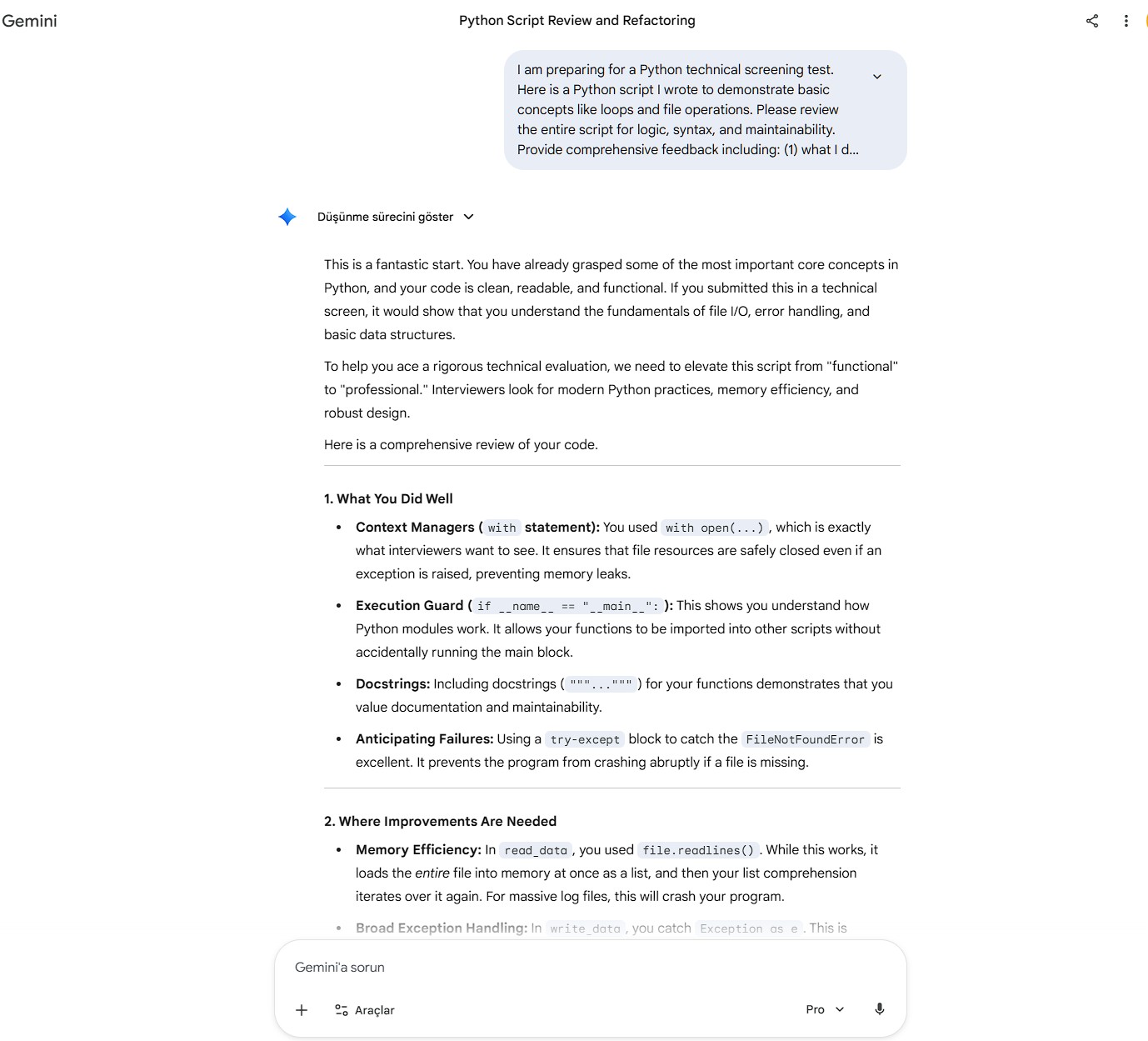
Gemini’s massive context capacity transforms it into a patient tutor who never loses track of what you’re working on, no matter how complex.
The Catch (Pricing & Limits): Google AI Studio offers extremely generous free access to Gemini Pro with high rate limits (approximately 60 requests per minute, 1,500 requests per day). Free tier includes the full 2M token context window and API access for building applications. Paid Gemini Advanced ($20/month through Google One) provides priority access and integration with Google Workspace but isn’t necessary for coding assistance. For learners using free AI coding assistants requiring massive context for large scripts, Gemini’s free tier is unmatched.
Pro Tips for Using AI to Learn Programming
- Never Copy-Paste Without Understanding: The biggest mistake beginners make with free AI coding assistants is treating them like magic code generators rather than learning tools. After AI generates code, always add this follow-up prompt: “Explain this code to me line-by-line like I’m a complete beginner. For each line, tell me: what it does, why it’s necessary, and what would break if I removed it.” This forces active learning. Test understanding by modifying the code yourself—change variable names, adjust logic, break things intentionally and fix them. Real programming skills develop through comprehension and modification, not blind copy-pasting.
- Use AI to Build, Not Just Complete Exercises: Traditional programming courses focus on isolated exercises (write a function that reverses a string). Free AI coding assistants enable project-based learning from day one. Instead of “help me learn loops,” ask: “I want to build tools that scrape weather data from a website and send me a text alert if it’ll rain tomorrow. Walk me through building this step-by-step, teaching me concepts as we go.” This approach teaches syntax in context of real goals, making abstract concepts concrete. You learn Python by building actual useful programs, with AI as your guide explaining each component.
- Practice Explaining Code Out Loud: Developers call this “rubber duck debugging” but it’s equally powerful for learning. After AI helps you build something, close the chat and explain your code out loud as if teaching someone else. “This line creates a list of numbers. This loop iterates through the list. This conditional checks if…” When you struggle to explain a section, you’ve identified a gap in understanding. Return to the AI and ask specifically about that confusing part. This self-assessment cycle—build with AI, explain independently, identify gaps, clarify with AI—accelerates learning far beyond passive reading.
Frequently Asked Questions
Will free AI coding assistants replace the need for human programmers?
Not in the foreseeable future, but they’re changing what skills matter. AI excels at generating boilerplate code, explaining syntax, and suggesting solutions to well-defined problems. Humans remain essential for: understanding complex business requirements, making architectural decisions, debugging subtle logic errors in large systems, and creative problem-solving for novel challenges. The practical reality: AI makes good programmers more productive and lowers the barrier for beginners to learn Python and build tools. Focus on developing skills AI can’t replicate—understanding user needs, systems thinking, and translating vague requirements into specific technical solutions. If your immediate goal is to just launch a project and you realize you don’t want to learn programming right now, skip the code entirely and check out our guide on the best free AI website builders to go live in minutes.
Do I need to install Python locally or can I learn entirely through browser-based free AI coding assistants?
You can absolutely learn Python programming for beginners entirely through browser tools like Replit, Google Colab, or Jupyter notebooks hosted online. These environments provide real Python interpreters without local installation, handling all setup complexity. However, eventually installing Python locally (once you’re comfortable with basics) is recommended because: (1) You’ll work faster without internet dependency, (2) Professional development happens in local environments, (3) You can build tools that interact with your computer’s files and applications. Start browser-based for zero friction, transition to local setup within 2-3 months as your comfort grows.
How should I prepare for coding screening tests using these AI tools?
Use free AI coding assistants strategically for test prep: (1) Pattern Recognition: Ask AI to explain common interview problem patterns (two pointers, sliding window, recursion) with multiple examples. Understanding patterns is more valuable than memorizing solutions. (2) Timed Practice: Attempt problems without AI first (simulating test conditions), then use AI to review your solution and learn better approaches. This builds independent problem-solving while learning optimization techniques. (3) Concept Drilling: Identify weak areas (e.g., recursion confuses you) and ask AI for progressively harder practice problems with detailed explanations. (4) Code Review: Have AI review your practice solutions for time complexity, space complexity, and coding style—exactly what interviewers assess. Combine independent practice with AI-assisted learning for optimal screening test preparation.
Executive Summary: The 2026 Free AI Coding Assistant Stack
For a quick recap before you start coding, here is how the top 7 AI assistants compare on their core strengths and free tier limits:
| Tool Name | Your Superpower (Best For) | Standout Feature | Free Tier Limits |
|---|---|---|---|
| Cursor | Building real projects with a “senior dev” | Full codebase understanding | 14-day Pro trial, then basic limits |
| Codeium | Budget-conscious learners | Unlimited AI autocomplete | 100% Free (No query limits) |
| Claude 4.5 Sonnet | Visual learners & deep concepts | Interactive UI “Artifacts” | Generous free tier (rate limited) |
| Replit | Absolute beginners (Zero setup) | Browser-based coding & hosting | Free public projects & basic AI |
| Blackbox AI | Fast syntax fixes & debugging | Direct GitHub repo search | Limited daily queries |
| Cody (Sourcegraph) | Multi-file context & architecture | Cross-file code intelligence | ~50-100 queries / month |
| Gemini 3 Pro | Analyzing huge scripts & error logs | 2 Million token context window | ~1,500 requests / day |
The Verdict: Which Free AI Coding Assistant Should You Choose?
Select based on your current skill level and learning goals:
- Absolute beginners starting from zero? → Replit (zero setup, browser-based, instant results) + Claude (patient explanations)
- Learning through building real projects? → Cursor (AI-first IDE, comprehensive project understanding) + Codeium (unlimited autocomplete)
- Preparing for technical interviews? → Claude (explanation depth) + Gemini (handling long problem sets)
- Building automation tools and scripts? → Codeium (fast autocomplete) + Blackbox (quick syntax answers)
- Understanding existing codebases? → Cody (multi-file context) + Gemini (large context window)
- Budget-conscious with zero AI budget? → Codeium (truly unlimited free) + Replit (functional free tier)
The reality of free AI coding assistants in 2026: You genuinely don’t need expensive bootcamps or university degrees to learn Python and build tools anymore. The combination of free AI coding assistants reviewed above provides personalized instruction that adapts to your pace, answers questions 24/7, and offers patience no human instructor can match. The limitation isn’t tool quality—it’s your dedication to consistent practice and active learning.
To learn Python successfully using these tools, commit to: (1) Daily coding practice (even 30 minutes counts), (2) Building real projects that interest you (not just completing exercises), (3) Always asking AI to explain code rather than blindly copying, (4) Testing your understanding by modifying generated code independently, (5) Gradually increasing complexity as concepts become comfortable.
Your immediate next step: Pick one tool from this list (recommend starting with Replit for simplicity or Cursor for power). Spend 30 minutes today building something real—a simple calculator, a to-do list program, a script that renames files. Experience learning by doing with AI as your guide. Most beginners are shocked how much they accomplish in their first session when AI handles syntax complexity while they focus on programming logic.
The computer science degree era is ending for many career paths. Free AI coding assistants combined with consistent practice now provide education matching traditional programs. Your competitive advantage is execution speed and problem-solving ability, not credential collection.
Pingback: PolyBuzz AI vs Moemate AI: The Best AI Character Guide for Content Creators in 2026 -
Thanks for the detailed information. If you ever need an AI image tool, I suggest trying Pixwit at https://pixwit.ai/. It is really user-friendly and free to start.