
Update (February 2026): We turned this workflow concept into reality! If you are ready to build this agent on your own PC without complex coding, read our step-by-step OpenClaw: Zero Skill Guide.
Clawdbot is an open-source AI agent powered by Anthropic’s Computer Use API that autonomously controls desktop interfaces to perform complex tasks like web browsing, data entry, and file management without human intervention. It functions as a local server application compatible with Windows, macOS, and Linux, distinguishing it from traditional text-based chatbots.
What Is Clawdbot? (It’s Not What You Think)
Forget everything you know about chatbots. Clawdbot isn’t some conversational AI that gives you answers in a chat window. It’s an AI agent that does things on your computer while you’re texting it from your phone.
Think of it like this: You’re lying in bed, half-asleep, and you text your computer: “Find me the cheapest flight to Tokyo in March and email the options to me.” Then you hear your computer fans spin up in the other room as Clawdbot opens Chrome, searches Google Flights, compares prices, screenshots the results, and drafts an email—all without you touching a keyboard.
That’s the promise. A local AI agent that connects to Discord, Telegram, or WhatsApp, receives your text commands, and executes them using actual mouse movements and keyboard inputs on your machine. It’s not using APIs or integrations—it’s literally moving your cursor around like a ghost in the machine.
The technical term is “computer use automation,” but I prefer to call it “headless computing for lazy people” (affectionate).
The Mac Mini Myth (And Why Windows Users Are Sleeping On This)
So why is everyone buying Mac Minis specifically? The viral posts make it seem like you need one to run Clawdbot. Spoiler: You absolutely don’t.
The Reality: Clawdbot requires a computer that is always on and connected to the internet to respond to your messages instantly.
- Enthusiasts buy Mac Minis because they are quiet, power-efficient, and aesthetically pleasing.
- But you do NOT need to spend $600 on new hardware.
You have two much smarter options:
Option 1: The “Free” Way (Use What You Have) Clawdbot runs on Node.js (Version 22+). This means it works on almost anything:
- Windows: Yes, even that old laptop gathering dust in your drawer.
- macOS: Your current MacBook works fine (just don’t close the lid).
- Linux: Any old desktop PC.
Option 2: The “Pro” Way (Rent a VPS) This is the ultimate “Zero Skill” hack for digital nomads. Instead of buying a physical computer, you can rent a tiny slice of a cloud computer (VPS) for $5/month.
- How it works: You rent a basic Linux server from providers like DigitalOcean, Hetzner, or AWS.
- The Benefit: It runs 24/7 in a data center. You don’t pay for electricity, it never goes offline, and you don’t need physical space in your apartment.
- The Cost: Less than a Netflix subscription.
So, don’t let the hardware photos scare you. Whether it’s a Mac Mini, a rusty Windows laptop, or a $5 cloud server, the AI works exactly the same.
How Clawdbot Actually Works (The Observe-Think-Act Loop)
Under the hood, Clawdbot uses Anthropic’s Computer Use API—a legitimately wild piece of tech that lets Claude (Anthropic’s AI) see your screen, move your mouse, and type on your keyboard.
The workflow is beautifully simple:
- You send a text via Discord/Telegram/WhatsApp
- Clawdbot receives it and passes your request to Claude
- Claude “observes” by taking screenshots of your desktop
- Claude “thinks” about what actions to take (which app to open, what to click, etc.)
- Claude “acts” by executing mouse movements and keyboard commands
- The loop repeats until the task is done (or it fails hilariously)
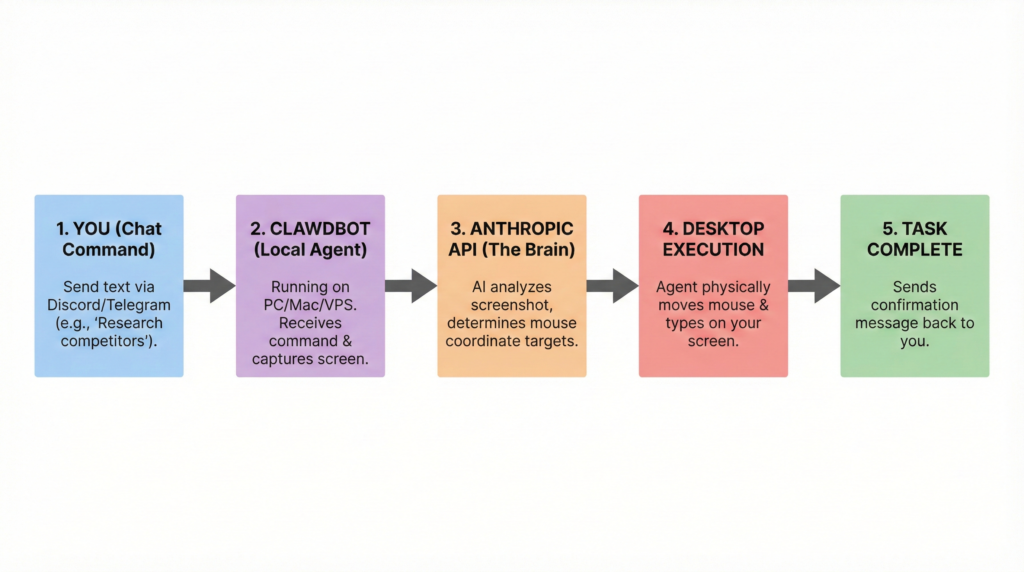
This is different from traditional automation tools like Zapier or IFTTT. Those tools connect APIs—predefined pathways between apps. Clawdbot doesn’t care if an app has an API. If a human can do it with a mouse and keyboard, Claude can attempt it.
The catch? It’s not instant. Watching Claude work is like watching someone use a computer for the first time—lots of pausing, occasional misclicks, and moments where you’re screaming “IT’S RIGHT THERE, JUST CLICK IT.” But when it works? Pure magic.
Real-World “Zero Skill” Automation Examples
Let’s get practical. Here are three automate tasks with AI scenarios that actually work today (with varying degrees of success):
1. Data Entry Hell? Gone.
“Open the Excel file on my desktop, find all rows where column C is blank, and fill them with data from the PDF in my Downloads folder.”
Claude can navigate file systems, open apps, parse documents, and copy-paste data. Is it faster than doing it yourself? Probably not the first time. But set it loose while you’re making coffee, and suddenly you’re the office wizard.
2. Research Aggregation
“Find the top 5 competitors to Notion, create a Google Doc, and make a comparison table with pricing and features.”
This is where Clawdbot shines. It can browse multiple websites, extract info, and compile it into a document—all while you’re busy pretending to be productive on Slack. Similar to how students are automating homework with AI tutors, professionals are outsourcing busywork to their personal AI assistant.
3. File Management Chaos
“Organize my Desktop into folders by file type and rename everything with today’s date.”
Your computer becomes Marie Kondo overnight. Claude will literally drag-and-drop files into folders, rename them, and send you a summary when it’s done. Peak lazy energy.
The Reality Check: These tasks work about 70% of the time. The other 30%? Claude gets confused, clicks the wrong button, or gets stuck in a loop. But that success rate is improving rapidly.
The Catch (Because There’s Always a Catch)
Let’s be brutally honest about the friction points:
Installation Isn’t “Zero Skill”
Setting up Clawdbot requires using the Terminal/Command Line. You’ll need to:
- Install Node.js
- Clone a GitHub repository
- Configure environment variables
- Generate API keys
This is “Low Skill” territory—not rocket science, but definitely not drag-and-drop. Expect to spend 30-60 minutes following setup guides and Googling error messages. Once it’s running though? Usage is genuinely Zero Skill. You’re just texting a bot.
API Costs Add Up
Clawdbot is Open Source (free software), but it uses the Anthropic API which charges per task. Simple requests might cost $0.05-0.20, but complex multi-step workflows can hit $1-2. If you’re automating dozens of tasks daily, budget accordingly. This isn’t a subscription—it’s pay-per-use, which is either liberating or terrifying depending on your self-control.
It’s Slow (For Now)
Watching Claude work is like watching paint dry in 1080p. Each action requires a screenshot, API processing, decision-making, and execution. A task that takes you 30 seconds might take Claude 2-3 minutes. The value proposition is doing it while you’re not available, not doing it faster.
Is It Safe? (Permissions and Privacy)
Here’s the uncomfortable truth: You’re giving an AI full control of your computer. Claude can see everything on your screen, access any file, and interact with any app.
The good news:
- Anthropic can’t see your screen. The Computer Use API processes screenshots in real-time but doesn’t store them on their servers (per their documentation).
- You control what apps are open. Set up a separate user account with limited permissions if you’re paranoid.
- It only acts when you command it. Clawdbot isn’t autonomously doing things in the background (yet).
The bad news:
- If you leave sensitive apps open (banking, password managers), Claude can technically interact with them.
- API logs exist. Your prompts are sent to Anthropic’s servers.
Best practice: Run Clawdbot on a dedicated machine or virtual environment with only the apps/data you’re comfortable exposing to an AI. Don’t run it on your main work laptop where you have client data and open tax returns.
The Future Is Headless (And Slightly Terrifying)
Clawdbot represents something bigger than just “a cool automation tool.” It’s a preview of headless computing—where your computer becomes an API you control from anywhere, executing tasks without you physically being there.
Imagine:
- Texting your home computer to “Compile that video and upload it to YouTube” while you’re on vacation
- Asking your office PC to “Fill out these expense reports” from your phone during lunch
- Telling your server to “Monitor this website and alert me if anything changes” 24/7
This is the direction personal computing is headed. Not flashier apps or better UIs, but computers that work for you autonomously. It’s equal parts exciting and dystopian—like having an intern who never sleeps, never complains, and occasionally deletes the wrong folder.
Zero Skill Rating: 8/10
Installation: 4/10 (Requires terminal knowledge)
Usage: 10/10 (Literally just texting)
Reliability: 7/10 (Works most of the time)
Cost: 6/10 (Cheap per task, but adds up)
Overall: 8/10
The Verdict: Clawdbot is the real deal, but it’s early-stage tech. If you’re willing to spend an hour setting it up and accept that it’ll fumble occasionally, you’ll gain a genuinely useful AI assistant. Just don’t buy a Mac Mini for it—that’s just marketing hype meeting tech influencer aesthetics.
Run it on whatever computer you already own, start small with simple tasks, and watch as your definition of “work” slowly shifts to “things I tell my AI to do while I nap.”
Welcome to the future. It’s lazy, it’s automated, and it doesn’t require a $600 hardware upgrade.
Clawdbot automates your desktop, but what about your schoolwork? Check out our Gauth AI Review for the mobile app that automates your math homework.
Want more AI automation guides that actually work? Subscribe to ZeroSkillAI.com for weekly “work smarter” breakdowns—no BS, no paywalls, just useful tech you can implement today.
Pingback: Poke AI Review: Why I Stopped Opening ChatGPT and Let Poke AI Text Me Instead -
Pingback: Moltbook: The AI Social Network Where Humans Are Banned (And It's Terrifying) -
Pingback: RentAHuman.ai Review: How I Discovered The Revolutionary Future Where I Became an API Endpoint for a Robot -
Pingback: Jobright AI Review: The Automated Job Search That Actually Works (With One Major Catch) -
Pingback: How to Build an AI Agent to Control Your PC (2026 Zero Skill Guide) -