How to Create Your Dream 2026 Vision Board Using Free AI (Step-by-Step)
December 17, 2025
How to Create Your Dream 2026 Vision Board Using Free AI (Step-by-Step)
Let’s be honest—you’ve spent hours scrolling through Pinterest, desperately searching for images that kind of match your dreams, right? You saved 47 pictures of someone else’s dream apartment, a vacation you can’t quite afford yet, and motivational quotes in fonts you’d never actually use.
What if I told you that you could create the exact images in your head—your dream life, your style, your vibe—in less than 30 minutes? For free?
Welcome to 2026 vision boarding, powered by AI. No more settling for “close enough.” With a vision board AI generator free tool, you’re about to create a vision board that actually looks like your future, not someone else’s curated aesthetic.
And the timing? Perfect. As we approach 2026, there’s no better moment to visualize and manifest the year ahead using free AI vision board tools.
The Best Free Vision Board AI Generator Tools (Zero Budget Required)
Before we dive in, let’s talk about the best vision board AI generator free options available right now. I’m keeping this 100% free because I know you’re not trying to drop $50/month on another subscription.
This is your primary AI vision board generator. It runs on DALL-E 3 technology (the same AI behind ChatGPT’s image creation), which means you’re getting premium quality without the premium price tag. You get a generous number of free image generations daily—more than enough for creating a complete vision board with AI.
Canva (Free Version) – Your Vision Board Assembly Tool
Once you’ve generated your dream images with this free AI generator, you’ll need somewhere to arrange them beautifully. Canva’s free version is perfect for creating collages, phone wallpapers, or printable vision boards.
Pro tip: You don’t need Canva Pro for this AI vision board project.
You can use the free version for this, but if you’re curious about premium features, check out our guide on Canva Free vs Pro.
Your Step-by-Step Guide to Creating a Vision Board with AI
Step 1: Define Your 2026 Goals (Get Specific)
Before you start using your vision board AI generator free tool, grab a notebook or open a notes app. Spend 10 minutes brainstorming what you want 2026 to look like across these categories:
Career & Success: Promotion? New job? Starting a business?
Travel & Lifestyle: Dream destinations? Digital nomad life?
Home & Living: Your ideal living space?
Health & Wellness: Fitness goals? Mental health priorities?
Relationships & Personal Growth: Quality time? New skills?
The more specific you get, the better your AI-generated vision board images will be. Instead of “I want to travel,” think “I want to sip coffee at a Parisian café while working on my laptop.”
Step 2: Generate Your Dream Images with Free AI (The Fun Part!)
This is where your free vision board AI generator becomes pure magic. Head over to Microsoft Designer or Canva AI and start creating. I’m going to give you ready-to-use prompts that you can literally copy and paste into the AI generator. Feel free to tweak the details to match your vision.
🌍 Travel & Lifestyle Prompts for Your AI Vision Board
Prompt 1: “A serene morning scene of a person working on a laptop at a cozy Parisian café, golden hour lighting, steaming coffee cup, Eiffel Tower visible in the background, warm and inviting atmosphere, photorealistic style”
Generated using Canva AI (Magic Media)
Prompt 2: “Overhead view of a person’s hands holding a passport and boarding passes, with a tropical beach sunset in the background, travel aesthetic, vibrant colors, inspiring wanderlust vibes”
Prompt 3: “A female digital nomad working from a modern beachfront villa in Bali, laptop open, ocean view through large windows, tropical plants, natural lighting, lifestyle photography style”
Prompt 4: “First-class airplane seat with a window view of clouds at sunrise, champagne glass on tray table, luxurious travel aesthetic, soft golden light, aspirational lifestyle”
💼 Career & Success Prompts for Your Free AI Vision Board
Prompt 1: “A confident professional woman giving a presentation in a modern, bright office space, floor-to-ceiling windows, engaged audience, natural daylight, successful business atmosphere, photorealistic”
Generated using Microsoft Designer
Prompt 2: “Minimalist home office setup with dual monitors, plants, organized desk, natural light streaming through window, productive and inspiring workspace, modern aesthetic”
Prompt 3: “Close-up of hands signing an important contract with a luxury pen, polished desk, soft dramatic lighting, success and achievement mood, cinematic style”
Prompt 4: “A diverse team celebrating in a contemporary office, high-fiving, genuine smiles, large windows with city view, teamwork and success energy, bright and uplifting”
🏡 Home & Living Prompts for AI-Generated Vision Boards
Prompt 1: “Minimalist Scandinavian living room filled with lush plants, cream sofa, natural wood coffee table, large windows with soft natural light, peaceful and airy atmosphere, interior design magazine quality”
Prompt 3: “Modern kitchen with marble countertops, fresh flowers in a vase, morning sunlight streaming through windows, clean and organized, aspirational home aesthetic”
Prompt 4: “Elegant bedroom with white linens, plants on nightstand, soft morning light, minimalist decor, serene and restful atmosphere, hotel-like luxury”
🧘 Health & Wellness Prompts for Your AI Vision Board
Prompt 1: “A woman practicing yoga on a wooden deck overlooking mountains at sunrise, peaceful expression, athletic wear, misty morning atmosphere, inspiring wellness lifestyle, photorealistic”
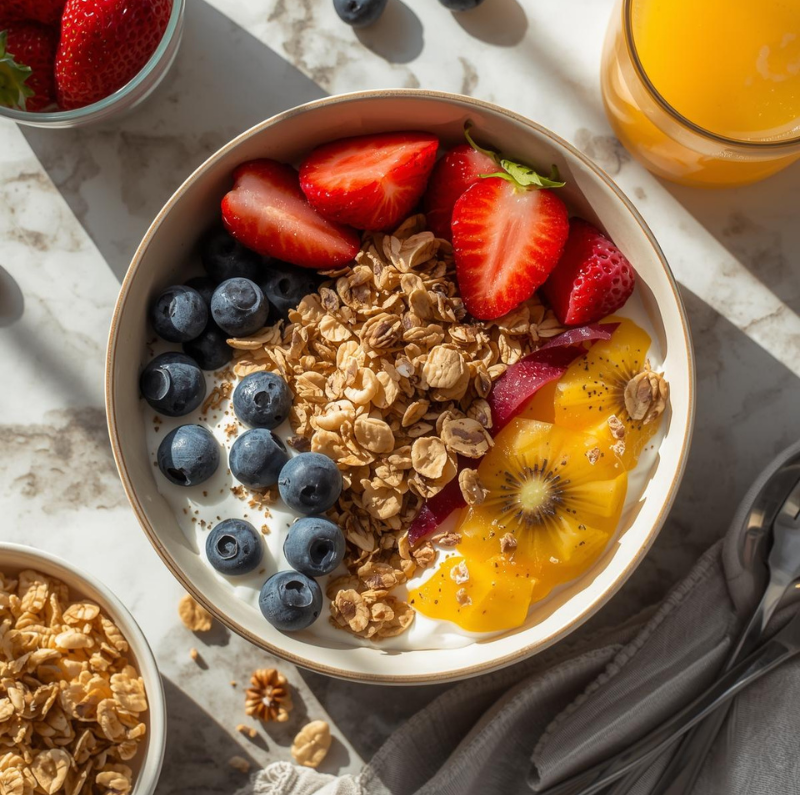
Prompt 2: “Overhead view of a healthy breakfast bowl with colorful fruits, granola, and yogurt, natural morning light, fresh juice, clean eating aesthetic, food photography style”
Generated using Canva AI (Magic Media)
Prompt 3: “Person running on a scenic coastal trail during golden hour, ocean views, athletic silhouette, motivational fitness atmosphere, energetic and vibrant”
Prompt 4: “Peaceful meditation space with cushions, candles, plants, soft natural light, calming sanctuary atmosphere, self-care and mindfulness vibes”
How to Use Your Free Vision Board AI Generator
Copy the prompt that resonates with your goals
Paste it into Microsoft Designer (your free AI generator)
Click “Generate” and wait about 30 seconds
Download your favorite version (you’ll get 4 variations)
Repeat with as many prompts as you want for your vision board!
Pro tip: Generate 8-12 images total using the vision board AI generator free tool for a well-rounded board. Don’t go overboard—quality over quantity!
Step 3: Assemble Your AI-Generated Vision Board in Canva
Now that you’ve used your free AI generator to create dream images, it’s time to bring them together into a stunning vision board.
Open Canva and search for “Phone Wallpaper” or “Vision Board” templates
Upload your AI-generated images by clicking “Uploads” and dragging your files
Arrange them in a grid or collage style that feels balanced
Optional: Add inspiring text overlays like “2026” or your key goals
Download as a PNG or PDF
Display options for your AI vision board:
Set it as your phone wallpaper (daily motivation!)
Print it and frame it for your desk
Save it as your laptop background
Create a digital folder you review weekly
Tips for Writing Better Custom Prompts in Your Vision Board AI Generator
Want to use your free AI generator to create images that are even more tailored to your vision? Here’s what makes AI prompts work better:
Be Specific About Details
Instead of “nice office,” try “modern glass office with city skyline view, natural light, minimalist desk”
Include Lighting Descriptions
Words like “golden hour,” “soft natural light,” or “dramatic sunset” dramatically improve your AI-generated vision board image quality
Specify the Mood
Add words like “peaceful,” “energetic,” “luxurious,” or “inspiring” to capture the feeling you want in your vision board
Mention the Style
Try adding “photorealistic,” “lifestyle photography,” “magazine quality,” or “cinematic” for professional-looking results from your vision board AI generator free tool
Include Perspective
“Overhead view,” “close-up,” or “wide angle shot” helps the AI generator understand the composition you want
Why Use a Free Vision Board AI Generator Instead of Pinterest?
Traditional vision boarding meant spending hours searching for images that were “close enough” to your dreams. But with a vision board AI generator free tool, you can:
Create custom images that match exactly what’s in your head
Save hours of searching through stock photos
Get unique visuals that aren’t on everyone else’s boards
Personalize every detail from lighting to mood to style
Generate unlimited options until you find the perfect fit
The best part? These free AI generators are incredibly easy to use, even if you’ve never touched AI tools before.
Your 2026 Starts Now with Free AI Vision Board Creation
Here’s the beautiful truth: creating this AI-generated vision board is the first step toward making it real.
You’re not just collecting pretty pictures anymore. You’re using a cutting-edge vision board AI generator free tool to visualize exactly what you want your life to look like. These aren’t generic stock photos—they’re custom-generated images of your dream future.
And the best part? Using this free AI vision board generator took you less time than your usual Pinterest scroll session, cost you exactly $0, and gave you something infinitely more powerful: a clear, personalized vision of where you’re headed.
So what are you waiting for?
Open up Microsoft Designer right now. Copy one of those prompts into the free AI generator. Generate your first vision board image. I promise you’ll be hooked after seeing what’s possible with AI-powered vision boarding.
Your dream 2026 isn’t going to manifest itself—but this AI vision board? It’s the perfect place to start.
Drop a comment below and tell me: What’s the first image you’re generating with your vision board AI generator free tool? I’d love to hear what dreams you’re bringing to life! 🚀
Happy creating with free AI, and here’s to making 2026 your best year yet!
1 thought on “How to Create Your Dream 2026 Vision Board Using Free AI (Step-by-Step)”
Hello, Neat post. There is an issue along with your web site
in internet explorer, would test this? IE still is the market chief and a good element of
people will omit your excellent writing due to this problem.


Hello, Neat post. There is an issue along with your web site
in internet explorer, would test this? IE still is the market chief and a good element of
people will omit your excellent writing due to this problem.