
Poke AI is a proactive artificial intelligence assistant that integrates with personal calendar and email data to send automated, context-aware reminders via SMS, iMessage, or WhatsApp. Unlike reactive chatbots like ChatGPT that require user prompts, Poke AI autonomously initiates contact to provide meeting briefs and schedule updates.
What Is Poke AI? (The Assistant That Actually Assists)
Forget everything you know about AI assistants. Poke AI isn’t an app you open. It’s not a chatbot that sits there waiting for your prompts. It’s an automated personal assistant that lives in your text messages and comes to you with information you didn’t know you needed—exactly when you need it.
The concept is beautifully simple: Poke AI connects to your calendar, email, and other productivity tools, then sends you contextual updates via SMS, iMessage, or WhatsApp throughout your day. No apps to download. No new platforms to learn. Just texts from an AI that actually pays attention to your life.
Think of it like having a hyper-competent executive assistant who:
- Reads your emails while you’re sleeping
- Scans your calendar for upcoming meetings
- Researches the people you’re about to meet
- Texts you summaries at the perfect moment
The interface? Your phone’s native messaging app. The effort required from you? Literally zero.
This is what “Zero Skill” actually means—technology that works for you instead of making you work for it.
The “Zero Skill” Experience (What It Actually Feels Like)
Here’s my typical morning before poke ai:
Wake up → Check calendar → Panic about 10 AM meeting → Google the person I’m meeting → Skim their LinkedIn → Join Zoom call underprepared → Pretend I remember our last conversation.
Here’s my morning with Poke AI:
Wake up → See text: “Morning! Your 10 AM with Sarah Chen (VP of Marketing at TechCorp). Last discussed pricing models on Dec 12. She mentioned concerns about enterprise features. Here’s a 3-sentence summary of her recent LinkedIn posts.”
That’s it. I didn’t open an app. I didn’t ask for this information. The proactive assistant just knew what I’d need and delivered it in the most frictionless way possible—a text message I’d see naturally while checking my phone anyway.
The psychological shift is massive. Instead of frantically preparing for meetings, I feel like someone’s already done the work for me. Because they have. Well, it has.
How Poke AI Actually Works (The Tech Behind the Magic)
Under the hood, poke ai is essentially an AI agent that monitors your digital ecosystem and triggers notifications based on context. Here’s the workflow:
- You grant permissions (Calendar, Email, optionally Slack/Notion)
- The AI monitors in the background looking for patterns and triggers
- It identifies moments where you need info (upcoming meetings, forgotten tasks, important emails)
- It texts you proactively via your preferred messaging platform
The “iMessage AI” experience is particularly seamless if you’re on iOS—messages appear in your native app alongside texts from friends, making it feel less like “using an AI tool” and more like having a really organized friend who remembers everything.
The key difference from tools like ChatGPT or even Siri? You’re not initiating the interaction. The AI is watching your schedule and workload, then deciding when to interrupt you with helpful context. It’s the difference between having to remember to check your calendar versus getting a tap on the shoulder right when it matters.
3 Ways Poke AI Saves Your Life (Real Use Cases)
Let’s get specific about when this productivity hack becomes genuinely life-changing:
1. The Meeting Savior
5 minutes before your Zoom call: “Incoming call with James Rodriguez. Last spoke 3 weeks ago about Q1 budget approval—he said yes but wanted monthly check-ins. He just posted on LinkedIn about their new product launch. Talking point: Ask how the launch is affecting their Q2 priorities.”
You walk into that meeting looking like you’ve been meticulously tracking every detail of the relationship. In reality, you forgot this meeting existed until 6 minutes ago.
2. The Email Nag (But in a Good Way)
2 PM notification: “You haven’t replied to Lisa’s email from yesterday about the project timeline. She’s marked it urgent. Want me to draft a response?”
Here’s the thing—we all ignore important emails. Not out of malice, just… inbox chaos. Poke AI becomes your accountability partner, gently reminding you about the things that actually matter before they become problems. It’s like having a personal assistant who stops you from looking flaky.
3. The Morning Brief (Actually Brief)
7:30 AM, every day: “Good morning! You have 3 meetings today. The 2 PM is new—added last night by your boss. You have 8 unread emails, 2 require responses today. Weather is 72° and sunny. Your Uber to the airport tomorrow is confirmed.”
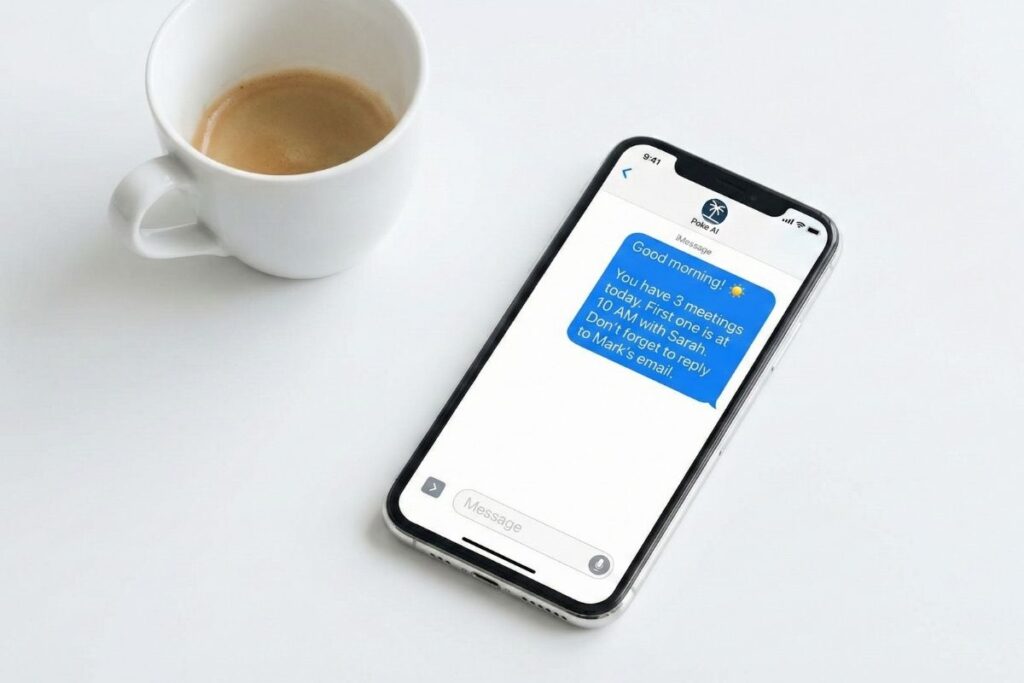
No scrolling through apps. No checking five different platforms. Just a single text that gives you the situational awareness to start your day without anxiety. It’s what every “morning routine productivity guru” promises, except it actually works because you don’t have to do anything.
The Privacy Trade-Off (Let’s Talk About the Elephant)
Here’s where we need to be brutally honest: For poke ai to work this well, it needs access to basically everything.
Your calendar. Your emails. Your Slack messages. Potentially your location, your contacts, and your browsing history. This isn’t like giving ChatGPT a single prompt—this is inviting an AI to continuously monitor your digital life.
The questions you need to ask yourself:
- Do you trust the company? (Check their privacy policy and data handling practices)
- Is the data encrypted? (End-to-end encryption is non-negotiable)
- Can you revoke access easily? (Always have an exit plan)
- Is it worth the trade-off? (Convenience vs. privacy)
For me? The answer is yes—but I’m also privileged to not work in highly sensitive industries. If you’re handling classified information, medical records, or legal documents, Poke AI might not be appropriate. But for the average knowledge worker drowning in calendar invites and Slack notifications? The productivity gains outweigh the creepiness factor.
Just know what you’re signing up for. This is surveillance capitalism, but at least it’s your surveillance working for you.
ChatGPT vs. Poke AI: Reactive vs. Proactive
Let’s break down the fundamental difference:
ChatGPT (Reactive AI):
- You: Opens app
- You: Thinks of prompt
- You: “Summarize this meeting for me”
- ChatGPT: Provides answer
- You: Copies info elsewhere
Poke AI (Proactive AI):
- Poke AI: Texts you unprompted
- Poke AI: “Your meeting in 10 mins—here’s what you need to know”
- You: Reads text
- You: Shows up prepared
One requires effort and initiative. The other just… happens. It’s the difference between having to cook dinner versus someone texting you “Dinner’s ready” right when you’re hungry.
This is the next evolution of AI assistants—from tools you use to systems that work on your behalf. While Pokee AI manages your schedule and communications, tools like Clawdbot handle your desktop tasks. Together, they represent a future where your digital life runs itself while you focus on actual work (or, let’s be honest, scrolling TikTok guilt-free).
The Future of AI Is Invisible
Here’s the uncomfortable truth about productivity tools: The best ones disappear.
You don’t think about electricity until the power goes out. You don’t think about your phone’s autocorrect until it fails. And soon, you won’t think about AI that texts you until you have to go back to manually checking calendars like some kind of caveman.
Poke ai represents something bigger than just another app. It’s a glimpse into a future where AI isn’t something you “use”—it’s something that just works in the background of your life, surfacing information at the exact moment you need it, then getting out of your way.
No more app-hopping. No more “wait, let me check my calendar.” No more forgetting to follow up on important emails. Just a quiet, competent presence that makes you look more organized, more prepared, and more on top of things than you actually are.
And isn’t that the entire point of productivity tools? To make you look like you have your life together while doing the absolute minimum amount of work?
Zero Skill Rating: 9/10
Setup: 8/10 (Requires granting permissions, but fairly straightforward)
Usage: 10/10 (Literally just receiving texts)
Reliability: 9/10 (Depends on integration quality)
Privacy: 6/10 (You’re trading data for convenience)
Overall: 9/10
The Verdict: Poke AI is the most “Zero Skill” productivity tool I’ve ever used because it genuinely requires zero ongoing effort. The setup takes 10 minutes. After that, it just works. Forever. In the background. Without you thinking about it.
The only reason it’s not a perfect 10? The privacy implications are real, and you need to be comfortable with an AI constantly monitoring your digital life. But if you can make peace with that trade-off, poke ai is the closest thing to having a personal assistant without actually paying someone’s salary.
This is what we meant when we said AI would change everything. Not flashier chatbots or better image generators—but proactive assistants that remove friction from your life one automated text message at a time.
The future isn’t about using AI. It’s about AI using itself on your behalf. And honestly? I’m here for it.
Want more “Zero Skill” AI tools that actually work? Subscribe to ZeroSkillAI.com for weekly reviews of automation tools that make you look smarter while doing less work.