
Struggling to find new blog post ideas?
We have all been there. You stare at a blank screen, wondering what to write next. You try to guess what people are searching for, but it feels like shooting in the dark.
What if I told you there is a way to ask Google exactly what people want to read?
And the best part? You don’t need to be a programmer to do it.
At ZeroSkillAI, our mission is to give you powerful tech tools without the headache. Today, I am sharing a simple, free Python script that I use to generate unlimited content ideas.
The “Why”
Most people use expensive SEO tools that cost $100/month. But Google actually gives away this data for free through its “Autocomplete” feature.
When you type “best AI tools for…” into Google, it suggests completions like “…students”, “…business”, etc.
These suggestions are real searches from real people.
My script automates this process. Instead of typing manually, it checks hundreds of variations in seconds and saves them for you.
How to Run This Script (No Installation Needed)
You might be thinking, “But I don’t have Python installed on my computer!”
Don’t worry. You don’t need to install anything. We will use a free tool from Google called Google Colab. It allows you to run Python code directly in your web browser.
Follow these 3 simple steps:
- Go to Google Colab and sign in with your Gmail account.
- Click on “New Notebook” (or File > New Notebook).
- Copy the code below, paste it into the empty box, and click the “Play” button (▶️) on the left.
The Magic Script
Here is the script. I have designed it to be super simple.
- Look for the section that says
### CHANGE YOUR TOPICS HERE ###. - Replace the example words with your own niche topics.
- Run the code and watch the magic happen!
import requests
import json
import time

# ==========================================
# ### CHANGE YOUR TOPICS HERE ###
# What do you want to research?
# ==========================================
seeds = [
    "best ai tools for",
    "how to use chatgpt for",
    "passive income with ai",
    "marketing for beginners"
]

# Function to get suggestions from Google
def get_google_suggestions(query):
    url = f"http://google.com/complete/search?client=chrome&q={query}&hl=en"
    headers = {'User-Agent': 'Mozilla/5.0'}
    try:
        response = requests.get(url, headers=headers)
        if response.status_code == 200:
            results = json.loads(response.text)
            return results[1]
    except:
        return []
    return []

print("🚀 Starting Research... Please wait.\n")

# Main Loop
found_keywords = []
for seed in seeds:
    print(f"🔎 Searching for: '{seed}'...")
    suggestions = get_google_suggestions(seed)

    if suggestions:
        for keyword in suggestions:
            if keyword not in found_keywords:
                found_keywords.append(keyword)
                print(f"  -> Found: {keyword}")

    # Sleep to be polite to Google
    time.sleep(1)

print("\n" + "="*40)
print(f"✅ SUCCESS! Found {len(found_keywords)} new content ideas.")
print("="*40)
print("Copy the list above and start writing!")
See It In Action! 🚀
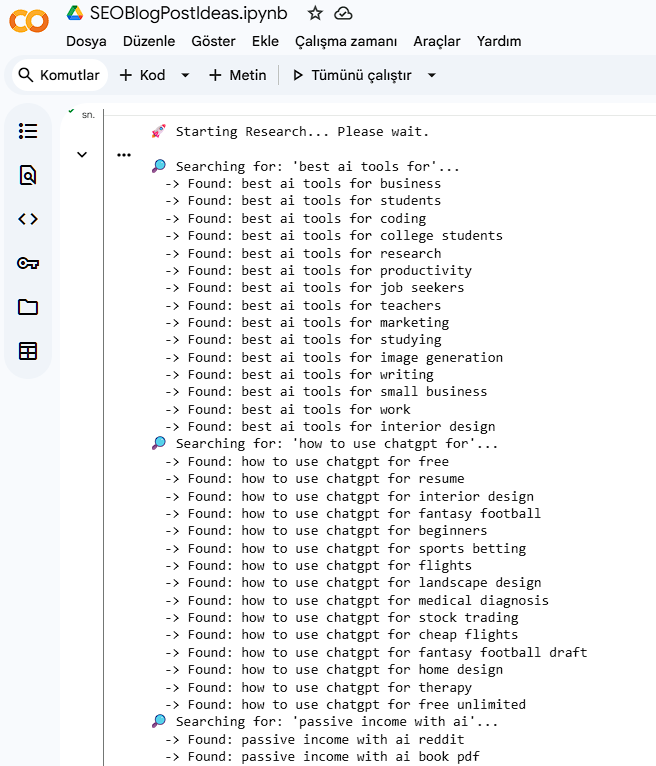
When you click the “Play” button in Google Colab, the script immediately starts talking to Google. Within seconds, you will see a stream of fresh, real-time search queries appearing on your screen.
Here is an example screenshot of what the output looks like. Every line starting with -> Found: is a potential new blog post idea for you!
How to Use These Keywords?
Now that you have a list of 50+ keywords, what should you do?
- Filter them: Pick the questions that look easy to answer.
- Check the competition: Put the keyword into Google. If you see big sites like Forbes, skip it. If you see Reddit or Quora, write an article about it!
- Create content: Write a simple “How-to” guide or a listicle answering that specific question.
Pro Tip: Use ChatGPT to generate an outline for these keywords to speed up your process.
Conclusion
SEO doesn’t have to be hard or expensive. With this simple Python script, you can find unlimited blog post ideas in minutes.
Enjoyed this tool? Share this article with a friend who needs help with content ideas!