
AI digital product workflows are end-to-end automated systems that research untapped markets, generate print-ready digital assets, and list them on platforms like Etsy and Amazon KDP—all without manual design work or inventory costs. In March 2026, these workflows represent the ultimate high-margin business model, with successful creators generating $3,000-15,000 monthly selling planners, wall art, and niche books while working less than 10 hours per week, since digital products carry 95-99% profit margins after platform fees.
The Delivery: From Attention to Revenue
In our previous guide, The Faceless Video Engine, we learned how to generate massive attention through automated video content. You now have the traffic—thousands of views, engaged audiences, growing subscriber counts.
But attention without monetization is just a vanity metric.
The next evolution is converting that audience into direct revenue through digital products. No inventory. No shipping. No customer service headaches. Just pure profit margin—typically 95-99% after platform fees.
This is the power of AI digital product workflows—the complete system from market research to listed product, with minimal human intervention. The workflow we’re building today can:
- Identify an untapped micro-niche in 5 minutes using AI analysis
- Generate print-ready digital assets (planners, wall art, coloring books) in 10 minutes
- Create SEO-optimized product listings with mockups in 5 minutes
- Total time per product: 20 minutes, mostly automated
- Profit per sale: $3-12 after platform fees
- Scale: 30-50 products listed per week
Creators using this exact system are running Etsy stores with 500+ products, Amazon KDP catalogs with 200+ books, and generating consistent passive income. Some niche products sell 10-50 copies monthly for years with zero maintenance.
This guide provides the exact prompts, settings, and configurations to build profitable AI digital product workflows. We’ll cover four levels:
Level 1: Micro-niche research (finding profitable gaps)
Level 2: Asset generation (creating print-ready designs)
Level 3: Packaging and listing (Etsy/KDP optimization)
Level 4: Workflow automation (scaling to 100+ products)
By the end, you’ll have a working AI digital product workflow capable of launching products daily. Let’s build your passive income machine.
Level 1: The Micro-Niche Research Agent (Copy-Paste Prompts)
The biggest mistake beginners make is creating “general” products—generic planners, generic wall art, generic journals. These compete with 50,000+ existing listings.
The winning strategy for a profitable automated Etsy store setup: Hyper-specific micro-niches with 100-500 existing products but clear demand signals. These have enough buyers to be profitable but little enough competition that your product ranks on page 1.
The Micro-Niche Discovery Prompt
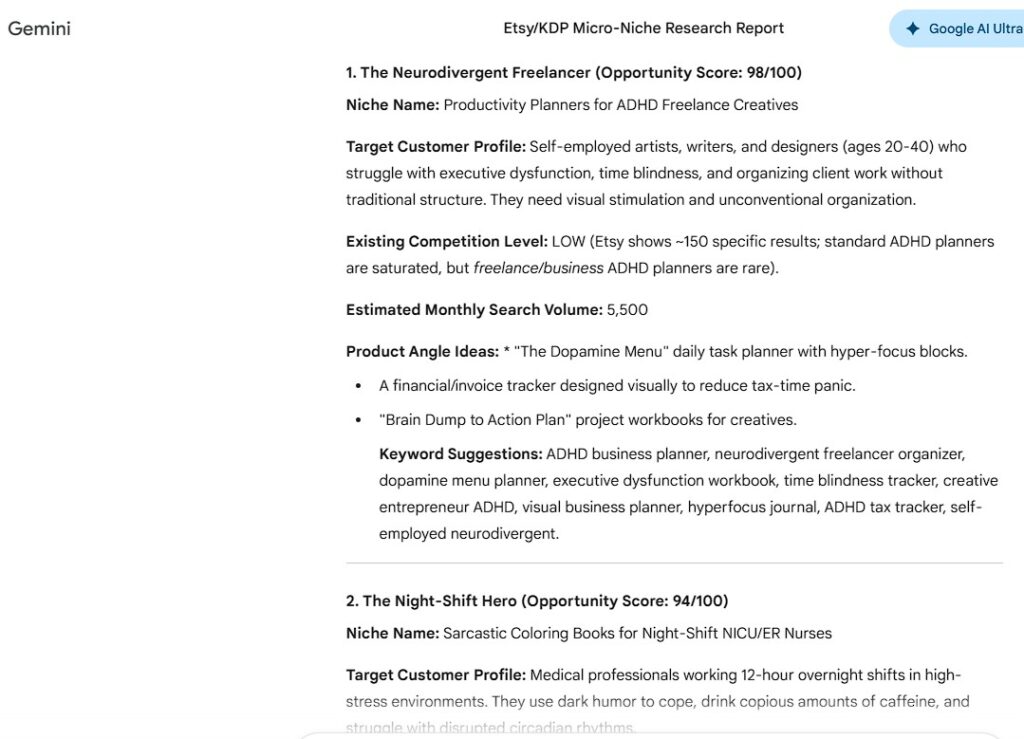
Copy this entire prompt and use it with ChatGPT, Claude, or Gemini:
You are a Digital Product Market Research Agent specializing in identifying profitable micro-niches on Etsy and Amazon KDP.

RESEARCH OBJECTIVE:
Find 10 highly specific, underserved micro-niches for [PRODUCT CATEGORY: e.g., "planners" / "wall art" / "joke books" / "coloring books"]

NICHE QUALITY CRITERIA:

MARKET SIZE INDICATORS (Must have 2+ of these):
- Specific subreddit with 10k-100k members
- Facebook group with active engagement
- Pinterest search volume (estimate based on autocomplete suggestions)
- Amazon KDP category with 100-1,000 existing books (not oversaturated)
- Etsy search showing 100-500 products (sweet spot)

SPECIFICITY REQUIREMENTS:
- Must combine 3+ attributes (profession + hobby + life stage, etc.)
- Example: "Planner for Homeschooling Moms Who Garden" (combines parenting + education + gardening)
- Example: "Joke Book for Sarcastic Veterinary Technicians" (combines humor + specific profession)
- Avoid: "Planner for Moms" (too broad) or "Planner for Left-Handed Redheaded Accountants Born in March" (too narrow)

PROFITABILITY SIGNALS:
- Existing products priced $8-25 (indicates willingness to pay)
- Top products have 100+ reviews (indicates sustained demand)
- Recent listings (past 30 days) getting early sales (indicates active market)

OUTPUT FORMAT:
For each niche, provide:
1. Niche name (specific description)
2. Target customer profile (demographics, pain points)
3. Existing competition level (LOW/MEDIUM/HIGH)
4. Estimated monthly search volume (based on related keywords)
5. Product angle ideas (3 specific product concepts for this niche)
6. Keyword suggestions (10 long-tail keywords for SEO)

ANTI-PATTERNS TO AVOID:
- Generic age/gender categories only ("planners for women")
- Trends that peaked 6+ months ago (identify by search trend decline)
- Niches with dominant established brands (indicates saturated market)
- Categories with trademark concerns (sports teams, celebrities, copyrighted characters)

INPUT: [DESCRIBE YOUR INTERESTS, SKILLS, OR TARGET MARKET PREFERENCES]

Begin research and provide 10 micro-niches ranked by opportunity score.
Example output:
If you input “I’m interested in productivity planners,” the AI might generate:
MICRO-NICHE #1: Daily Planners for ADHD College Students
- Target: 18-24 year olds managing coursework with ADHD
- Competition: MEDIUM (230 Etsy products, 45 KDP books)
- Monthly searches: ~2,400 (estimated from "ADHD planner student" keyword cluster)
- Product angles:
  1. Time-blocking planner with visual timers and dopamine tracking
  2. Assignment tracker with procrastination intervention prompts
  3. Exam prep planner with hyperfocus session templates
- Keywords: ADHD student planner, neurodivergent college planner, focus planner for students,
  executive function planner, distraction tracking planner, dopamine schedule planner

OPPORTUNITY SCORE: 8.5/10 (growing niche, specific pain point, adequate search volume)
This research takes 3-5 minutes. You now have validated micro-niches with built-in demand and actionable product concepts.
Advanced: Trend Validation
Before committing to a niche, validate with this follow-up prompt:
For the micro-niche "[NICHE NAME]", perform trend analysis:

1. Search Google Trends for related keywords (past 12 months)
2. Check if trend is: RISING / STABLE / DECLINING
3. Identify seasonal patterns (if any)
4. Note any recent events driving interest
5. Predict 6-month outlook: GROWING / PLATEAUING / FADING

Recommendation: PROCEED / PROCEED WITH CAUTION / SKIP

Provide 2-sentence justification for recommendation.
Only proceed with niches showing RISING or STABLE trends. Declining trends mean you’re arriving late to a dying market.
Level 2: The Visual Factory & Asset Generation
Once you’ve identified your micro-niche, you need print-ready assets. For AI digital product workflows, this means generating designs using specific Midjourney digital art prompts at commercial print quality (minimum 300 DPI, correct dimensions).
Product Type 1: Pattern-Based Designs (Seamless Patterns, Backgrounds)
Use this for your AI printable generation: Scrapbook paper, digital paper packs, fabric patterns, phone wallpapers
Midjourney Prompt Template:
/imagine prompt: seamless repeating pattern, [STYLE] style, [COLOR PALETTE], [SUBJECT/THEME],
--tile --ar 1:1 --quality 2 --style raw --s 50

STYLE OPTIONS:
- watercolor boho
- minimalist geometric
- vintage floral
- modern abstract
- hand-drawn doodle

COLOR PALETTE FORMAT:
- "sage green and dusty rose on cream background"
- "navy blue and gold metallic accents"
- "pastel rainbow gradient"

SUBJECT/THEME:
- tiny wildflowers and butterflies
- coffee cups and books (for book lovers)
- yoga poses and mandalas
- camping gear and pine trees

EXAMPLE COMPLETE PROMPT:
/imagine prompt: seamless repeating pattern, watercolor boho style, sage green and dusty
rose on cream background, tiny wildflowers and butterflies, delicate hand-painted aesthetic,
soft edges --tile --ar 1:1 --quality 2 --style raw --s 50
Critical flags explained:
--tile: Makes pattern seamlessly repeating (essential for backgrounds)--ar 1:1: Square format (best for patterns)--quality 2: Maximum quality setting--style raw: Less Midjourney “house style,” more prompt-accurate--s 50: Lower stylization (more literal interpretation)
Post-generation:
- Download at maximum resolution
- Upscale using Topaz Gigapixel AI or Magnific to 3600x3600px (ensures 300 DPI at 12×12 inches)
- Test tile in Photoshop or GIMP to verify seamless edges
- Export as high-quality PNG or PDF
Profit strategy: Use your AI digital product workflows to bundle 12-20 patterns into a ‘Digital Paper Pack’ and sell for $6-12 on Etsy. Cost to produce: $0.40 in Midjourney credits. Profit margin: 97%.
Product Type 2: Standalone Illustrations (Wall Art, Planner Inserts, Coloring Pages)
Use this for: Printable wall art, journal prompts with illustrations, coloring books, flashcards
Midjourney Digital Art Prompts Template:
/imagine prompt: [SUBJECT], minimalist line art illustration, clean black lines on white
background, simple and elegant, [SPECIFIC DETAILS], professional vector style, high contrast,
perfect for printing --ar [RATIO] --quality 2 --style raw

ASPECT RATIO OPTIONS:
- --ar 2:3 (standard poster, 8x12 inches)
- --ar 4:5 (Instagram-friendly, 8x10 inches)
- --ar 11:17 (KDP book cover dimensions)

SUBJECT EXAMPLES:
- meditation pose with chakra symbols (for wellness niche)
- coffee brewing process infographic (for coffee lovers)
- anatomy of a perfect garden layout (for gardeners)
- veterinary technician with stethoscope and pet (for vet tech niche)

EXAMPLE COMPLETE PROMPT:
/imagine prompt: ADHD brain with organized compartments and scattered thoughts, minimalist
line art illustration, clean black lines on white background, simple and elegant, include
timer, checklist, and dopamine molecule symbols, professional vector style, high contrast,
perfect for printing --ar 2:3 --quality 2 --style raw
For coloring books specifically:
/imagine prompt: [SUBJECT] coloring page, intricate line art, medium complexity, clear
outlines, no shading, white background, designed for adult coloring book, balanced detail
distribution --ar 8.5:11 --quality 2 --style raw --s 25
Post-generation:
- Download highest resolution
- Upscale to 2550x3300px (300 DPI at 8.5×11 inches)
- Convert to pure black and white (remove any gray anti-aliasing for clean print)
- Add 0.25-inch bleed margin if required by printer
Profit strategy: Create series of 30-50 related illustrations, package as themed collection. Example: “30 Daily Affirmation Cards for ADHD Adults” sells for $8-12 with $0.60 production cost.
AI Upscaling for Print Quality
Critical for all digital products: Midjourney outputs at 1024x1024px by default. This is insufficient for professional printing.
Upscaling workflow:
Option A: Magnific AI (cloud-based, best quality)
- Upload Midjourney output
- Select “Print” preset
- Upscale to 3x-4x size
- Download print-ready file
- Cost: $30/month unlimited (worth it if doing 20+ products/month)
Option B: Topaz Gigapixel (local software)
- One-time purchase $99
- Batch processing capability
- Slightly lower quality than Magnific but very fast
- Best for: High-volume producers
Option C: Free alternatives
- Real-ESRGAN (open-source, requires technical setup)
- waifu2x (online, free, lower quality)
- Use for: Testing concepts before investing in paid tools
Always verify: Zoom to 100% and check that text/lines are crisp, not blurry. Blurry = bad customer reviews = refunds.
Level 3: Packaging & Listing Generation (Automated Etsy Store Setup)
You have print-ready assets. To maintain a true zero code product creation pipeline, you now need product listings that actually sell.. This means professional mockups and SEO-optimized copy.
The Mockup Assembly Line
Tools for professional mockups:
Canva Pro (recommended for beginners):
- Pre-made mockup templates (planners on desks, wall art in frames, books on shelves)
- Bulk Create feature: Upload 50 designs, auto-generate 50 mockups
- Cost: $13/month
- Time: 2 minutes per product (after initial template setup)
Placeit by Envato:
- Massive mockup library (10,000+ templates)
- Higher quality than Canva but no bulk processing
- Cost: $15/month
- Time: 3 minutes per product
Workflow for automated Etsy store setup mockups:
- Choose 3-5 mockup templates for your product type (desk scene, lifestyle photo, close-up detail shot)
- Create Canva Bulk Create spreadsheet:
- Column A: Product name
- Column B: Design file link
- Column C: Primary color (for branded elements)
- Upload spreadsheet to Canva
- Canva generates all mockup variations automatically
- Download as batch ZIP file
- Upload to Etsy listings
Total time: 2 minutes per product after template setup. Traditional method: 15-20 minutes per product doing mockups manually.
The SEO Listing Generator
Etsy and Amazon KDP ranking depends heavily on keywords. This prompt generates optimized listings:
You are an Etsy/Amazon KDP SEO Expert specializing in high-converting product listings.

PRODUCT INFORMATION:
- Product type: [e.g., "ADHD planner for college students"]
- Format: [e.g., "30-page PDF printable"]
- Key features: [e.g., "time-blocking, dopamine tracking, assignment deadlines"]
- Target customer: [e.g., "neurodivergent college students aged 18-24"]
- Price point: [e.g., "$8.99"]

GENERATE:

1. TITLE (140 characters max for Etsy, 200 for KDP):
   - Include 3-5 primary keywords
   - Front-load most important keywords
   - Must be readable and compelling (not keyword salad)
   - Format: [Primary Keyword] | [Secondary Benefit] | [Format/Quantity]

2. DESCRIPTION (First 160 characters are critical - this appears in search):
   - Paragraph 1: Hook (problem + solution in 2 sentences)
   - Paragraph 2: Features (bullet list of 5-7 key features)
   - Paragraph 3: How to use (simple 3-step instructions)
   - Paragraph 4: What's included (file formats, page count, dimensions)
   - Paragraph 5: Call to action

3. 13 TAGS (Etsy max) or 7 KEYWORDS (KDP max):
   - Mix of broad and long-tail keywords
   - Include 2-3 word phrases (Etsy allows multi-word tags)
   - Prioritize: high search volume + low competition
   - Avoid: single generic words ("planner" alone), trademarked terms

4. CATEGORY SUGGESTIONS:
   - Primary category path
   - 2-3 alternative categories if primary is too competitive

STYLE REQUIREMENTS:
- Write in second person ("You'll love...")
- Focus on benefits, not just features
- Use emotional triggers appropriate to niche
- Include social proof language ("Join thousands of...")
- NO: ALL CAPS, excessive punctuation, spammy language

OUTPUT FORMAT:
Provide complete, copy-paste ready listing content.
Example output:
TITLE:
ADHD Planner for College Students | Focus & Productivity Tracker | Printable PDF Study Planner

DESCRIPTION:
Struggling to stay organized with ADHD and a packed class schedule? This printable ADHD-friendly
planner is specifically designed for neurodivergent college students who need structure without
overwhelming detail.

✨ KEY FEATURES:
- Visual time-blocking with color-coded priority levels
- Dopamine tracking to identify your peak focus hours
- Assignment deadline tracker with built-in buffer days
- Distraction log to identify patterns and triggers
- Weekly review prompts for continuous improvement
- Hyperfocus session templates for deep work
- Simple, uncluttered layouts that won't overwhelm

HOW TO USE:
1. Download the PDF after purchase (instant access)
2. Print on standard 8.5x11" paper or use digitally on tablet
3. Start with the weekly overview, then drill into daily pages

WHAT'S INCLUDED:
- 30-page printable PDF planner
- Daily, weekly, and monthly layouts
- Letter size (8.5" x 11") optimized for standard printers
- High-resolution 300 DPI for crisp printing
- Lifetime access - print as many times as needed

TAGS:
adhd planner, college student planner, neurodivergent planner, adhd productivity,
focus planner, executive function planner, printable student planner, adhd organization,
study planner adhd, time blocking planner, dopamine tracking, adhd college, study schedule

PRIMARY CATEGORY: Stationery & Office > Planners & Organizers > Academic Planners
This listing is ready to paste directly into Etsy or KDP. No further editing needed unless you want to add personal branding.
Batch Processing Listings
To scale your AI digital product workflows for an automated Etsy store setup:
- Create spreadsheet with 30 products:
- Column A: Product name
- Column B: Features
- Column C: Target customer
- Use ChatGPT API with above prompt to generate 30 listings
- Export to CSV
- Use Etsy’s bulk upload tool (CSV import)
- Result: 30 products listed in 1 hour vs. 15 hours manually
According to ZeroSkillAI, successful Etsy sellers list 20-30 products in their first month, then add 10-15 monthly. This volume is only achievable with automation.
Level 4: The Assembly Line (Workflow Automation for Zero Code Product Creation)
Individual tools are powerful, but connecting them into an AI digital product workflow is where scale happens. This is zero code product creation—no manual steps between research and published listing.
The Complete Automation Blueprint for AI Digital Product Workflows
Tools for workflow orchestration:
Make.com (recommended for beginners):
- Visual workflow builder (drag-and-drop)
- Pre-built integrations for Etsy, Midjourney, OpenAI, Google Sheets
- 1,000 operations/month free tier
- $9/month for 10,000 operations (sufficient for 50+ products)
n8n (recommended for advanced users & scaling):
- Powerful open-source alternative to Make and Zapier
- Can be self-hosted on your own server (DigitalOcean, Hetzner, etc.) for virtually zero monthly operation costs
- Unlimited workflows and executions once hosted
- Steeper learning curve but offers ultimate flexibility for complex AI digital product workflows
Zapier (alternative):
- Simpler interface but more expensive
- Better for simple “if this, then that” workflows
- Less flexible for complex multi-step processes
The 8-Step Automated Pipeline
Step 1: Niche Research → Idea Bank
- Trigger: Weekly scheduled run
- Action: Send niche research prompt to ChatGPT API
- Output: 10 product concepts saved to Google Sheets “Idea Bank” tab
Step 2: Idea Validation → Production Queue
- Input: Ideas from bank
- Action: Automated Google Trends API check
- Output: Ideas with RISING/STABLE trends move to “Production Queue” tab
Step 3: Product Concept → Visual Prompt
- Input: Product from queue
- Action: Send to ChatGPT API with prompt generation template
- Output: Midjourney-ready prompt for Midjourney digital art prompts saved to row
Step 4: Visual Prompt → Asset Generation
- Input: Midjourney prompt
- Action: Send to Midjourney API (via unofficial connector)
- Output: Raw image URL saved, file downloaded to Dropbox
Step 5: Asset → Upscaling
- Input: Raw image
- Action: Send to Magnific API for upscaling
- Output: Print-ready 300 DPI file saved to Dropbox “Print-Ready” folder
Step 6: Asset → Mockup Generation
- Input: Print-ready asset
- Action: Insert into Canva template via Canva API
- Output: 3-5 mockup variations generated and saved
Step 7: Product Info → Listing Generation
- Input: Product details from queue
- Action: Send to ChatGPT API with SEO listing prompt
- Output: Complete listing copy (title, description, tags) saved to row
Step 8: Complete Product → Etsy Publication
- Input: All assets + listing copy
- Action: Upload to Etsy via Etsy API
- Output: Published product, URL logged, move to “Published” tab
Total automation time: 15-20 minutes per product (mostly API processing)
Human intervention: 5 minutes for final quality check before Step 8
Capacity: 10-20 products per day depending on API limits
Cost per product:
- ChatGPT API: $0.08
- Midjourney: $0.40
- Magnific upscaling: $0.15 (on unlimited plan)
- Make.com operations: $0.03
- Total: $0.66 per product
Revenue per product: $3-12 (varies by price point and conversion rate)
Break-even: 1 sale per product
Profit margin: 95-98% after platform fees
Advanced: AI Printable Generation at Scale
The cutting edge of AI printable generation in March 2026 is template-based variability—creating 100 variations of the same core product for different micro-niches.
Example: “Weekly Planner” template generates:
- Weekly Planner for ADHD College Students
- Weekly Planner for Homeschool Moms
- Weekly Planner for Freelance Writers
- Weekly Planner for Gym Enthusiasts
- [96 more variations…]
How it works:
- Create master template with variable fields:
{{NICHE}},{{PRIMARY_COLOR}},{{KEY_FEATURE_1}}, etc. - Google Sheets with 100 rows of niche-specific data
- Make.com workflow generates 100 unique products from 1 template
- Each gets custom Midjourney visuals based on niche keywords
- All 100 listed on Etsy in batch upload
Result: 100 products capturing 100 different micro-niches, all from 1 afternoon of setup work.
This is the zero code product creation strategy that separates hobbyists earning $200/month from full-time sellers earning $8,000+/month.
The Final Quality Checklist: Human-in-the-Loop Validation
Even the most sophisticated AI digital product workflows occasionally produce errors that cost you customer trust. Before publishing any product, spend 3-5 minutes on this quality check:
Pre-Publishing Checklist
☐ Print Resolution Verification (60 seconds)
- Open file at 100% zoom
- Verify dimensions match product description (8.5×11″, 12×12″, etc.)
- Confirm resolution is 300 DPI minimum (check file properties)
- Look for pixelation or blurriness at 100% zoom
- Reject if: Any blur visible, resolution below 300 DPI, dimensions incorrect
☐ AI Artifact Detection (90 seconds)
- Scan for classic AI errors:
- Malformed text (gibberish letters in designs)
- Extra/missing fingers in illustrations of hands
- Impossible geometry or perspective
- Merged/bleeding elements that should be separate
- Asymmetry where symmetry is expected
- Reject if: Obvious AI artifacts that look “wrong” to human eye
☐ Trademark & Copyright Check (60 seconds)
- Verify no copyrighted characters, logos, or brand names
- Check that design doesn’t closely resemble existing products (reverse image search)
- Confirm no trademarked phrases in text elements
- Critical: Etsy/Amazon will remove listings and penalize accounts for IP violations
☐ Commercial Use Rights Verification (30 seconds)
- Confirm all AI-generated assets were created with commercial-use tools
- Midjourney: ✅ Commercial rights included with paid subscription
- DALL-E: ✅ Commercial rights included
- Stable Diffusion: ⚠️ Depends on model license (check specific model)
- Save generation prompts and dates (proof of original creation)
Total time: 3-5 minutes
Products rejected: Approximately 1 in 20-30 with mature workflows
Impact: Prevents customer complaints, refund requests, and account penalties
If product fails any check: Route back through workflow for regeneration. Never publish substandard products—one bad review can tank your store’s credibility for months.
Frequently Asked Questions
Is Etsy/Amazon KDP saturated? Can new sellers still succeed?
The platforms are crowded but not saturated—there’s a critical difference.
What’s oversaturated:
• Generic products (“planner for women,” “motivational quotes wall art”)
• Trending topics from 6+ months ago (everyone jumped on them)
• Broad single-keyword categories
What still works:
• Hyper-specific micro-niches (combining 3+ attributes)
• Newly emerging trends (you need to catch them early)
• Underserved professional niches (veterinary techs, homeschool parents, specific hobbies)
Data from March 2026: Etsy has 7.5 million active sellers but 95 million active buyers. KDP publishes 3,000+ new books daily but readers buy 600+ million books yearly. The math still favors sellers who target specific niches.
The winning strategy for AI digital product workflows and automated Etsy store setup in 2026:
1. List 30-50 products in first 30 days (establish catalog breadth)
2. Target 5-10 distinct micro-niches (don’t put all eggs in one basket)
3. Refresh underperforming listings after 60 days (new images, better SEO)
4. Add 10-15 new products monthly (consistent growth signals algorithm)
Sellers who do this consistently report first sales within 14-30 days, profitability within 90 days. Those who list 5 products and wait for magic typically quit after 3 months.
Do I need to disclose AI usage on Etsy or Amazon KDP?
Platform policies as of March 2026:
Etsy’s AI disclosure policy:
• Creators must select “I used AI” checkbox when listing products
• Checkbox appears in “Production Partners” section
• Does NOT negatively impact search rankings (Etsy confirmed this)
• Failure to disclose can result in listing removal and account warnings
• Required: Always check the box—honesty protects your account
Amazon KDP’s AI content policy:
• Must disclose if content is “AI-generated” or “AI-assisted” AI-generated: Majority of text/images created by AI
• AI-assisted: AI used for editing, ideation, but human-written core content
• Disclosure happens during book submission process
• Books without disclosure can be removed retroactively
• Exception: Using AI for covers, formatting, or minor edits doesn’t require disclosure
Best practice: Always disclose. Buyers increasingly expect and accept AI tools—hiding it creates risk without benefit. Many successful sellers actively market “AI-enhanced design” as a feature (faster customization, more variety).
Customer perception 2026: Products created through AI digital product workflows are widely accepted if quality is high. Buyers care about: Does it solve my problem? Does it look professional? Is it priced fairly? Production method is secondary.
How much does it cost to start creating AI digital product workflows?
Startup costs vary by scale and tool choices. Here’s realistic breakdown:
Minimum viable setup (testing concept):
• Midjourney Basic: $10/month (limited generations)
• Canva Free: $0/month (basic mockups)
• Etsy seller account: $0.20 per listing
• ChatGPT API: ~$3/month for 30 products
• Total for first month: $13 + ($0.20 × number of products)
• To list 30 products: $19 total investment
Recommended startup (serious launch):
• Midjourney Standard: $30/month (sufficient for 50-100 products)
• Canva Pro: $13/month (bulk features, better mockups)
• Magnific AI: $30/month (upscaling for print quality)
• Make.com: $9/month (workflow automation)
• ChatGPT API: $5/month (150+ products)
• Etsy listings: $6 (30 products × $0.20)
• Total first month: $93
Revenue timeline (typical):
• Month 1: $0-50 (building catalog, no sales yet)
• Month 2: $50-200 (first sales trickle in)
• Month 3: $150-500 (algorithm recognizes active store)
• Month 6: $500-2,000 (mature catalog with proven winners)
Break-even: Most sellers recover initial investment by Month 3-4. By Month 6, profitable sellers typically earn 10-20x their monthly tool costs.
For creators masterint AI digital product workflows: Upfront time investment (learning tools, setting up automation) is 20-30 hours. After that, 5-10 hours weekly maintenance generates $1,000-5,000+ monthly revenue at scale.
Compared to alternatives:
• Print-on-demand: Requires same design work but 60-70% profit margins (vs 95-99% for digital)
• Dropshipping: Requires inventory management, customer service, 10-30% margins
• Affiliate marketing: Requires traffic generation, 5-20% commissions
• Digital products win: Highest margins, lowest overhead, most scalable
Conclusion: Consistency Beats Perfection
Here’s what separates successful AI digital product workflows from abandoned projects: Volume and consistency.
The Etsy/Amazon algorithm doesn’t reward perfect products. It rewards active sellers with growing catalogs. A store with 100 products at 7/10 quality outperforms a store with 10 products at 10/10 quality.
Why scaling your AI digital product workflow matters:
- More products = more chances to rank for different keywords
- More products = more data on what sells (you need failures to find winners)
- More products = signals to algorithm that you’re serious seller
- More products = compound effect (each product drives traffic to others)
The 30-60-90 strategy:
Days 1-30: List 30-50 products across 3-5 micro-niches
Days 31-60: Analyze which niches/products get traction, double down on winners
Days 61-90: Scale winning niches to 20-30 products each, discontinue losers
By Day 90: You have 80-150 products, clear data on what works, and consistent sales.
What you now have:
- Micro-niche research prompts that find profitable gaps
- Midjourney digital art prompts for commercial-quality assets
- AI printable generation workflows for print-ready files
- Listing optimization prompts for SEO-optimized copy
- Complete automated Etsy store setup blueprint
- Automation framework for scaling to 100+ products
What you can do with this:
- Launch Etsy store generating $1,000-5,000 monthly passive income
- Build Amazon KDP catalog of 50-200 niche books
- Create portfolio of digital assets that sell for years
- Scale to multiple stores targeting different demographics
- Combine with The Faceless Video Engine to drive traffic to your store
- Build multiple income streams as outlined in 100+ Best AI Side Hustles
The path forward:
Week 1: Pick 3 micro-niches using research prompts
Week 2: Generate 30 products (10 per niche)
Week 3: Create mockups and listings for all 30
Week 4: List everything, start collecting data
Most people overcomplicate this. Start simple:
- Pick one micro-niche you understand personally
- Create 10 products for that niche this week
- List them on Etsy with optimized SEO
- Let the market tell you if it works
- Double down on winners, pivot away from losers
The digital product revolution is here. Stores launched in 2024-2025 using these exact methods are now earning $3,000-15,000 monthly. The barrier to entry keeps dropping while opportunity expands.
Ready to build your passive income machine?
Pick your niche. Generate your first asset. Create your first listing. Publish before it’s perfect.
Follow ZeroSkillAI.com for more automation frameworks, copy-paste configurations, and zero-skill tools that create asymmetric advantages. We’re democratizing entrepreneurship—no design degree required.
The algorithm rewards action, not planning. Your first product matters more than your hundredth. Start building today.