
AI video generators have evolved beyond simple text-to-video experiments. Today’s best AI video generators can create cinematic clips, animate still images, generate synchronized audio, maintain character references, and help creators build more complex visual stories.
Choosing among the best AI video generators in 2026 isn’t straightforward. Some platforms focus on cinematic realism, others offer more creative effects, and some bring several AI video models together in one workspace.
Today’s AI video tools serve different purposes, from generating realistic cinematic footage to creating social media clips and editing existing scenes. Understanding these differences can help you choose a platform that fits your workflow instead of paying for features you may never use.
In this guide, we’ll compare seven of the best AI video generators and platforms to consider in 2026, focusing on their latest identifiable models, key features, limitations, and best use cases. This is a feature-based comparison using official product documentation, not a claim that every tool has been independently tested.
Quick Comparison: Best AI Video Generators in 2026
This AI video generator comparison focuses on documented capabilities, practical use cases, and limitations to help you narrow down the options.
| Tool | Latest model or version referenced | Best for |
|---|---|---|
| Runway | Gen-4.5 | Cinematic shots and prompt control |
| Google Veo | Veo 3.1 | Realistic video with generated audio |
| Adobe Firefly | Firefly Video and partner models | Creative workflows and model choice |
| Luma AI | Ray3.14 | Controlled motion and high-quality output |
| ByteDance Seedance | Seedance 2.5 | Longer, multi-shot storytelling |
| Pika | Pika 2.5 | Creative effects and short-form content |
| Kling AI | Kling 3.0 | Cinematic motion and scene generation |
Model names, available features, subscription limits, and regional access can change. Check the linked official pages before choosing a paid plan.
How We Compared These AI Video Generators
Finding the best AI video generator 2026 requires more than comparing model names. A useful comparison considers the features that affect the final result, the amount of creative control available, and how easily each tool fits into an existing workflow.
This guide focuses on five practical criteria:
- Generation capabilities: Whether the platform supports text-to-video, image-to-video, reference images, or synchronized audio.
- Creative control: Whether users can guide camera movement, scene composition, character appearance, and the timing of actions.
- Clip duration: Whether the model is primarily designed for short shots or can support longer sequences.
- Editing workflow: Whether the platform includes tools for modifying footage, extending scenes, or combining different models.
- Access and limitations: Whether features depend on a subscription, regional availability, credits, or a specific platform.
The recommendations are based on available product documentation and stated features, rather than a controlled performance test. They should therefore be treated as a practical shortlist, not a definitive ranking of visual quality.
For the fairest comparison, try the same prompt and reference image across several platforms. Review motion consistency, adherence to instructions, unwanted visual artifacts, and the amount of editing needed before deciding which tool offers the best value for your project.
1. Runway Gen-4.5: Best for Cinematic Control
Best for: Filmmakers, creative professionals, and creators who want detailed control over individual shots.
Runway’s Gen-4.5 model supports text-to-video and image-to-video generation. You can describe a scene from scratch or provide an image and prompt the model to animate it.
Its official documentation highlights motion quality, visual fidelity, and prompt adherence. It also supports detailed instructions involving camera movement, scene composition, and the timing of events.
Key features
- Generate videos from text prompts or image references.
- Describe camera movements and changes within a shot.
- Choose from supported aspect ratios, including landscape, portrait, and square formats.
- Generate clips between two and ten seconds, according to the current Gen-4.5 documentation.
Limitations
Gen-4.5 produces relatively short clips, so longer videos usually require multiple generations and editing. Generation also consumes credits, and access depends on the subscription plan.
Verdict
Runway is one of the best AI video generators for cinematic control if you want to create cinematic B-roll, atmospheric scenes, or carefully directed shots rather than simply turning a script into a complete video.
Official source: Runway Gen-4.5 documentation
2. Google Veo 3.1: Best for Video With Generated Audio
Best for: Creators who want realistic visuals with sound effects, ambient audio, or dialogue.
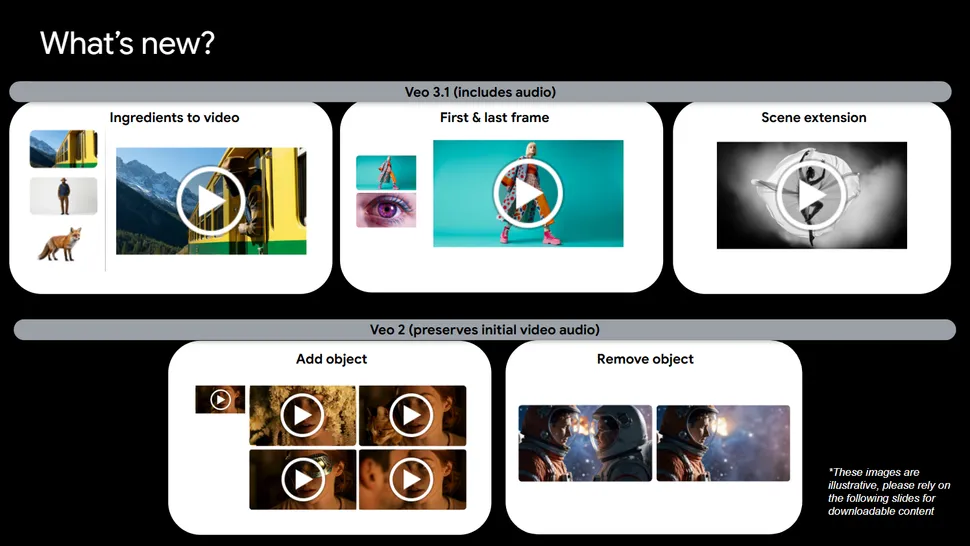
Google DeepMind’s Veo 3.1 combines video generation with audio capabilities. Depending on the workflow, creators can generate scenes with sound, use reference images, extend clips, and guide visual continuity.
The model is available through Google’s creative ecosystem, including Gemini and Google Flow, with access varying by product and plan.
Key features
- Text-to-video and image-to-video generation.
- Native audio generation, including sound effects and dialogue.
- Reference images to help guide characters, objects, and visual style.
- Scene extension and first-frame/last-frame controls in supported workflows.
- Output options that include 1080p and 4K in supported workflows.
Limitations
Generating speech and synchronizing it naturally with complex actions can still be inconsistent. Access, output resolution, and available controls depend on the specific Google product and subscription.
Verdict
Veo 3.1 is among the best AI video generators for creators who need generated audio alongside visuals. It’s particularly relevant for cinematic clips, visual storytelling, and short scenes that benefit from synchronized audio.
Official source: Google DeepMind Veo
3. Adobe Firefly: Best for a Flexible Creative Workflow
Best for: Designers, marketers, and video creators who already use Adobe’s creative tools.
Adobe Firefly is more than a single video model. It provides a creative workspace that includes Adobe’s own generative models and selected partner models.
That distinction matters because you can potentially compare different models within one environment instead of maintaining separate workflows for every provider.
Key features
- Generate video from text and images.
- Access Adobe’s Firefly Video Model and selected partner models.
- Compare outputs from different models in supported workflows.
- Use AI-assisted editing and other creative tools within Adobe’s ecosystem.
- Work alongside other Adobe creative applications.
Adobe’s official video-generation page lists partner models, including Google Veo 3.1 and Luma Ray3, with availability depending on the product and plan.
Limitations
Firefly’s broad model selection doesn’t mean every model is included in every subscription. Generative credits, commercial-use terms, and access can vary by feature and model.
Verdict
Firefly is a sensible option if you need a flexible creative workspace rather than one standalone generator. It’s especially worth considering when video generation is only one part of a broader design and editing process.
Official source: Adobe Firefly AI video generator
4. Luma AI Ray3.14: Best for Controlled Motion and Visual Refinement
Best for: Creators who want to refine existing footage, guide scene transitions, or produce high-quality visual sequences.
Luma’s Ray3 family focuses on cinematic video generation, reference-based control, and video modification. Its Ray3.14 update adds native 1080p generation, faster performance, improved stability, and stronger prompt adherence, according to Luma.
The platform also offers workflows for extending clips, working with keyframes, and modifying visual elements in existing footage.
Key features
- Text-to-video and image-to-video workflows.
- Character references and keyframe-based control in supported features.
- Video modification, including changes to environments or lighting.
- Draft Mode for exploring ideas more quickly.
- Native 1080p generation in Ray3.14, with additional output options depending on workflow.
Limitations
Some of its more advanced controls may take time to learn. Availability and output options can differ between the model, editing feature, and subscription tier.
Verdict
Luma is worth exploring if your project requires more than generating an isolated clip. Its reference and modification workflows may be useful when you need to guide the appearance, movement, or continuity of a scene.
Official source: Luma Ray3
5. ByteDance Seedance 2.5: Best for Multi-Shot Storytelling
Best for: Creators who want to generate longer sequences with connected scenes and reference materials.
Seedance 2.5 was announced by ByteDance’s Seed team on July 31, 2026. The model focuses on longer storytelling, multimodal references, and more precise editing.
One notable capability is its ability to generate clips of up to 30 seconds in a single pass. It can also accept multiple reference materials, helping creators guide the appearance, movement, and style of a sequence.
Key features
- Generate clips of up to 30 seconds in a single pass.
- Extend existing generations across multiple rounds.
- Use multiple image, video, and audio references.
- Generate audio and video together.
- Refine timing and specific sections of a sequence through supported editing controls.
Limitations
Complex actions and interactions can still produce physical inconsistencies. Availability also varies by region and platform; the official announcement lists access through services such as Jimeng AI and Doubao Pro, with API availability handled separately.
Verdict
Seedance 2.5 is worth investigating if your goal is connected storytelling rather than a collection of unrelated short clips. Its longer generation window and reference-based controls may help with narrative sequences, promotional videos, and short films.
Official source: Introducing Seedance 2.5
6. Pika 2.5: Best for Creative Effects and Short-Form Content
Best for: Social media creators, visual experimentation, and short, attention-grabbing clips.
Pika focuses on accessible video creation and effects. Its product ecosystem includes tools for transforming images and footage, changing elements within a scene, and creating stylized visual effects.
Pika 2.5 is identified as its flagship generative video model in the company’s current model listings. The Pika ecosystem also includes separate effects and transformation tools, so not every feature should be assumed to belong to the core model itself.
Key features
- Generate short video clips with expressive motion.
- Use creative effects and transformations.
- Experiment with image-based animation and visual changes.
- Explore specialized tools for modifying existing clips.
- Access supported models through Pika’s creative ecosystem.
Limitations
Specialized effects are not the same as full filmmaking controls. For complex narratives, consistent characters, or tightly directed multi-shot scenes, you may need additional tools and editing.
Verdict
Pika is a useful candidate if you want to experiment with visual ideas or create short-form content for social platforms. Compare its current features and output limits with your intended format before committing to a subscription.
Official source: Pika
7. Kling AI 3.0: Best for Cinematic Motion and Scene Generation
Best for: Creators looking for cinematic movement, detailed scenes, and more directed video generation.
Kling 3.0 appears in current model listings from platforms that offer multiple third-party video generators. It is associated with cinematic shots, motion realism, and prompt adherence.
However, model access through an aggregator is not necessarily identical to access through Kling’s own service. Features, generation limits, and pricing may differ by provider.
Key features to look for
- Text-to-video and image-to-video support.
- Control over scene composition and movement.
- Options for generating cinematic sequences.
- Available reference and continuity controls.
- Output formats and durations suitable for your intended project.
Limitations
Confirm the exact Kling 3.0 feature set on the platform where you plan to use it. Third-party listings can help establish that a model is available, but they do not prove that every feature is offered everywhere.
Verdict
Kling 3.0 is worth comparing with Runway, Veo, and Seedance if cinematic movement is your main priority. Before paying, check its official access options and test whether it handles your specific prompts and scenes reliably.
For a current model listing, see Pika’s model catalog. This is a third-party availability reference, not a substitute for Kling’s own product documentation.
Which AI Video Tools Should You Choose?
Choosing among the best AI video generators in 2026 depends on the video you want to make, your editing workflow, your budget, and how much creative control you need.
| Your main goal | Start by comparing |
|---|---|
| Cinematic shots with detailed prompts | Runway Gen-4.5 |
| Video with generated sound and dialogue | Google Veo 3.1 |
| Video creation within a wider design workflow | Adobe Firefly |
| Refining motion and modifying footage | Luma Ray3.14 |
| Longer sequences and multi-shot stories | Seedance 2.5 |
| Creative effects and social clips | Pika 2.5 |
| Cinematic motion and directed scenes | Kling 3.0 |
These are use-case recommendations based on documented features, not a universal quality ranking. A model that works well for a cinematic landscape may not be the best choice for a talking character or a product demonstration.
What About Free AI Video Generators?
Some of the best AI video generators offer free access, trial credits, or limited generation options. However, free access should not be confused with unlimited use.
Before signing up, check:
- Generation limits: How many clips can you create?
- Watermarks: Are exported videos branded?
- Resolution: Is high-resolution output included?
- Queue times: Are free generations slower?
- Commercial rights: Can you use the results in monetized content or client projects?
- Reference features: Are image-to-video and advanced controls available?
- Regional access: Is the service available in your country?
Free plans change frequently. Check each provider’s current pricing page rather than relying on an older list of free tools.
How to Get Better Results From an AI Video Generator
Even the best AI video generators need clear prompts, useful reference images, and a suitable editing workflow to produce consistent results. Choosing a strong model is only part of the process.
When using text to video AI tools, describe the subject, action, environment, lighting, and camera movement as clearly as possible. Specific instructions give the model more guidance, although results can still vary between generations.
1. Describe the action, not just the subject
Instead of writing:
A woman in a city.
Try:
A woman in a dark coat walks through a rainy city street at night. The camera tracks slowly beside her as reflections from neon signs move across the wet pavement.
The second prompt describes both the subject and the movement.
2. Keep each shot focused
Trying to fit too many actions into a short clip can make the result unpredictable. Start with one main action and one clear camera movement. Add complexity only when necessary.
3. Use reference images when consistency matters
If you need a specific character, product, or visual style, a reference image can help guide the output. Some models also support multiple references, keyframes, or character controls.
4. Expect to edit the results
AI-generated clips may contain unwanted details, inconsistent objects, awkward motion, or timing issues. Review every generation and use a video editor to trim clips, correct pacing, add narration, and assemble the final sequence.
Comparing the best AI video generators with the same prompt can also help you identify which model best matches your visual style and production needs.
For a deeper explanation of prompt structure, see our AI video generator guide.
Frequently Asked Questions
What is the best AI video generators in 2026?
The best AI video generators in 2026 depend on your project. Runway Gen-4.5 is worth comparing for cinematic control, Veo 3.1 for generated audio, Firefly for a multi-model creative workflow, and Seedance 2.5 for longer sequences. Your best choice depends on the output you need and the features available in your plan.
Which AI video generator creates audio?
Google Veo 3.1 supports native audio generation, including sound effects and dialogue. Seedance 2.5 also supports audio-video generation. Exact controls and results vary by model and platform.
Can AI video generators create complete YouTube videos?
They can generate many of the visual clips used in a YouTube video, but a complete production may still require scripting, narration, editing, music, captions, and fact-checking. Script-to-video platforms can automate more of the process, while cinematic generators usually focus on individual scenes or clips.
Are AI-generated videos free to use commercially?
Not automatically. Commercial-use permissions depend on the provider, model, subscription, and applicable terms. Review the relevant license before using generated content in client work, advertisements, or monetized videos.
Is OpenAI Sora still available?
OpenAI’s Sora product was discontinued on April 26, 2026, according to its official page. It should therefore not be treated as a currently available option in a 2026 buying guide.
Official source: OpenAI’s Sora page
Final Thoughts
The best AI video generators in 2026 offer different strengths. Some models prioritize cinematic shots, others generate audio alongside video, and some focus on reference-based editing or longer storytelling.
For beginners, the most practical approach is to choose a tool based on one clear use case, check its current access and pricing, and test a few representative prompts before committing to a paid plan.
You do not need the most advanced model for every project. You need the one that fits your workflow, budget, and required level of control.