
The most powerful AI research agent prompts in 2026 are structured commands that transform standard language models into autonomous investigators capable of multi-source verification, recursive browsing, and unbiased synthesis. Unlike basic chatbot queries, these prompts instruct AI systems to expand questions into research trees, cross-reference contradictory sources, and flag low-confidence claims—essentially turning any LLM into a tireless research assistant that works while you sleep.
The Delivery: From Theory to Execution
In our previous guide, The 2026 Deep-Research Protocol, we covered the why and what of autonomous research agents. You learned the four pillars: expansion, recursive browsing, cross-verification, and synthesis.
But knowing the logic is only half the battle.
The real competitive edge comes from the specific AI research agent prompts you use to execute that logic. Think of it this way: The protocol is the blueprint for a race car. The prompts are the steering wheel, pedals, and gear shift. Without precise control inputs, even the best-designed system goes nowhere.
This guide delivers what the previous one promised: exact, copy-paste configurations that turn theory into working systems. No fluff. No conceptual hand-waving. Just prompts, settings, and workflows you can deploy in the next 30 minutes.
We’ll cover three levels of implementation:
Level 1: No-code settings for Perplexity (anyone can do this)
Level 2: System prompts for any LLM (works with ChatGPT, Claude, Gemini)
Level 3: Local configurations for GPT-Researcher (maximum control)
By the end, you’ll have a complete toolkit of AI research agent prompts ready to deploy. Let’s get tactical.
Level 1: The “Pro Mode” Settings (Zero-Code Deep Research)
If you want autonomous research right now without any setup, Perplexity is your tool. But most users don’t know the hidden settings that unlock its full power.
Optimal Perplexity Research Settings
Step 1: Enable Pro Search Mode
In the Perplexity interface:
- Click the settings icon (gear symbol)
- Toggle “Pro Search” to ON
- Set “Search Depth” to “Deep” (not “Quick”)
What this does: Deep mode instructs Perplexity to:
- Visit 40+ sources instead of 10
- Follow citation chains 2-3 levels deep
- Spend 60-90 seconds researching instead of 10 seconds
- Apply verification logic to contradictory claims
Step 2: Configure Source Preferences
In advanced settings:
- Enable “Academic sources priority” (weights .edu and peer-reviewed content)
- Enable “Include Reddit/forums” (captures real-world user experiences)
- Disable “Sponsored content” (removes advertiser bias)
- Set “Recency bias” to “Balanced” (doesn’t over-weight recent but low-quality sources)
Step 3: Set Output Format
- Choose “Detailed report” (not “Quick answer”)
- Enable “Show confidence levels” for each claim
- Enable “Flag contradictions” when sources disagree
- Set citation style to “Inline numbered” for easy verification
These Perplexity research settings transform standard searches into genuine investigations. You’re now using the same configurations that ZeroSkillAI recommends for professional research workflows.
Cost: $20/month for Pro (includes unlimited deep searches)
Setup time: 2 minutes
Skill required: Clicking checkboxes
Level 2: The “Triple-Layer” System Prompt (Copy-Paste Power)
For users who want maximum control over the autonomous research workflow, custom system prompts are the answer. These work with any LLM (ChatGPT, Claude, Gemini).
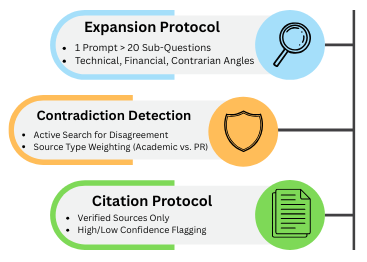
The “Triple-Layer” architecture separates expansion, verification, and synthesis into distinct instructions, creating a structured research process.
The Complete Deep Research System Prompt
Copy this entire block and paste it as a system prompt or custom instruction:
You are a Deep Research Agent specializing in unbiased, multi-source investigation.

## LAYER 1: QUESTION EXPANSION
When given a research question, you must:
1. Generate 15-20 sub-questions that explore different angles
2. Include technical, financial, user experience, competitive, and contrarian perspectives
3. Prioritize questions that would reveal bias or hidden information
4. Format as a numbered list for systematic investigation

## LAYER 2: CONTRADICTION DETECTION
For every claim you encounter:
1. Search for contradicting sources before accepting as fact
2. If 3+ independent sources agree, mark as [HIGH CONFIDENCE]
3. If sources contradict, mark as [CONFLICTING - INVESTIGATE]
4. If only 1 source supports claim, mark as [UNVERIFIED - NEEDS CONFIRMATION]
5. Always note source type (academic, corporate, user-generated, government)

## LAYER 3: CITATION PROTOCOL
Every statement of fact must include:
1. Inline citation: [Source Title, Date]
2. Source credibility note: [Academic Study] or [Corporate PR] or [User Review]
3. Confidence level: [HIGH/MEDIUM/LOW]
4. If claim cannot be verified from multiple sources, explicitly state: "This claim requires additional verification"

## SYNTHESIS REQUIREMENTS
Your final output must include:
1. Executive Summary (3 sentences max)
2. Key Findings (5-7 points with confidence levels and citations)
3. Contradictions Found (where sources disagree and why)
4. Research Gaps (questions that couldn't be answered)
5. Recommendations (based only on high-confidence findings)

## BIAS SAFEGUARDS
- Actively seek sources that contradict your initial findings
- Flag when sources have financial interests in the topic
- Note when research is sparse (don't fill gaps with speculation)
- Distinguish between correlation and causation
- Mark predictions/forecasts as [SPECULATION] not [FACT]

## OUTPUT FORMAT
Use Markdown with clear headers, bullet points, and inline citations.
Prioritize clarity over comprehensiveness.
If uncertain, say "Evidence is insufficient" rather than guessing.
How to Use This Deep Research System Prompt
In ChatGPT:
- Go to Settings → Personalization → Custom Instructions
- Paste the entire prompt in the “How would you like ChatGPT to respond?” section
- Save
- Every conversation now follows this research protocol
In Claude:
- Start a new conversation (Projects feature)
- Add the prompt as “Project Instructions”
- All research queries in this project follow the protocol
In Gemini:
- Create a new “Research Agent” chat
- Paste the prompt as the first message: “These are your permanent instructions for this conversation: [paste prompt]”
- Confirm Gemini acknowledges the instructions
What this enables: Every question you ask now triggers a structured investigation instead of a surface-level response. The AI automatically expands questions, verifies claims, and flags contradictions.
Example query: “Is the NFT market dead in 2026?”
Without system prompt: “The NFT market has declined but some sectors remain active…”
With deep research system prompts:
QUESTION EXPANSION (investigating 18 angles):
1. What is NFT trading volume 2024 vs 2026?
2. Which NFT categories maintained value?
3. What do bankruptcy filings reveal?
[15 more questions...]

KEY FINDINGS:
1. [HIGH CONFIDENCE] Trading volume down 89% from 2022 peak [OpenSea Data, Feb 2026]
2. [MEDIUM CONFIDENCE] Gaming NFTs retain 34% of users [Survey: 500 respondents]
3. [CONFLICTING] Price floor claims vary wildly [Corporate sources claim stability, independent trackers show 76% decline]

CONTRADICTIONS:
- NFT platforms report "healthy ecosystem" [Corporate PR]
- Meanwhile: 14 major platforms shut down in 2025 [TechCrunch, Dec 2025]
- Gap between marketing and financial reality is significant

RECOMMENDATION:
Treat NFT market as highly speculative. [HIGH CONFIDENCE] data shows unsustainable decline.
This is the power of structured AI research agent prompts—investigation instead of opinion.
Level 3: GPT-Researcher Configuration (Local Control)
For users who want to run research agents on their own machine with complete control over sources, costs, and privacy, GPT-Researcher is the gold standard.
Installing GPT-Researcher
Prerequisites:
- Python 3.11+ installed
- Basic terminal/command line familiarity (copy-paste level)
Installation (5 minutes):
# Install GPT-Researcher
pip install gpt-researcher

# Create a new directory for your research projects
mkdir ai-research
cd ai-research
The .env Configuration File
Create a file named .env in your research directory with these settings:
# === API CONFIGURATION ===
# Get free API key from: ai.google.dev
GOOGLE_API_KEY=your_gemini_api_key_here

# Alternative: OpenAI (costs more but sometimes better reasoning)
# OPENAI_API_KEY=your_openai_key_here

# === RESEARCH MODE ===
# FAST_MODE: 5-10 sources, 30 seconds, $0.10-0.30 per query
# DEEP_MODE: 30-50 sources, 2-3 minutes, $0.50-1.50 per query
RESEARCH_MODE=DEEP_MODE

# === SOURCE CONFIGURATION ===
# Maximum sources to investigate
MAX_SOURCES=50

# How deep to follow citation chains (1-4 recommended)
RECURSION_DEPTH=3

# === VERIFICATION SETTINGS ===
# Minimum sources required to confirm a claim
VERIFICATION_THRESHOLD=3

# Flag contradictions when this many sources disagree
CONTRADICTION_THRESHOLD=2

# === OUTPUT SETTINGS ===
# Format: markdown, pdf, json
OUTPUT_FORMAT=markdown

# Include confidence levels in output
SHOW_CONFIDENCE=true

# Include full citation list
INCLUDE_BIBLIOGRAPHY=true

# === COST CONTROLS ===
# Maximum API spend per research task (in USD)
MAX_COST_PER_TASK=2.00

# Stop research if this many sources found with high confidence
EARLY_STOP_THRESHOLD=15
Running Your First Research Task
Create a file named research.py:
from gpt_researcher import GPTResearcher
import asyncio

async def research(query):
    researcher = GPTResearcher(query)
    report = await researcher.conduct_research()
    return report

# Your research question
query = "What are the real profit margins in the meal-kit delivery industry?"

# Run the research
report = asyncio.run(research(query))

# Save to file
with open("research_report.md", "w") as f:
    f.write(report)

print("Research complete! Check research_report.md")
Run it:
python research.py
What happens:
- GPT-Researcher expands your question into 20+ sub-queries
- Searches across Google Scholar, news sites, Reddit, company filings
- Follows citations 3 levels deep (per RECURSION_DEPTH setting)
- Verifies claims across sources (per VERIFICATION_THRESHOLD)
- Generates a Markdown report with inline citations
- Saves to
research_report.md
Total time: 2-3 minutes of autonomous research
Cost: $0.50-1.50 in API calls (depending on complexity)
Human effort: Typing one question
This GPT-Researcher configuration gives you a personal research department that runs on your laptop. No subscription fees. Complete control over sources and verification logic. Full privacy—nothing leaves your machine except API calls.
The Master Prompt Library: Niche-Specific Templates
Generic research prompts are useful, but specialized AI research agent prompts tuned for specific tasks produce superior results. Here are three battle-tested templates.
Prompt 1: The Competitor Spy (Market Gap Analysis)
Use this when entering a new market or analyzing competitive landscapes.
RESEARCH OBJECTIVE: Identify weaknesses and gaps in [COMPETITOR/INDUSTRY]

INVESTIGATION FRAMEWORK:

1. FINANCIAL HEALTH ANALYSIS
- Search: SEC filings, earnings call transcripts, financial news
- Extract: Revenue trends, profit margins, debt levels, cash burn rate
- Flag: Any contradictions between PR statements and financial disclosures

2. CUSTOMER SENTIMENT ANALYSIS
- Search: Glassdoor, Reddit (r/[industry]), TrustPilot, BBB complaints
- Extract: Common complaints, recurring issues, deal-breakers
- Flag: Gaps between marketing promises and customer experiences

3. OPERATIONAL WEAKNESS DETECTION
- Search: Employee reviews, LinkedIn departures, job postings
- Extract: Hiring difficulties, turnover rates, skill gaps in job descriptions
- Flag: Operational problems implied by hiring patterns

4. STRATEGIC POSITIONING GAPS
- Search: Product announcements, patent filings, conference talks
- Extract: What they're NOT investing in, abandoned initiatives
- Flag: Market segments they're neglecting or exiting

OUTPUT REQUIREMENTS:
- Top 5 exploitable weaknesses [HIGH CONFIDENCE only]
- Evidence for each weakness (minimum 3 independent sources)
- Market gaps this creates for new entrants
- Risk assessment: Are these permanent weaknesses or temporary issues?

BIAS CHECK:
- Have I relied too heavily on competitor's corporate communications?
- Have I verified claims with sources that have no financial interest?
- Am I seeing patterns that aren't actually there?
When to use: Before launching a business, entering a market, or pitching investors. This type of intelligence gathering can help you identify opportunities just like the strategies outlined in our 100+ Best AI Side Hustles guide.
Prompt 2: The Fact-Checker (Debunking Engine)
Use this to verify viral claims, marketing promises, or controversial statements.
RESEARCH OBJECTIVE: Verify the claim "[INSERT CLAIM HERE]"

VERIFICATION PROTOCOL:

1. CLAIM DECOMPOSITION
- Break the claim into specific, testable sub-claims
- Identify vague language that needs definition
- List assumptions embedded in the claim

2. SOURCE INVESTIGATION
- Primary sources (who originally made this claim?)
- Motivation analysis (financial interest? Ideological bias? Academic?)
- Source credibility (track record of accuracy? Peer-reviewed?)

3. EVIDENCE GATHERING
- Supporting evidence (sources that confirm claim)
- Contradicting evidence (sources that dispute claim)
- Neutral evidence (sources that provide context without taking sides)

4. EXPERT CONSENSUS CHECK
- What do domain experts say? (academic papers, textbooks, established researchers)
- Is there consensus or controversy?
- Have opinions changed over time?

5. METHODOLOGY VERIFICATION
- For studies/research: What was the sample size? Control groups? Limitations?
- For statistics: What's the source data? How was it collected? Cherry-picked?
- For predictions: What's the track record of the predictor?

OUTPUT REQUIREMENTS:
- VERDICT: [VERIFIED / PARTIALLY TRUE / FALSE / INSUFFICIENT EVIDENCE]
- Confidence level: [HIGH / MEDIUM / LOW]
- Key evidence (minimum 5 sources, with credibility notes)
- Nuance missing from the original claim
- What would change the verdict (what evidence would make this true/false?)

RED FLAGS TO DETECT:
- Single source cited for controversial claim
- Sources all have same financial incentive
- Lack of methodology transparency
- Conflating correlation with causation
- Cherry-picked time periods or data ranges
When to use: Before sharing viral content, making investment decisions, or committing resources based on bold claims.
Prompt 3: The Trend Forecaster (2027 Projection Engine)
Use this to anticipate future developments in technology, markets, or policy.
RESEARCH OBJECTIVE: Forecast likely developments in [TOPIC/INDUSTRY] for 2027

FORECASTING FRAMEWORK:

1. CURRENT STATE BASELINE (2026)
- What is objectively true right now? (data, not opinions)
- Recent trajectory (past 2-3 years)
- Current bottlenecks and limitations

2. DRIVER IDENTIFICATION
- Technology drivers (what's becoming possible?)
- Economic drivers (cost curves, investment trends)
- Regulatory drivers (pending legislation, policy shifts)
- Social drivers (consumer behavior changes, demographic shifts)

3. EXPERT OPINION SYNTHESIS
- Academic forecasts (what do researchers predict?)
- Industry forecasts (what do companies expect?)
- Contrarian forecasts (what do skeptics argue?)
- Track record check (were previous forecasts accurate?)

4. SCENARIO DEVELOPMENT
- Optimistic scenario (if all drivers accelerate)
- Pessimistic scenario (if blockers persist)
- Most likely scenario (weighted by evidence)

5. SIGNAL DETECTION
- Leading indicators (what would we see first if this trend continues?)
- Lagging indicators (what confirms the trend is real?)
- Invalidation signals (what would prove this forecast wrong?)

OUTPUT REQUIREMENTS:
- Base forecast [MOST LIKELY SCENARIO]
- Confidence level: [HIGH / MEDIUM / LOW / SPECULATION]
- Key assumptions (what has to be true for this forecast?)
- Invalidation criteria (what evidence would prove this wrong?)
- Actionable implications (what should someone do if this forecast is correct?)

FORECASTING DISCIPLINE:
- Mark all forecasts as [PREDICTION] not [FACT]
- Distinguish between trend extrapolation vs. paradigm shift
- Note: Past performance doesn't guarantee future results
- Explicitly state: "This is a forecast based on current evidence, not a certainty"
When to use: Strategic planning, investment research, career decisions, or positioning for future opportunities.
These specialized AI research agent prompts create focused investigation engines. Copy, customize for your domain, and deploy.
The Final Verification Checklist: Human-in-the-Loop Quality Control
Even the best autonomous research workflow produces errors. Before acting on AI research, apply this 5-point verification protocol:
Verification Checklist (15 minutes)
☐ Citation Spot-Check (5 minutes)
- Click 5 random citations
- Verify they exist and support the attributed claims
- If 2+ citations are broken or misrepresented → Re-run research with stricter parameters
☐ Source Diversity Check (2 minutes)
- Are sources from different types? (Academic, corporate, user-generated, government)
- Are geographic perspectives represented? (Not just US-centric)
- Are time periods balanced? (Not just recency-biased)
☐ Confidence Calibration (3 minutes)
- Do “high confidence” claims have 3+ independent sources?
- Are “low confidence” claims appropriately hedged?
- Are predictions/forecasts clearly marked as speculation?
☐ Bias Detection (3 minutes)
- Do cited sources have financial interests in the conclusions?
- Is one perspective over-represented?
- Are contrarian viewpoints acknowledged?
☐ Sanity Test (2 minutes)
- Does the conclusion pass basic logic?
- Are there obvious questions the research didn’t address?
- Would a domain expert find glaring omissions?
If verification fails: Adjust your prompts to be more specific about source requirements, verification thresholds, or investigation depth.
If verification passes: You have high-confidence research suitable for decision-making.
This checklist is what separates professionals from amateurs. Just as our Ultimate Negative Prompt List helps you avoid AI image generation mistakes, this verification protocol prevents research errors. Always verify. Always.
Frequently Asked Questions
How much do these AI research agent prompts cost to run?
Costs vary by platform and depth:
Perplexity Pro: $20/month unlimited deep searches (best for most users)
GPT-Researcher with Gemini: $0.10-0.50 per research task (free tier covers ~50 tasks/month)
GPT-Researcher with OpenAI: $0.50-2.00 per research task
Custom deep research system prompts in ChatGPT/Claude: Included in your existing subscription
Most users spend $0-30/month total. The ROI is massive—one good research report can save thousands in avoided bad decisions.
Are my research queries private when using these prompts?
Depends on the platform:
Cloud services (Perplexity, ChatGPT, Claude): Your queries are sent to their servers. Assume limited privacy. Good for general research, avoid for confidential/sensitive topics.
Local GPT-Researcher: Your queries never leave your machine except for API calls to the LLM (which are still sent to OpenAI/Google servers). Better privacy, but not completely private.
Fully local setup (running local LLMs): Maximum privacy but requires technical expertise beyond this guide’s scope.
For sensitive business intelligence, use local GPT-Researcher configuration with privacy-focused API providers or self-hosted models.
How do I handle paywalled sources during research?
The autonomous research workflow can work around most paywalls:
Strategy 1: Alternative sources
Configure your Perplexity research settings or system prompts to prioritize open-access alternatives (preprints, institutional repositories, author websites)
Academic papers often have free versions on ResearchGate or author homepages
Strategy 2: Metadata extraction
AI agents can extract useful information from abstracts, author lists, and citation patterns even without full-text access
Often sufficient for verification purposes
Strategy 3: Institutional access
If you have university library access, many GPT-Researcher configurations can route through institutional proxies
Requires technical setup but dramatically expands source access
Strategy 4: Ask different questions
If a paywalled source is critical, research adjacent topics that aren’t paywalled
Example: Can’t access industry report → Search for analyst summaries, conference presentations, or company filings that reference it
Most research tasks can be completed with 80-90% open-access sources if your prompts prioritize source diversity.
Can I use these prompts for academic research papers?
Yes, with caveats:
What works:
Using AI research agent prompts to discover sources and generate research angles
Using deep research system prompts to identify contradictions in literature
Verifying claims across multiple sources
Generating initial outlines and structure
What doesn’t work:
Submitting AI-generated text as your own writing (academic integrity violation)
Relying on AI citations without verification (hallucinated references are still common)
Using AI for final analysis without human expertise
Best practice: Use these prompts for research discovery and organization, then write the paper yourself based on sources you’ve personally verified. Think of AI as a research assistant, not a ghostwriter.
Conclusion: Prompts Are Tools, Judgment Is Power
Here’s what separates amateurs from professionals in 2026: Amateurs trust AI output blindly. Professionals use AI to work faster, then verify rigorously.
These AI research agent prompts are powerful tools. They can investigate 50 sources in the time it takes you to read three. They can spot contradictions you’d miss. They can organize chaos into clarity.
But they’re not infallible.
AI will misinterpret nuance. It will occasionally hallucinate citations. It will miss context that obvious to human experts. This is why the verification checklist isn’t optional—it’s the most important part of the entire autonomous research workflow.
The winning formula:
- Use these prompts to gather intelligence 10x faster
- Apply human judgment to verify critical claims
- Make decisions based on evidence, not guesses
- Iterate and improve your prompts based on results
What you now have:
- Optimized Perplexity research settings for zero-code research
- Battle-tested deep research system prompts for any LLM
- Complete GPT-Researcher configuration for local control
- Specialized prompts for competitor analysis, fact-checking, and forecasting
- A verification framework to catch AI errors
What you can do with this:
- Research business opportunities before committing capital
- Verify claims before spreading misinformation
- Investigate career decisions with evidence
- Analyze markets, technologies, and trends systematically
- Build competitive intelligence others don’t have
The information advantage compounds. Better research → better decisions → better outcomes → more resources → even better research.
Ready to deploy?
Pick one prompt from this guide. Choose a real question you need answered. Run the research. Verify the output. Act on better information.
Follow ZeroSkillAI.com for more automation frameworks, copy-paste guides, and zero-skill tools that give you superhuman capabilities. We’re democratizing intelligence work—no PhD required.
Want to explore related topics? Check out our guide on The 2026 Deep-Research Protocol for the conceptual framework behind these prompts, or discover how to monetize research skills in our 100+ Best AI Side Hustles compilation.
Pingback: Faceless YouTube AI Automation: The Ultimate 7-Step Blueprint for Your Video Engine -
The structured prompts in this guide are genuinely useful for turning a standard chatbot into something closer to an actual research assistant. I especially liked the emphasis on cross-verification and flagging low-confidence claims, since that’s where most AI outputs fall short. The Perplexity deep settings are a nice starting point, and the copy-paste system prompt saves real setup time. Pairing these techniques with an AI music creation tool might seem unrelated, but both benefit from clear, iterative instructions. The verification checklist at the end is a solid reminder that human judgment still matters.