
Let’s be honest: Google Search is broken for students.
You type “causes of the French Revolution” and get:
- 5 sponsored ads for history textbooks
- A recipe blog (somehow)
- Wikipedia (which your professor banned)
- SEO-optimized garbage written by bots in 2019
- Maybe, maybe, a useful source buried on page 3
Then you spend 45 minutes clicking links, opening 20 tabs, losing track of which source said what, and ultimately writing your essay from memory while hoping you don’t accidentally plagiarize.
There’s a better way. It’s called Perplexity AI, and it’s about to cut your research time by 90%.
Perplexity AI is what happens when ChatGPT and Google Search have a baby, and that baby becomes an obsessive librarian who actually cites its sources. You ask a question. It searches the entire internet in real-time. It synthesizes an answer. And—this is the critical part for students—it shows you exactly where every fact came from with clickable citations.
No more guessing if the AI is hallucinating. No more scrolling through SEO spam. No more “I swear I read this somewhere but can’t find the source.” Just direct answers with academic-grade citations you can actually use in your papers.
This isn’t just another homework AI tool. This is the best AI for students who want accurate information fast without risking academic integrity. And unlike ChatGPT’s knowledge cutoff, Perplexity AI pulls from the live web—meaning it knows what happened yesterday, not just what was on the internet in 2023.
If you’re still Googling your homework questions in 2026, you’re working 10x harder than you need to. Let me show you why Perplexity is the academic research tool that actually understands what students need.
What is Perplexity AI? (Simpler Than ChatGPT for Research)
Think of Perplexity AI as your personal research assistant who:
- Searches the entire internet instantly
- Reads dozens of sources in seconds
- Summarizes the answer clearly
- Cites every single claim with footnotes
It’s fundamentally different from ChatGPT:
ChatGPT:
- Generates answers from its training data (knowledge cutoff in October 2023)
- Doesn’t search the web unless you have ChatGPT Plus with browsing enabled
- Can “hallucinate” facts confidently (make stuff up)
- Doesn’t cite sources by default
Perplexity AI:
- Searches the live web for every query
- Synthesizes information from multiple current sources
- Cites every fact with numbered references [like this]
- Designed specifically for research and information retrieval
The key difference: ChatGPT knows what it was trained on. Perplexity AI knows what’s on the internet right now.
For students, this is game-changing. When your history professor asks about recent archaeological discoveries or your political science class requires current event analysis, ChatGPT is useless. Perplexity AI pulls from today’s news, yesterday’s journal publications, and this morning’s research papers.
Why Perplexity is the Ultimate “Homework AI” Tool
Feature 1: Citations (No More Fake Quotes)
This is the killer feature for students. Every answer Perplexity AI gives you includes numbered citations that link directly to sources:
Example query: “What were the main causes of World War I?”
Perplexity’s answer might look like: “The main causes of World War I included militarism, alliances, imperialism, and nationalism [1]. The assassination of Archduke Franz Ferdinand in 1914 acted as the immediate trigger [2], but underlying tensions had been building for decades due to colonial competition [3] and the complex web of European alliances [4].”
Each number [1][2][3][4] is a clickable link to:
- Academic papers
- News articles
- Government websites
- Educational institutions
- Primary source documents
Why this matters for homework:
- You can verify every fact before using it
- You have real sources to cite in your bibliography
- Your professor can check your work (and see you used legitimate sources)
- No risk of citing AI-generated hallucinations
Compare this to ChatGPT: If you ask ChatGPT the same question, it gives you an answer but zero sources. You have no idea if it’s accurate, outdated, or completely fabricated. Using that answer in an essay without verification is academic Russian roulette.
Perplexity AI eliminates that risk. It’s the AI citation generator students actually need.
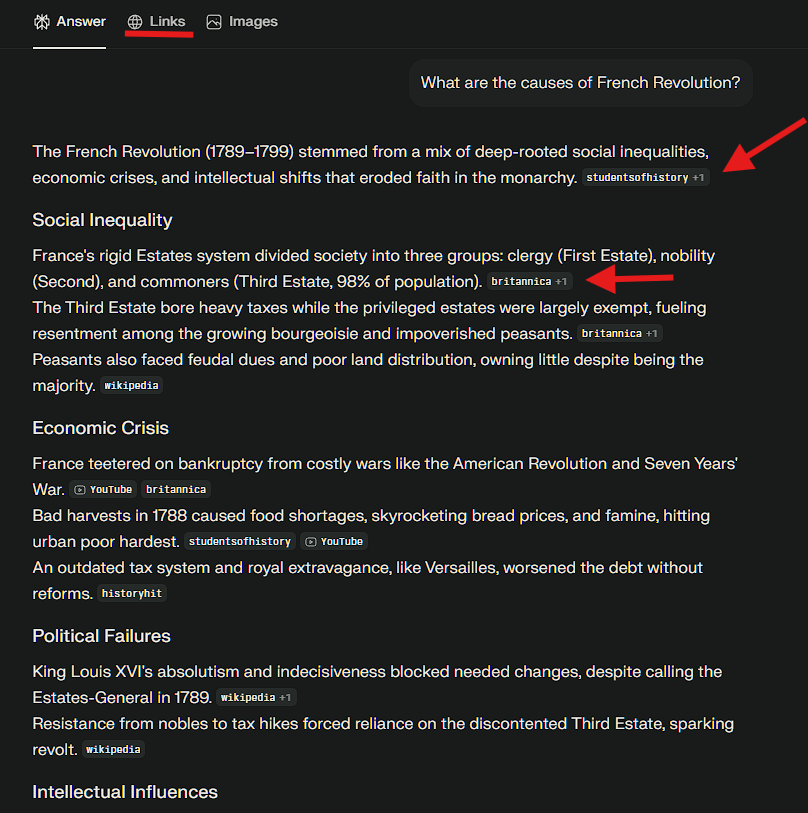
Feature 2: Pro Search (Deep Research Mode)
The free version of Perplexity AI is great for quick questions. But Pro Search (available in the paid tier, but you get 5 free uses daily) is where it becomes a legitimate academic research tool.
How Pro Search works:
- You ask a broad question
- Perplexity asks you follow-up questions to clarify
- It narrows the search based on your answers
- It delivers a hyper-focused, comprehensive answer
Example:
You: “What’s the impact of social media on mental health?”
Perplexity (Pro Search): “I’ll help you research this. A few questions:
- Are you focusing on a specific age group (teens, adults, elderly)?
- Which platforms are you most interested in (Instagram, TikTok, Facebook)?
- Are you looking at specific mental health outcomes (anxiety, depression, body image)?
- Do you need recent studies (last 2 years) or a historical perspective?”
You: “Teens, Instagram and TikTok, anxiety and depression, recent studies.”
Perplexity: Now delivers a focused answer citing 2024-2025 research specifically about teen anxiety/depression related to Instagram/TikTok usage, with proper academic citations.
This is insanely useful for thesis papers, research projects, or any assignment requiring depth. Instead of wading through irrelevant Google results, you get laser-focused research in minutes.
Need help with math homework instead of research? Perplexity is great for text-based subjects, but for solving complex math, physics, or chemistry problems step-by-step, check out our Gauth AI Review. That tool specializes in STEM homework with visual problem-solving.
Feature 3: Collections (Organize Research by Class)
Perplexity AI lets you create “Collections”—basically folders for different research projects or classes.
How to use Collections:
Create a Collection for each class:
- “History 101 – French Revolution”
- “Biology 202 – Genetics”
- “Econ 305 – Macroeconomic Policy”
Save relevant searches: Every time you research something, save it to the appropriate Collection. When you need to review for exams or write papers, all your research is organized in one place.
Share with study groups: Collections can be shared with classmates. Your entire study group can contribute research to a shared Collection, building a collaborative knowledge base.
This feature transforms Perplexity AI from a search tool into a research management system. No more losing track of that perfect source you found three weeks ago. Everything’s saved and organized.
Perplexity vs. The Competition (2026 Edition)
Let’s compare the main tools students actually use for homework:
| Feature | Google Search | ChatGPT (Free) | Perplexity AI |
|---|---|---|---|
| Real-time info | ✅ Yes | ❌ Cutoff (Oct 2023) | ✅ Yes |
| Cited sources | ⚠️ Manual (you find them) | ❌ No citations | ✅ Automatic footnotes |
| Ad-free results | ❌ Ads everywhere | ✅ No ads | ✅ No ads |
| Summarizes info | ❌ No (just links) | ✅ Yes | ✅ Yes |
| Academic reliability | ⚠️ Depends on source | ⚠️ Can hallucinate | ✅ Cites sources |
| Ask follow-ups | ❌ No | ✅ Yes | ✅ Yes (better context) |
| Cost | Free | Free | Free (Pro: $20/mo) |
| Best for | Finding specific sites | Creative writing | Research & homework |
The verdict:
- Use Google: When you need a specific website or shopping
- Use ChatGPT: When you need creative help (brainstorming, outlining, rewriting)
- Use Perplexity AI: When you need accurate, cited information for academic work
Perplexity vs Google isn’t even a fair fight for students. Google gives you a list of links. Perplexity gives you the answer with the links. One takes 5 minutes, the other takes 30 seconds.
How to Use Perplexity for School (Zero Skill Workflows)
Scenario 1: Writing an Essay from Scratch
The old way:
- Google your topic
- Click 10-15 links
- Read articles trying to find relevant info
- Take notes
- Lose track of sources
- Write essay from memory
- Panic because you can’t find that one quote
- Spend another hour relocating sources
- Finally finish Time: 4-6 hours
The Perplexity way:
Step 1: Outline with Perplexity (10 minutes)
Prompt:
I'm writing a 5-page essay on the causes of the American Civil War.
What should my main sections be? Give me a clear outline.
Perplexity generates a structured outline with major themes.
Step 2: Research each section (5 minutes per section)
Prompt for each section:
For my essay section on "Economic Differences Between North and South,"
what are the key points I should cover? Include specific examples and statistics.
Perplexity gives you detailed info with citations [1][2][3] you can click through.
Step 3: Collect sources (automatic)
Click on the citation numbers to view the actual sources. Copy the URLs for your bibliography. Perplexity has already done 90% of your research—you just need to verify and take notes.
Step 4: Write the essay (in your own words)
Use the information to write your essay. DO NOT copy-paste Perplexity’s text. That’s plagiarism. Use it for research and understanding, then write in your own voice.
Time: 1-2 hours total
Savings: 3-4 hours of research drudgery
Scenario 2: Summarizing Long PDFs
The Problem: Your professor assigned a 50-page journal article. You have three other classes. You don’t have time to read 50 pages.
The Solution: Perplexity AI can summarize uploaded PDFs.
How to do it:
- Upload the PDF to Perplexity
- Ask: “Summarize the main arguments of this paper in 3 paragraphs”
- Follow up: “What methodology did they use?”
- Follow up: “What were their key findings?”
- Follow up: “What are the limitations of this study?”
In 5 minutes, you understand the paper well enough to:
- Participate in class discussion
- Write a response paper
- Cite it accurately in your essay
Pro tip: Use this for literature reviews. Upload 5-10 papers, summarize each, and you’ve got your lit review foundation done.
Scenario 3: Fact-Checking and Verification
The Problem: You found a claim on social media or in a random article. You need to verify if it’s true before using it in your paper.
The Solution: Ask Perplexity AI to fact-check.
Example: Claim: “The Great Wall of China is visible from space.”
Prompt:
Is the Great Wall of China actually visible from space?
What do astronauts and scientists say? Cite your sources.
Perplexity’s answer: “No, the Great Wall of China is not visible from space with the naked eye [1]. This is a common myth. Astronauts, including those from NASA, have confirmed that the wall is too narrow to be seen from low Earth orbit without magnification [2]. Even from the International Space Station, the wall is not distinguishable [3].”
Each number links to NASA, scientific journals, or credible news sources. You now have verified information you can confidently use.
This saves you from:
- Using false information in essays
- Losing credibility with professors
- Accidentally spreading misinformation
Smart Strategies: Perplexity + Other Tools
Perplexity AI is incredible for research, but combining it with other tools creates the ultimate student workflow:
The Research → Presentation Pipeline
Step 1: Research your topic with Perplexity AI (gather sources, get cited info)
Step 2: Turn that research into a presentation with Gamma App
Paste your Perplexity research notes into Gamma, and it auto-generates a professional slide deck in seconds. Perfect for class presentations or group projects.
The Complete Homework Stack
Different subjects need different tools. Here’s the optimal stack:
For research and essays: Perplexity AI (you’re reading about it now)
For math/science problems: Gauth AI (step-by-step problem solving)
For creating presentations: Gamma App (turn research into slides)
For creative writing: ChatGPT (brainstorming, outlining, feedback)
For citations/bibliography: Zotero or EasyBib (auto-format your sources)
Perplexity excels at information retrieval, but it’s part of an ecosystem. Use the right tool for each job.
Want to see the full list? Check out our comprehensive guide to the 10 Best Free AI Tools for Students to see where Perplexity ranks alongside other essential tools for school.
Free vs. Pro: Is It Worth Paying?
Perplexity AI has two tiers:
Free Tier (Totally Usable)
What you get:
- Unlimited basic searches
- Citations on every answer
- Web search integration
- Collections for organizing research
- 5 Pro Searches per day
What you don’t get:
- Unlimited Pro Search (the deep research mode)
- Access to GPT-4, Claude, and other premium models
- File upload for larger documents
Who it’s for: 95% of students. The free tier is genuinely powerful enough for most homework needs.
Pro Tier ($20/month)
What you get:
- Unlimited Pro Searches (the clarifying questions feature)
- Access to GPT-4, Claude 3.5 Sonnet, and other advanced models
- Upload larger files (PDFs, docs)
- $5/month per user for students (50% discount with .edu email)
Who it’s for:
- Graduate students doing thesis research
- Students writing major research papers (20+ pages)
- Anyone who maxes out the 5 daily Pro Searches regularly
Is it worth $10/month (student price)?
Yes if:
- You’re in a research-heavy major (history, political science, literature)
- You’re writing a thesis or capstone project
- You regularly need to analyze academic papers
No if:
- You’re in a STEM major where you need problem-solving more than research (use Gauth AI instead)
- You’re doing basic homework and the free tier covers your needs
- You’re on a tight budget (free tier is genuinely excellent)
My recommendation: Start with free. If you find yourself hitting the 5 Pro Search limit daily, upgrade to Pro. Most students never need it.
The Academic Integrity Question (Use Responsibly)
Let’s address the elephant in the classroom: Is using Perplexity AI cheating?
Short answer: Not if you use it correctly.
How it’s NOT cheating:
- Using it to find credible sources (same as Google, but better)
- Using it to understand complex topics (same as asking a tutor)
- Using it to verify facts and check claims
- Using it to organize research notes
How it IS cheating:
- Copy-pasting Perplexity’s answers directly into your essay
- Using it to write essays with AI without attribution
- Submitting AI-generated text as your own work
- Not actually reading the sources it cites
The ethical rule: Use Perplexity AI as a research tool, not a writing replacement.
Good workflow:
- Ask Perplexity for information
- Click through to the cited sources
- Read the actual articles/papers
- Take your own notes
- Write the essay in your own words
- Cite the original sources (not Perplexity itself)
Bad workflow:
- Ask Perplexity for information
- Copy-paste directly into essay
- Submit
- Get caught by plagiarism detection
Think of Perplexity as a librarian: A librarian finds you the books you need, but you still have to read them and write the paper yourself. That’s how you should use Perplexity AI.
Privacy and Data: What Does Perplexity Know?
Important for students to know:
What Perplexity stores:
- Your search queries
- Your Collections (research folders)
- Usage patterns
What it doesn’t store:
- Personal documents you upload (they’re processed, not saved)
- Credit card info if you’re on free tier
- Your location (unless you allow it)
Can your school track your Perplexity usage?
No. Unlike ChatGPT or Google, Perplexity doesn’t integrate with school platforms. Your searches are private. Your professors can’t see what you researched.
Can Perplexity detect if you copy-pasted its text?
No. But your school’s plagiarism detector can. Don’t copy-paste. Always write in your own words.
Common Student Questions (FAQ)
Can I cite Perplexity AI in my bibliography?
No. Cite the original sources that Perplexity references, not Perplexity itself.
Wrong:
"According to Perplexity AI, the French Revolution began in 1789."
Right:
"The French Revolution began in 1789 (Doyle, 2001)."
[Use the source Perplexity cited, which you clicked through and verified]
Does Perplexity work for STEM subjects?
Yes, but with limitations.
Good for:
- Understanding scientific concepts
- Finding recent research papers
- Explaining complex theories
- Literature reviews
Not ideal for:
- Step-by-step math problem solving (use Gauth AI instead)
- Chemical equation balancing
- Detailed physics calculations
Perplexity AI explains why and what. For how to solve, use specialized STEM tools.
Can teachers detect if I used Perplexity?
Not directly. But they can detect if you:
- Copy-pasted AI text (plagiarism detectors flag this)
- Cited sources you clearly didn’t read
- Used vocabulary way above your normal level
- Suddenly started writing perfectly structured essays
How to avoid suspicion:
- Always rewrite in your own voice
- Actually read the sources you cite
- Maintain your natural writing style
- Show your work (include research notes if asked)
Is Perplexity better than ChatGPT for homework?
Yes, for research-based assignments.
Use Perplexity when:
- You need factual, cited information
- You’re writing research papers
- You need current events or recent data
- Academic credibility matters
Use ChatGPT when:
- You need creative brainstorming
- You want feedback on your writing
- You’re outlining ideas
- You need something explained simply (not cited)
They’re complementary tools, not competitors.
The Verdict: Stop Googling, Start Perplexity-ing
Perplexity AI is the best AI for students who value:
- Speed (research in minutes, not hours)
- Accuracy (cited sources, not hallucinations)
- Organization (Collections keep everything tidy)
- Academic integrity (easy to verify and cite sources)
Is it perfect? No tool is. You still need to:
- Read the actual sources
- Write in your own words
- Think critically about the information
- Do the actual learning
But Perplexity AI removes the friction from research. It eliminates the frustration of wading through Google’s ad-infested search results. It gives you a head start so you can spend your time on actual learning instead of information hunting.
The bottom line:
For high school students: Use the free tier. It’s more than enough for essays, projects, and exam prep.
For college students: Free tier for most classes. Upgrade to Pro ($10/month with student discount) if you’re writing major research papers.
For graduate students: Pro tier is worth it. The unlimited Pro Search and advanced models save hours on thesis research.
Compared to other homework AI tools, Perplexity AI wins on accuracy, citations, and academic reliability. It’s not a shortcut to avoid learning—it’s a tool to learn faster and more efficiently.
Your Next Steps (Start Using Perplexity Today)
Right now:
- Go to perplexity.ai
- Try a search for your next homework assignment
- Click through the citations to see the actual sources
- Notice how much faster this is than Google
This week:
- Create Collections for each of your classes
- Research your next essay topic entirely through Perplexity
- Compare the time spent vs. your usual Google research method
This semester:
- Make Perplexity your default research tool
- Combine it with Gamma App for presentations
- Use Gauth AI for STEM problem-solving
- Watch your homework time shrink while your grades improve
The students who are crushing it academically in 2026 aren’t smarter—they’re just using better tools. Perplexity AI is one of those tools.
Stop fighting with Google Search. Stop worrying about ChatGPT hallucinations. Start using the academic research tool designed specifically for getting accurate, cited information fast.
Your future self (the one who’s not panicking at 11 PM before a paper is due) will thank you.
Follow ZeroSkillAI.com for more guides on using AI ethically and effectively for school. We help students work smarter, not harder.
Want a complete productivity toolkit? Check out our 10 Best Free AI Tools for Students guide for everything you need to dominate academics.
Need help with math and science? Read our Gauth AI Review for step-by-step STEM problem solving.
Got your research done? Turn it into a killer presentation with Gamma App in minutes.