
An AI Art Style Cheat Sheet is a curated collection of specific prompt modifiers—such as lighting effects, art mediums, and camera angles—that users can add to their base prompts to drastically improve the quality and aesthetic of images generated by tools like Midjourney and Stable Diffusion.
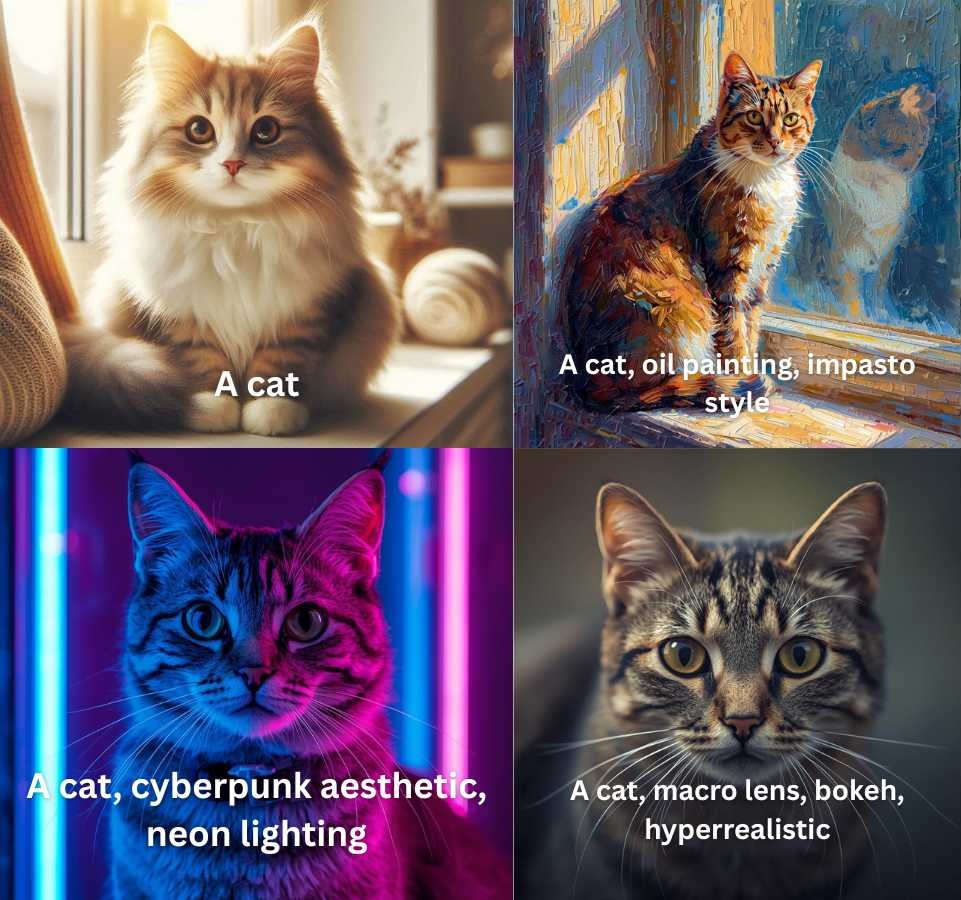
If you’ve ever typed “a cat” into an AI art generator and gotten a mediocre result, then stared in jealousy at someone else’s stunning, photorealistic masterpiece, this AI Art Style Cheat Sheet is exactly what you need.
Here’s the secret nobody tells beginners: Your prompt is boring. Not because your idea is bad, but because you’re missing the “magic words.” The difference between “a dragon” and “a dragon, volumetric lighting, cinematic composition, rendered in Unreal Engine 5, 8k” is the difference between a doodle and a movie poster.
This AI Art Style Cheat Sheet is your unfair advantage. It is the ultimate Midjourney style list and Stable Diffusion style modifiers collection that you can copy-paste to instantly upgrade your results. We’re talking about turning amateur prompts into viral art.
I’ve spent months testing thousands of prompts to figure out which keywords actually move the needle. This AI Art Style Cheat Sheet is the result—organized by category so you can mix and match. No guessing. No trial and error. Just copy, paste, and watch the AI work.
Whether you need cinematic lighting prompts for dramatic scenes or camera angles for AI art to change the perspective, everything is here. Bookmark this page, because you’re about to become an AI artist without learning a single thing about actual art.
Why You Need an AI Art Style Cheat Sheet
AI image generators are trained on billions of labeled images. When you add technical terms like “volumetric lighting” or “bokeh,” the AI prioritizes those high-quality visual patterns.
- Basic prompt: “a forest”
- Result: Generic trees, flat lighting.
- Cheat Sheet prompt: “a forest, golden hour lighting, misty atmosphere, wide angle lens, cinematic composition, 8k resolution”
- Result: Dramatic sunset rays, professional photography composition, depth, and mood.
This AI Art Style Cheat Sheet gives you the exact labels that consistently produce professional results. You are speaking the AI’s native language.
Category 1: Lighting & Atmosphere (The Mood Setters)
Lighting determines 80% of your image quality. These cinematic lighting prompts included in our AI Art Style Cheat Sheet will transform flat renders into dramatic art.
Core Lighting Keywords:
volumetric lighting
god rays
golden hour
blue hour
bioluminescent
rim lighting
backlighting
dramatic shadows
soft diffused light
hard light
neon glow
cyberpunk neon
studio lighting
three-point lighting
Rembrandt lighting
chiaroscuro
lens flare
light rays
subsurface scattering
ambient occlusion
crepuscular rays
dappled light
luminescence
radiant glow
ethereal lighting
moody lighting
atmospheric lighting
How to use these lighting keywords:
- Volumetric lighting / God rays: Creates visible light beams (sunlight through forest trees). Essential for atmospheric, mystical scenes.
- Golden hour: Warm sunset/sunrise lighting. Makes everything cinematic and professional-looking instantly.
- Bioluminescent: Glowing bio-organic lighting. Perfect for alien landscapes, underwater scenes, or fantasy environments.
- Rim lighting: Light behind subject creating glowing outline. Common in portrait photography and action shots.
- Chiaroscuro: High contrast light/shadow. Renaissance painting style, extremely dramatic results.
- Cyberpunk neon: Bright saturated artificial lighting. Essential for sci-fi aesthetics.
Atmosphere modifiers:
misty atmosphere
foggy
hazy
dusty air
volumetric fog
atmospheric perspective
depth haze
smoke
mist
fog machine effect
Pro Tip from the AI Art Style Cheat Sheet: Combine Golden Hour with Volumetric Fog for an instant award-winning landscape look.
Category 2: Camera Angles & Lenses (The Director’s Cut)
Stop using the default front view. These camera angles for AI art mimic real cinematography to create professional compositions.
Camera Keywords:
wide angle
macro lens
telephoto lens
fisheye lens
tilt-shift
bokeh
shallow depth of field
deep focus
aerial view
drone shot
bird's eye view
worm's eye view
low angle shot
high angle shot
dutch angle
over-the-shoulder
close-up
extreme close-up
medium shot
establishing shot
cinematic composition
rule of thirds
golden ratio composition
centered composition
off-center composition
symmetrical framing
leading lines
depth of field
50mm lens
85mm lens
24mm lens
200mm lens
GoPro perspective
security camera angle
How to use camera keywords:
- Wide angle: Shows more scene, slight edge distortion. Great for landscapes and architecture.
- Macro lens: Extreme close-up with detail. Perfect for textures, insects, or product photography.
- Bokeh / Shallow depth of field: Blurred background, sharp subject. Professional portrait look every time.
- Fisheye: Extreme wide angle with spherical distortion. Dynamic, energetic compositions.
- Drone shot / Aerial view: Top-down or high-angle perspective. Cinematic and dramatic framing.
- Low angle shot: Camera looking up at subject. Makes subjects appear powerful, heroic, imposing.
- Dutch angle: Tilted camera. Creates tension, unease, or dynamic energy.
Using specific lens types like “50mm lens” or “Macro lens” from this AI Art Style Cheat Sheet is the fastest way to make an image look like professional photography.
Category 3: Art Mediums & Styles (The Artist’s Touch)
Want to change the entire vibe? Use these artist styles for AI to switch between painting, digital art, and realism.
Traditional Art Styles:
oil painting
watercolor
acrylic painting
pencil sketch
charcoal drawing
ink drawing
pen and ink
gouache
pastel painting
impasto
pointillism
crosshatching
stippling
conte crayon
sanguine drawing
wash technique
wet-on-wet
dry brush
palette knife painting
Digital Styles:
pixel art
voxel art
low poly
isometric 3D
vector art
digital painting
concept art
matte painting
CGI
photorealistic
hyperrealistic
stylized
cell shaded
anime style
Studio Ghibli style
cartoon style
comic book art
manga style
vector illustration
flat design
gradient mesh
Historical Art Movements:
impressionist
expressionist
art nouveau
art deco
baroque
renaissance
rococo
neoclassical
romanticism
ukiyo-e
surrealism
cubism
futurism
constructivism
vaporwave
cyberpunk aesthetic
steampunk aesthetic
dieselpunk
solarpunk
atompunk
biopunk
This section of the AI Art Style Cheat Sheet lets you channel entire art movements with single keywords.
Category 4: Render Engines & Quality (The “Pro” Look)
These render engine keywords signal to the AI that you expect professional-grade, high-definition output.
Render Engine Keywords:
Unreal Engine 5
Octane Render
V-Ray
Arnold Render
Cycles
Redshift
Corona Renderer
Ray Tracing
path tracing
global illumination
ambient occlusion
physically based rendering
subsurface scattering
caustics
volumetric rendering
Quality Keywords:
8k resolution
4k resolution
16k
ultra detailed
highly detailed
intricate details
sharp focus
crystal clear
HD
UHD
professional photography
award-winning photography
national geographic quality
trending on ArtStation
featured on Behance
top of r/art
museum quality
gallery worthy
masterpiece
ultra high definition
pin sharp
tack sharp
How to use render keywords:
- Unreal Engine 5 / Octane Render: Signals cutting-edge CGI quality in prompts.
- Ray Tracing: Realistic light behavior. Produces photorealistic reflections and shadows.
- 8k resolution / Ultra detailed: Maximum quality and detail level signaling.
- Trending on ArtStation: Meta-tag that emulates popular professional art styles.
The “Zero Skill” Formula: How to Stack Modifiers
Now that you have the AI Art Style Cheat Sheet, how do you use it?
Formula:[Subject] + [Art Style/Medium] + [Lighting] + [Camera Angle] + [Render Quality]
Before & After Examples Using This Guide:
❌ Basic Prompt:a knight
✅ Enhanced Prompt:a knight in ornate armor, oil painting style, dramatic chiaroscuro lighting, low angle shot, highly detailed, trending on ArtStation, 8k resolution
❌ Basic Prompt:a futuristic city
✅ Enhanced Prompt:a futuristic city, cyberpunk aesthetic, neon glow, volumetric fog, drone aerial view, rendered in Unreal Engine 5, 8k resolution, cinematic composition, ray tracing
❌ Basic Prompt:a flower
✅ Enhanced Prompt:a flower with water droplets, macro lens, bokeh background, golden hour lighting, shallow depth of field, crystal clear, professional photography, 4k
The pattern is simple: Start with your subject, then consult this AI Art Style Cheat Sheet and pick 4-6 modifiers.
Advanced Tips: Mixing Styles for Unique Results
The best AI art prompts copy paste strategy involves combining contrasting styles:
Contrasting combinations:
steampunk aesthetic + Studio Ghibli style= Whimsical mechanical worldscyberpunk + watercolor painting= Soft artistic take on hard sci-fibaroque architecture + bioluminescent lighting= Fantasy historical fusion
Stacking lighting for depth:
volumetric lighting + rim lighting + god rays= Maximum atmospheric dramagolden hour + lens flare + soft diffused light= Dreamy ethereal quality
Camera angle combinations:
low angle shot + symmetrical composition= Imposing, grand feelingaerial view + rule of thirds= Professional landscape photography
Where to Test These Keywords: OpenArt AI Playground
The best place to experiment with this Midjourney style list? OpenArt AI. Use their “Remix” feature to see how other artists stack modifiers, then test your own combinations.
Workflow:
- Browse OpenArt’s community gallery
- Find an image with lighting/style you like
- Click “Remix” to see their full prompt
- Swap in your subject + add modifiers from this guide
- Generate and iterate
This is the “Zero Skill” method—learn by reverse-engineering successful prompts, then customize with keywords from this resource.
Don’t Forget Negative Prompts
While this guide tells the AI what you want, you need negative prompts specifying what you don’t want. Use our comprehensive Negative Prompt List alongside these modifiers for maximum quality.
Typical negative prompts to pair with these keywords:
ugly, blurry, low quality, distorted, extra fingers, bad anatomy,
watermark, signature, text, poorly drawn, amateur, deformed,
mutated, bad proportions, duplicate, morbid
Pro workflow: Positive prompts (this guide) + Negative prompts = Consistent professional results.
Practical Use Case: Professional LinkedIn Headshots
You can use the best AI art prompts copy paste techniques from this guide to boost your career.
Prompt for Headshots:professional business headshot, studio lighting, shallow depth of field, 50mm lens, neutral background, sharp focus, professional photography, soft diffused light, 4k resolution
Generate polished profile photos, then upload to Jobright AI for your resume. The right style modifiers make AI-generated headshots indistinguishable from professional photography.
The Verdict: Your New Superpower
You don’t need artistic talent to create professional AI art. You need this AI Art Style Cheat Sheet and the willingness to copy-paste strategically. These keywords are your shortcut to results that look like they took years of training.
The “Zero Skill” method:
- Think of your subject
- Choose 1-2 keywords from each category above
- Combine them in your prompt
- Generate
- Iterate by swapping modifiers
AI art isn’t about being a great artist—it’s about being a great director. These Stable Diffusion style modifiers tell the AI cinematographer how to light scenes, tell the AI photographer which lens to use, and tell the AI stylist which aesthetic to channel.
The people creating viral AI art aren’t more talented. They just know the magic words from lists like this. Now you do too.
Bookmark this page. Copy-paste liberally. Create shamelessly. Welcome to being an AI artist.
Frequently Asked Questions About AI Art Style Modifiers
Do these prompts work in DALL-E 3?
Yes, but with variation. DALL-E 3, Midjourney, and Stable Diffusion all respond to style modifiers, but each interprets them slightly differently. Test the same prompt across platforms—you’ll get different results. Midjourney tends to be more artistic, Stable Diffusion more customizable, DALL-E 3 better at following complex instructions.
Can I use artist names in AI prompts?
Depends on the platform. Midjourney and Stable Diffusion allow artist names (e.g., “Greg Rutkowski style”), but some platforms block living artists for copyright reasons. If blocked, describe the style characteristics instead: “fantasy digital art, painterly, vibrant colors” instead of naming a specific artist.
What is the best resolution for Midjourney?
Use --ar 16:9 for landscapes, --ar 2:3 for portraits. Midjourney’s default is square (1:1). Add aspect ratio flags for better composition. For maximum detail, upscale after generating. Quality keywords like “8k” and “highly detailed” improve sharpness regardless of actual pixel dimensions.
Should I use all modifiers at once?
No, 4-6 targeted modifiers work best. Overloading prompts (15+ keywords) confuses the AI and dilutes your vision. Choose specific keywords from each category: one lighting style, one camera angle, one art medium, and quality tags. Focused prompts > kitchen sink prompts.
How do I know which style keywords to combine?
Think about your desired mood first. Want dramatic? Use chiaroscuro + low angle + dark atmosphere. Want dreamy? Use golden hour + bokeh + soft light. Want futuristic? Use cyberpunk neon + Unreal Engine 5 + wide angle. Match modifiers to emotional tone, not random combinations.
Can I save my own custom prompt formulas?
Yes, keep a personal prompt library. Create a note document with your successful prompts labeled by style (e.g., “Fantasy Landscape Formula,” “Professional Portrait Formula”). When you find a winning combination, save the exact prompt structure and swap subjects as needed. Efficiency increases dramatically with reusable templates.
Follow ZeroSkillAI.com for more AI art guides, prompt engineering secrets, and “Zero Skill” shortcuts that make you look like a professional without the decade of art school.
Ready to put these prompts into action? Head over to OpenArt AI and start remixing community art with your new cheat sheet vocabulary. Then use our Negative Prompt List to eliminate common AI art mistakes and achieve consistently professional results.