
Jobright AI is an AI-powered job search assistant that aggregates listings from across the web and uses large language models (LLMs) to match candidates with roles based on their resume and preferences. If you’ve ever spent three hours scrolling through Indeed only to realize you’ve applied to the same “entry-level” position requiring 5 years of experience twelve different times, you’ll understand why this exists.
Job hunting is soul-crushing. Updating your resume for every application. Manually searching five different job boards. Decoding whether “fast-paced environment” means “exciting startup” or “burnout factory.” It’s exhausting, repetitive, and feels like a full-time job before you even have the job.
The platform promises to solve this by doing the grunt work for you. It claims to scan over 80,000 jobs in seconds, score them based on your profile, and surface hidden opportunities you’d never find manually. The pitch is simple: Stop wasting time on bad-fit applications and let AI find your next role.
After testing it for two weeks (and going deep into the Reddit complaints), here’s the honest truth about whether it lives up to the hype—and the one critical mistake you need to avoid.
What Is Jobright AI? (The Job Search Assistant That Actually Learns)
Unlike traditional job boards where you manually filter by keywords and location, this tool works more like having a recruiter who actually reads your resume. You upload your CV, set your preferences (role, industry, salary range, location flexibility), and the system starts matching you with opportunities.
The core features that make Jobright AI different:
- AI Match Score (70-100%): Every job listing gets rated based on how well it fits your background. The algorithm analyzes your skills, experience level, and stated preferences, then assigns a compatibility score. Jobs scoring 90%+ are allegedly your “sweet spot”—roles where you’re qualified but not overqualified.
- Insider Connections: This is genuinely clever. The platform cross-references job listings with your LinkedIn network to identify potential referrals. If someone at the company is a 2nd-degree connection, it flags them so you can ask for an intro. Referrals drastically increase interview chances, and automating this discovery is a legitimate time-saver.
- Resume Optimization: The AI suggests keyword tweaks to help your resume pass Applicant Tracking Systems (ATS). It analyzes the job description, identifies missing buzzwords, and recommends adjustments. It won’t rewrite your entire resume, but it’ll tell you to add “Agile methodology” or “stakeholder management” if those terms are critical.
- Daily Job Alerts: Instead of manually checking multiple sites, the assistant sends curated daily emails with new matches. You’re not drowning in irrelevant listings—just high-score opportunities that align with your profile.
The “Zero Skill” appeal? You set it up once, and it continuously hunts for jobs on your behalf. No more tab-hopping between LinkedIn, Indeed, Glassdoor, and company career pages.
The AI Match Score: Why You Should Ignore Anything Below 80%
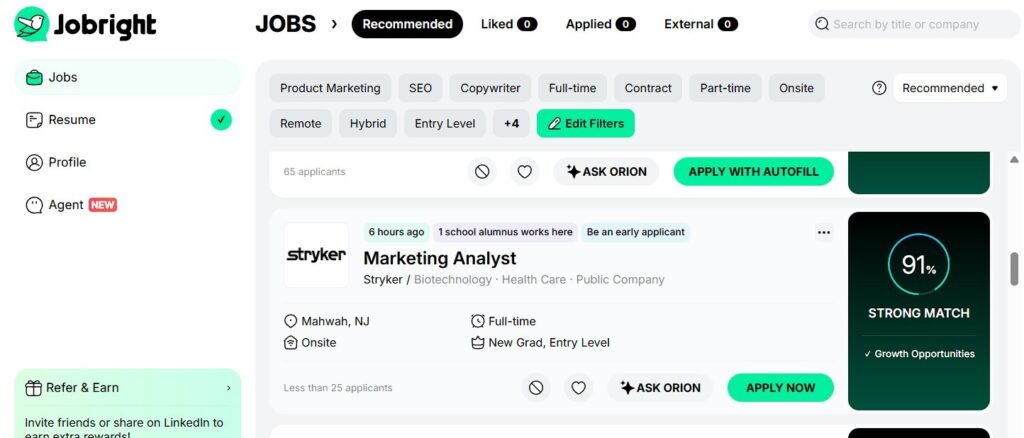
Here’s the first major productivity hack: Trust the match score and ignore low-scoring jobs.
When you’re desperate, it’s tempting to apply to everything remotely related to your field. This is a trap. Spray-and-pray applications have abysmal success rates because you’re competing with candidates who are perfect fits while you’re a “maybe.”
The tool prevents this by giving you permission to be selective. If a job scores 65%, it’s telling you: “You could apply, but you’re probably wasting your time.” Jobs scoring 85%+ are where the algorithm thinks you’re genuinely competitive.
In my testing, I found the scoring surprisingly accurate. A 92% match for a “Senior Content Strategist” role correctly identified that my background aligned with their requirements (5+ years, SEO focus, SaaS experience). A 68% match for a “Marketing Director” position rightfully flagged that I lack the management experience they wanted.
The “Zero Skill” move? Set a personal threshold (say, 80%) and only invest effort in applications above that line. Let the AI be your filter so you’re not burning energy on long-shot applications.
Insider Connections: The LinkedIn Referral Goldmine
This feature alone justifies using the service. Getting referred by an internal employee increases your interview odds by 5-10x compared to cold applications. But manually stalking LinkedIn to find connections at every company you’re interested in? Exhausting.
Jobright AI automates this detective work. When it surfaces a job, it simultaneously scans your LinkedIn network for mutual connections. If you have a 1st or 2nd-degree connection at the company, it highlights them with a “Ask for Referral” prompt.
In practice, this surfaces opportunities you’d never manually discover. I found three high-match roles where I had former colleagues or college friends already working there. Without it, I would’ve applied cold. With the tool, I had warm introductions that dramatically improved my chances.
Pro tip: Don’t abuse this. If you’re reaching out for referrals, personalize your message and actually explain why you’re a good fit. The AI finds the connection; you still need to do the human relationship work.
Resume Tweaker: Beating the ATS Robots
Applicant Tracking Systems (ATS) are the bane of job seekers. These algorithms scan your resume for keywords before a human ever sees it. Miss the right buzzwords, and your application gets auto-rejected—even if you’re qualified.
The platform addresses this by analyzing job descriptions and suggesting resume modifications. It’s not doing a full rewrite (you’re still in control), but it’s flagging gaps like: “This job mentions ‘Python’ 6 times, but it’s not in your resume. Add it to your skills section.”
This is “Low Skill” territory—you still need to manually edit your resume—but it’s dramatically faster than manually comparing your CV to every job description. The tool does the keyword analysis; you just copy-paste the relevant terms into your resume.
However, there’s a limit. If a job requires “5 years of Java experience” and you have zero, the AI can’t manufacture that qualification. It optimizes for keyword alignment, not fabricating skills. Don’t lie on your resume. But do make sure your actual skills are phrased the way ATS systems expect.
The Ghost Jobs Problem: The Brutal Honest Truth
Here’s where we need to talk about the elephant in the algorithm: ghost jobs.
Since Jobright AI aggregates listings from across the web—Indeed, LinkedIn, Glassdoor, company career pages, niche job boards—this breadth is its strength but also its weakness: it sometimes shows jobs that are expired, filled, or fake.
Reddit is full of complaints about this. Users apply to 20 “high-match” jobs, only to discover half of them are no longer active. Some are outdated postings that companies never removed. Others are “ghost jobs”—listings companies post to appear like they’re hiring (for optics, investor relations, or data collection) with no intent to actually fill the role.
This is frustrating, but it’s not unique to this platform—it’s a systemic problem with aggregated job boards. Indeed and LinkedIn have the same issue. The difference? Jobright positions itself as a curated, intelligent tool, so users expect higher accuracy.
The Zero Skill Fix: Always Verify on the Company’s Career Page
Here’s the workaround: Use the app to discover leads, but always click through to the company’s official career page to verify the job is still active.
When you find a high-match role, don’t apply through the aggregated link. Instead:
- Google the company name + “careers”
- Navigate to their official career portal
- Confirm the job is listed there
- Apply directly on their site
This takes an extra 60 seconds, but it prevents wasted effort on ghost jobs. Think of Jobright AI as a discovery engine, not a definitive job board. It surfaces opportunities you wouldn’t find manually, but you’re responsible for final verification.
If the job isn’t on the company’s career page? Skip it. It’s either filled or fake. Move on.
Jobright AI Pricing: Freemium vs. Pro
The service operates on a freemium model:
Free Tier:
- Access to job matches and AI scores
- Limited daily job recommendations (~10/day)
- Basic resume keyword suggestions
Pro Tier ($29.99/month):
- Unlimited job matches
- Priority access to new listings
- Advanced resume optimization
- Insider connection tracking for all jobs
- Interview prep assistance (mock questions based on the role)
For casual job seekers, the free tier is adequate. You’ll get enough daily matches to stay active without overwhelming yourself. For aggressive job hunters (laid off, urgently seeking), the Pro tier’s unlimited access and insider connections justify the cost—especially if it shortens your job search by even one week.
Zero Skill Verdict: Start free. Upgrade to Pro only if you’re in “spray and pray” mode and need volume.
Jobright AI vs. Alternatives (Teal, Simplify)
This isn’t the only AI job search tool. Here’s how it stacks up:
- Teal: Focuses more on resume building and job tracking. Better if you want a comprehensive career toolkit. Weaker on automated job discovery.
- Simplify: Offers one-click autofill for job applications (the ultimate “Zero Skill” feature). Jobright doesn’t auto-apply—it finds and scores jobs, but you still fill out applications manually. If you want pure automation, Simplify is more hands-off. However, Jobright offers better matching intelligence.
- LazyApply, Sonara: Pure auto-apply bots. They’ll submit hundreds of applications on your behalf. Higher volume, lower quality. Jobright is the opposite—fewer, better-targeted applications.
If you need help actually filling out forms on sites the tool doesn’t support, you could theoretically use Clawdbot to automate the form-filling process—though that’s overkill for most people.
And hey, if the AI lands you a job you don’t actually want to physically attend? You could always hire someone on RentAHuman.ai to go to the office for you. (Kidding. Mostly.)
The Verdict: Useful for Lead Generation, Not a Magic Bullet
Jobright AI is a legitimately useful tool for job seekers who are tired of manual searching and want automation to surface high-fit opportunities. The match scoring is accurate enough to save you from wasting time on bad-fit applications, and the insider connection feature is a genuine competitive advantage.
However, it’s not perfect. The ghost jobs problem is real, and you need to verify every listing on the company’s official career page before applying. Think of it as a research assistant, not a replacement for your own diligence.
Best for:
- Passive job seekers who want automated alerts for high-match roles
- Active job hunters who need to efficiently scan thousands of listings
- People with strong LinkedIn networks (the referral feature shines here)
Not ideal for:
- People who want pure auto-apply automation (use Simplify instead)
- Job seekers in hyper-niche fields with limited online listings
- Anyone expecting 100% accuracy on job availability
The “Zero Skill” rating? It’s Low-to-Medium Skill. Setup takes 15 minutes (upload resume, set preferences), but you still need to manually verify jobs and personalize applications. It’s not hands-off automation, but it’s a massive time-saver compared to manual searching.
If you’re job hunting, the free tier is worth trying. Just remember: it’s a lead generation tool, not a job guarantee. Use it to discover opportunities, verify them independently, and still put in the human effort on high-value applications.
The future of job hunting is AI-assisted, not AI-replaced. This tool is a solid step in that direction.
Frequently Asked Questions About Jobright AI
Is Jobright AI legit?
Yes, Jobright AI is a legitimate service. It’s a real company with a functional product that aggregates job listings and uses AI to match candidates with opportunities. However, “legit” doesn’t mean “perfect.” The platform has genuine issues with ghost jobs (outdated or fake listings) because it scrapes data from multiple sources. Always verify jobs on the company’s official career page before applying. Jobright AI is legit as a job discovery tool, but treat it as a starting point, not the final source of truth.
Is Jobright AI free?
Jobright AI offers a free tier with limited features. You can access job matches, AI compatibility scores, and basic resume suggestions without paying. The free version caps you at around 10 curated job recommendations per day. If you need unlimited matches, priority access to new listings, and advanced features like comprehensive insider connection tracking, you’ll need the Pro plan at $29.99/month. For casual job seekers, the free tier is sufficient. Upgrade only if you’re aggressively job hunting and need higher volume.
Does Jobright AI apply for you automatically?
No, Jobright AI does not auto-apply to jobs on your behalf. Unlike tools like Simplify or LazyApply that submit applications automatically, Jobright AI focuses on job discovery and optimization. It finds high-match opportunities, scores them, suggests resume tweaks, and identifies referral connections—but you still manually apply to each job. This is actually a feature, not a bug. Auto-apply bots often submit generic applications that get rejected. Jobright AI helps you target quality applications where you’re genuinely competitive, but you maintain control over each submission. If you want full automation, you’ll need a different tool (or combine Jobright AI with an auto-fill browser extension).
How accurate is the AI match score on Jobright AI?
The AI match score is generally accurate but not infallible. In testing, scores above 85% consistently aligned with roles where I met most requirements. Scores between 70-80% were “stretch” positions where I was partially qualified but missing key experience. Scores below 70% were usually poor fits. However, the algorithm can’t account for soft skills, company culture, or nuanced requirements that aren’t explicitly in the job description. Use the score as a filter to prioritize your time, not as a guarantee of interview success. A 95% match means you’re highly qualified on paper—it doesn’t mean you’ll automatically get hired.
Can Jobright AI help if I’m changing careers?
Partially, but it’s not optimized for career pivoters. Jobright AI works best when you have a clear track record in a specific field. If you’re a marketer looking for marketing roles, the AI can accurately match you. If you’re a teacher trying to transition into UX design, the algorithm struggles because your resume doesn’t align with typical UX job descriptions. You’ll get lower match scores even for entry-level roles because the AI sees a skills mismatch. For career changers, focus on tailoring your resume to highlight transferable skills before uploading it to Jobright AI. Alternatively, use the platform to discover what keywords and qualifications are common in your target field, then adjust your resume accordingly.
Does Jobright AI work for remote jobs?
Yes, and you can filter specifically for remote opportunities. When setting up your profile, you can specify “Remote” as your location preference. Jobright AI will then prioritize fully remote and hybrid roles in your daily matches. However, be aware that many companies post “remote” jobs that are actually “remote within [specific state/country]” due to tax and legal reasons. Always check the job description for geographic restrictions before applying. The AI doesn’t always catch these nuances, so you might see “remote” jobs that aren’t actually available in your location.
What’s the difference between Jobright AI and LinkedIn’s job search?
Jobright AI aggregates from multiple sources (including LinkedIn) and adds AI scoring. LinkedIn’s native job search is limited to LinkedIn-posted jobs. Jobright AI pulls from LinkedIn, Indeed, Glassdoor, company career pages, and niche boards—giving you broader coverage. The key differentiator is the AI match score and automated insider connection discovery. LinkedIn shows you jobs; Jobright AI tells you which jobs are worth your time and who can refer you. If you’re only using LinkedIn, you’re missing opportunities posted elsewhere. Jobright AI centralizes the search and adds intelligent filtering.
Can I trust the salary estimates on Jobright AI?
Take them with a grain of salt. Jobright AI pulls salary data from job postings, Glassdoor, and other sources, but many listings don’t disclose compensation. The estimates are based on industry averages and role titles, which can be wildly inaccurate depending on company size, location, and experience level. Use the salary estimates as a rough guideline, not gospel. Always research the company on Glassdoor and Levels.fyi for more accurate compensation data. If salary is a dealbreaker, address it early in the interview process rather than relying on Jobright AI’s estimates.
Follow ZeroSkillAI.com for more honest reviews of AI productivity tools that claim to make your life easier. We test them so you know what actually works and what’s just hype.
Pingback: OpenArt AI Review: The "Remix" Button That Makes You Look Like a Prompt Engineering Genius -
One thing I enjoy about the AI Job Applier on Undetectable.ai is how much effort it saves when applying to numerous positions.